TL;DR
- HubSpot lead scoring assigns a numeric HubSpot Score to contacts based on criteria you define. Manual scoring uses contact property values and behavioral signals. Predictive scoring uses machine learning to rank contacts by close probability.
- Combined lead scoring in HubSpot merges the manual score with the predictive score into a single composite qualification signal. It is available on Marketing Hub Professional and above and is the most accurate qualification model HubSpot produces.
- Dialora handles inbound and callback lead qualification by phone, syncing structured call data to HubSpot contact records in real time so the CRM reflects the actual conversation before the rep opens the record.
The RevOps Director at a 55-person B2B SaaS company turned on HubSpot lead scoring in January. By March, her marketing team was reporting a 40 per cent increase in MQL volume. Her sales team was reporting no change in SQL conversion rate. The scoring model was marking contacts as qualified based on email opens and blog page views. The contacts who actually closed had a different profile: they responded to callbacks within 24 hours and asked product-specific questions on the first conversation. None of those signals was in the scoring model.
HubSpot lead qualification is only as accurate as the signals you feed it.
This is how to build the model so the signals match reality.
HubSpot lead qualification uses the HubSpot Score contact property to rank leads by fit and engagement. Manual scoring assigns positive and negative point values to contact properties and behavioral signals. Predictive lead scoring uses AI trained on historical closed-won data to rank contacts by close probability. Combined lead scoring merges both signals into a single score. All three methods are configured inside HubSpot's Properties and Workflow settings.
Why HubSpot Lead Scoring Fails When Built on the Wrong Signals
HubSpot's default scoring model measures marketing engagement: email opens, page visits, and form fills. That signal set tells you how interested a contact is in your content. It does not reliably tell you how ready they are to buy.
The gap between marketing engagement and purchase intent is where most HubSpot lead scoring models produce noise. A contact who downloads three guides and opens every email has a high score. A contact who submitted a demo request, matches your ICP firmographically, and replied to the first follow-up message has a lower score because they have fewer interaction events. The SDR calls the guide-downloader first.
Lead scoring in HubSpot produces accurate qualification when the model uses fit criteria alongside behavioral signals. Fit criteria are the contact and company properties that define your ICP: industry, company size, job title, annual revenue, and geography. Behavioral signals show intent. Together, they produce a score that reflects both who the contact is and what they are doing.
The growth marketing manager at a fintech SaaS company had a scoring model with 14 positive criteria and 3 negative criteria when she was hired. Her first audit found the model had no fit criteria whatsoever. Every criterion was behavioral: email opens, page visits, and form fills. She added eight fit-based criteria and six negative disqualifiers over a single afternoon. SQL conversion rate from the scoring model improved 31 per cent in the following 60 days.
Pro-tips:
A high engagement score with no fit score identifies a content reader. A high fit score with moderate engagement identifies a buyer who has not clicked yet. Your reps should call in that order.
How to Set Up Lead Scoring in HubSpot
Lead scoring in HubSpot is managed through the HubSpot Score contact property. The path is Settings > Properties > Contact Properties. Search for HubSpot Score and click to edit the scoring criteria.
The scoring criteria tab has two sections: positive attributes (increase the score) and negative attributes (decrease the score).
Build positive attributes in two layers:
- Fit criteria: Target job titles, company size in ICP range, industries in the target list, and geographies you serve. Each criterion gets a point value proportional to its predictive weight. A VP-level decision maker at a target-size company in a priority industry should earn enough points to rank near the top of the qualified threshold regardless of behavioral signals.
- Behavioral signals: High-intent page visits (pricing page, demo page, competitor comparison page), demo form submissions, and email link clicks on sales-stage content. Assign higher point values to high-intent behaviors and lower values to top-of-funnel behaviors like blog visits.
Build negative attributes for disqualifying signals: personal email domains (Gmail, Yahoo, Hotmail), student or intern job titles, competitor company names in the company field, and contacts who have unsubscribed from all emails.
Save the rule. HubSpot Score updates automatically as contact properties change and as behavioral events are registered.
The HubSpot lead scoring setup for a new scoring model takes two to four hours if the ICP is already defined. If the ICP criteria are unclear, define those first. A scoring model built on an undefined ICP produces a leaderboard that nobody trusts.
What Is HubSpot Predictive Lead Scoring?
Predictive lead scoring in HubSpot uses machine learning to identify the contact property combinations that correlated with your historical closed-won deals, then applies that pattern to current contacts. Each contact receives a close probability percentage rather than a manually defined point total.
It is available on Sales Hub Professional and Enterprise. The model requires a minimum of 100 closed-won contact records to train on. Below that threshold, the model does not produce reliable predictions.
Predictive lead scoring: HubSpot does not replace manual scoring for new organizations. It extends it for organizations with enough historical data for the AI to find meaningful patterns.
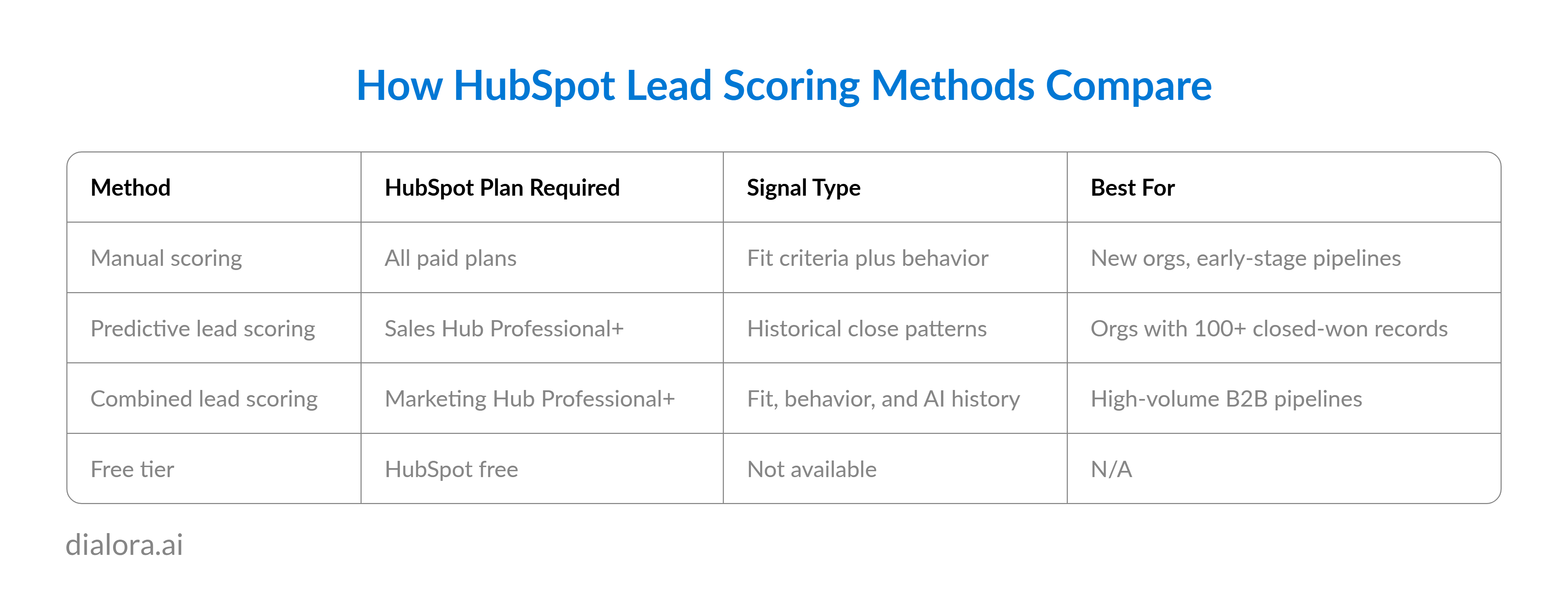
Combined lead scoring in HubSpot merges the manual HubSpot Score with the predictive close probability into a single composite score. A contact earns points from the criteria you defined manually and receives an additional weight from the AI-identified close probability. The composite score reflects both explicit fit criteria and learned patterns from your own deals.
Pro-tips:
Predictive lead scoring needs historical closed-won data to learn from. An org with fewer than 100 closed deals should run manual scoring until the data set grows.
Ready to See How Dialora Qualification Data Lands in HubSpot Before the SDR Opens the Record?
How to Use HubSpot Lead Scoring to Trigger Automated Workflows
Lead scoring in HubSpot is not just a ranking system. It is an enrollment trigger for the workflows that move contacts through the pipeline.
Build a contact-based workflow triggered when the HubSpot Score is greater than your MQL threshold. Actions inside the workflow: update lifecycle stage to MQL, enrol in the SDR outreach sequence, create a follow-up task for the assigned rep, and send an internal notification to sales.
The HubSpot Marketing Hub lead scoring automation closes the loop between score and action in real time. The moment a contact crosses the MQL threshold, the workflow fires. No rep has to check the score. No manager has to approve the handoff. The contact arrives in the SDR queue already classified as qualified.
HubSpot CRM lead qualification automation also handles negative transitions. A workflow triggered when HubSpot Score drops below a threshold (due to inactivity or disqualifying property updates) can automatically move the lifecycle stage back to subscriber or lead, remove the contact from active sequences, and route them to a re-engagement nurture track.
How Dialora Feeds Your HubSpot Scoring Model
Dialora connects to HubSpot via the general API to turn inbound conversations into structured CRM data. When inbound calls or form submissions occur, Dialora runs the prospect through a configured voice qualification flow. The structured outcomes, including confirmed company size, stated budget, timeline, and decision authority, sync directly to the HubSpot contact record as custom properties. These properties immediately feed your HubSpot Score calculation, ensuring your model prioritizes phone-verified data rather than just basic form-submitted assumptions.
This continuous pipeline works around the clock. If a lead submits a demo form after hours and ignores the automated email sequence, Dialora calls back within minutes. The qualification conversation runs, the results sync, and the contact enters your scoring pipeline with the same high-quality data as a daytime lead. Ultimately, HubSpot handles the contact ranking and workflow triggers, while Dialora handles the inbound calls that produce the data worth ranking.
Conclusion
Automated lead qualification and sales lead qualification are different problems, but they must function as one continuous pipeline. A scoring model built merely on engagement data qualifies the prospects who read your blog, while a model fueled by Dialora qualifies the ones actually ready to buy. The true impact of phone-verified data shows up in your SQL-to-close rate, not just your MQL volume.
Ready to See Dialora Add Phone Qualification Data to Your HubSpot Scoring Model? Every inbound call is a qualification signal. Dialora makes sure it lands in HubSpot with the right contact properties attached. See It Handle a Real Call
Frequently Asked Questions
Does HubSpot Free have lead scoring?
HubSpot's free plan does not include the HubSpot Score property or any lead scoring functionality. Manual lead scoring is available on all paid HubSpot CRM tiers starting with Starter. Predictive lead scoring is available on Sales Hub Professional and Enterprise. Combined lead scoring, which merges manual and predictive signals, is available on Marketing Hub Professional and above. Teams on the free plan can manually categorize contacts using lifecycle stage properties, but cannot run automated scoring rules.
What is HubSpot predictive lead scoring?
HubSpot predictive lead scoring uses AI to assign each contact a probability score based on patterns identified in historical closed-won contact data. The model trains on the contact properties and behavioral signals associated with your previous customers and applies those patterns to current contacts. Each contact receives a close probability percentage. The feature is available on Sales Hub Professional and Enterprise and requires a minimum of 100 closed-won contacts to produce reliable scores.
What is combined lead scoring in HubSpot?
Combined lead scoring in HubSpot merges the manual HubSpot Score with the AI-generated predictive close probability into a composite qualification score. It is available on Marketing Hub Professional and above. The combined score reflects both the explicit fit and behavioral criteria defined in the manual scoring model and the historical close patterns identified by the predictive AI model. Teams using combined scoring use it as the primary enrollment trigger for MQL workflows.
How do you set up lead scoring in HubSpot?
To set up lead scoring in HubSpot, go to Settings, select Properties, and open the Contact Properties section. Search for HubSpot Score and click to edit scoring criteria. Add positive attributes for fit criteria such as target job titles, company sizes, and industries, and for behavioral signals such as demo page visits and form submissions. Add negative attributes for disqualifying signals like personal email domains or unsubscribed status. Save the criteria. HubSpot Score updates automatically in real time as contact properties change.
Where is lead scoring in HubSpot?
Lead scoring in HubSpot is located in Settings under Properties, inside the Contact Properties section. The scoring property is called HubSpot Score. To access predictive scoring, navigate to your Contacts list in the CRM and look for the AI predictions or Likelihood to Close column, available on Sales Hub Professional and above. Combined lead scoring setup is inside the HubSpot Score property settings for orgs on Marketing Hub Professional and above, where the AI score option appears as an additional weight option within the scoring criteria editor.