TL; DR
- Zoho CRM's scoring rules assign numeric values to leads based on fit criteria and behavioral signals. Without scoring, every lead looks identical to every rep, and the ones worth calling sit below the ones that are not.
- Lead assignment rules in Zoho route high-scoring leads directly to the right rep the moment a lead is created. No manual triage. No manager decision. The rule runs the routing.
- Dialora adds an AI voice qualification layer before leads reach Zoho, handling inbound calls and fast callbacks so the leads that hit your scoring model already carry phone-based qualification data.
The Sales Ops manager who set up Zoho two years ago still runs the same triage process she ran before the CRM existed. Leads arrive from web forms, imported lists, and inbound calls. They land in the Leads module in the same queue. Her two SDRs call in order of date created. The lead submitted at 6:55 PM on Thursday gets a call on Monday morning. That lead answered a competitor at 7:12 PM on Thursday.
The CRM has the tools to fix this. They are not turned on yet.
This guide covers how to automatically qualify leads Zoho CRM-style, using native scoring rules and assignment logic, and how to extend that workflow to phone-based inbound leads using AI lead qualification.
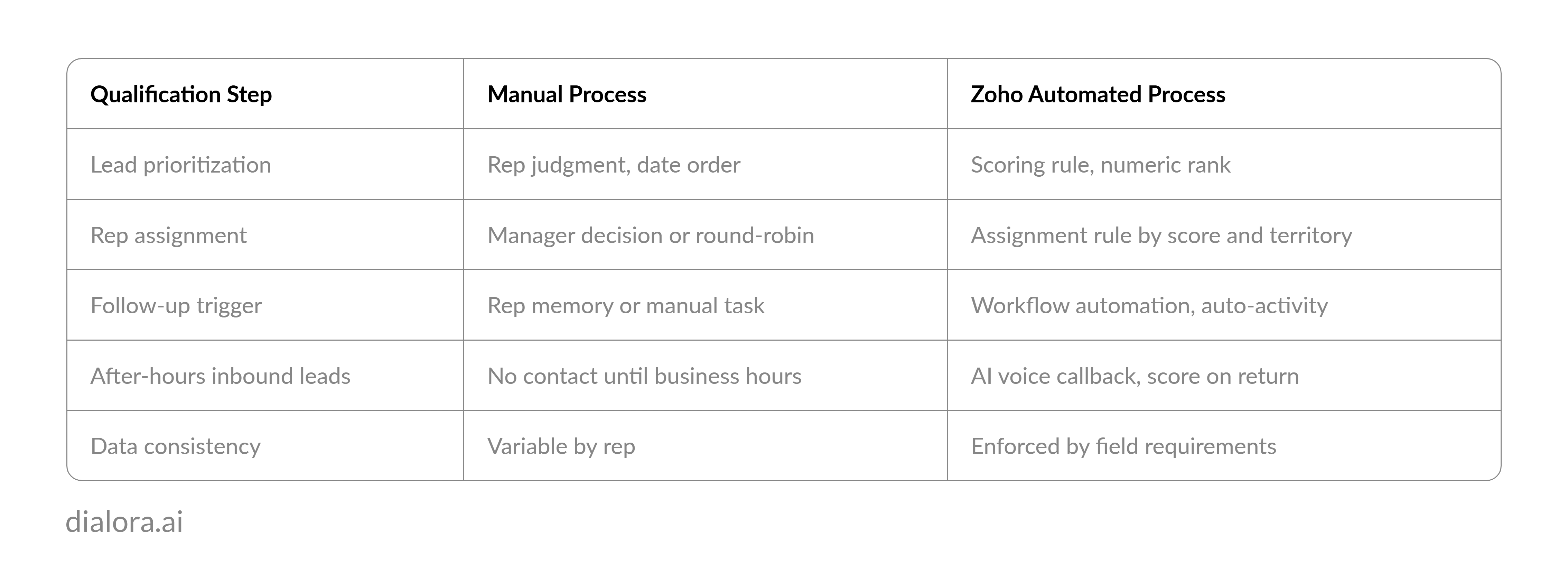
Automatically qualifying leads in Zoho CRM combines three native features: scoring rules that assign numeric values based on lead fit and behavior, assignment rules that route high-scoring leads to the correct rep without manual review, and workflow automation that triggers follow-up activity when a lead crosses a score threshold. Connecting an AI voice layer to Zoho via API extends this pipeline to phone-based inbound leads that form fields alone cannot qualify.
Why Manual Lead Qualification Breaks the Zoho CRM Leads Module
The Zoho CRM leads module stores every incoming lead at the same default priority. No score. No routing logic. No automatic next step. The rep opens the module and makes a judgment call about which lead to contact first. That judgment call is exactly what the qualification system is supposed to eliminate.
Manual qualification in Zoho fails at three predictable points. First, reps default to the most recent lead, not the highest-fit lead. A lead who visited the pricing page and requested a demo call sits below a cold inquiry created two hours later. Second, qualification decisions are inconsistent across reps. What one SDR considers worth pursuing, another passes over. Third, no one is calling leads at 7 PM or on Saturday. The window where inbound lead response rates are highest runs straight through the hours when the team is not working.
The sales operations coordinator at a 22-person professional services firm discovered this when she audited her Zoho CRM leads module after a slow quarter. She had 580 leads in the module with no scoring rules active. The top 60 leads by conversion probability, identified after the fact, had an average age of 11 days. Five had already closed with a competitor. She had been at the firm for two years and had never pulled that report before.
Pro-tip:
A lead submitted at 6:55 PM is not less qualified than one submitted at 11 AM. The qualification window is the same. The response capability is not.
How to Set Up Lead Scoring in Zoho CRM
Zoho CRM lead scoring lives in Setup. The path is Setup > CRM Settings > Scoring Rules > Leads.
Scoring rules assign positive or negative point values based on field data. A lead from a target industry earns positive points. A personal email domain earns negative points. A lead who clicked a high-intent link earns points. A lead with no phone number on file earns negative points.
Build the scoring model in this order:
- Fit criteria first: Define the fields that identify your ideal customer and assign positive point values proportional to their predictive weight. Company size, industry, job title, and geography are standard starting criteria. Set higher values for the criteria that most strongly correlate with closed-won deals.
- Negative scoring second: Assign negative values to disqualifying signals. Competitor company names in the company field, student or intern job titles, and personal email domains are common negative criteria. Negative scoring is what prevents low-fit leads from accumulating points through behavioral signals alone.
- Behavioral signals third: If Zoho Campaigns or Zoho Marketing Automation is connected, behavioral signals like email link clicks, pricing page views, and form submissions can increment the score. These carry more predictive weight than static field data because they reflect active interest.
Save the scoring rule and apply it to the Leads module. Scores recalculate automatically as field data changes.
Zoho CRM lead scoring updates in near-real time. A lead who visits a pricing page gains points immediately. A lead whose job title gets corrected to a non-target role loses points on the next scoring refresh.
How Do Zoho CRM Lead Assignment Rules Work?
Lead assignment rules in Zoho CRM run at the moment a lead is created or when a qualifying field is updated. The setup path is Setup > CRM Settings > Leads > Assignment Rules.
Rules use a criteria-matching structure. Define the criteria first, then specify the assignment action. Stack rules from most specific to most general:
- Score above 80 AND industry in target list: assign to senior SDR
- Score between 40 and 79: assign to standard SDR queue
- Lead source equal's inbound phone: assign to Dialora AI callback queue with data-gathering task
- All other leads: assign to nurture sequence
The CRM lead qualification process in Zoho then flows from raw entry to assigned lead without a human routing decision at any step. A lead hits the module, the scoring rule evaluates all available field data and assigns a numeric score, the assignment rule matches the score and routes the lead, and a workflow rule fires the first follow-up activity.
The Zoho CRM web-to-lead form is where most inbound leads enter the pipeline. The fields the form captures at intake determine what data the scoring model works with from the first moment the lead exists. A form that collects company name, job title, and industry gives the scoring model an immediate fit signal. A form that collects only name and email gives it nothing.
Pro-tip:
Lead assignment rules only produce consistent routing when the scoring model has consistent input data. Form field design and scoring rule design are the same decision.
What Automated Lead Qualification Produces in Zoho CRM Over Time
Zoho CRM lead conversion from scored to active contact accelerates when assignment rules remove the routing decision from the rep entirely. The rep receives a lead that is already qualified, already assigned, with a follow-up task already created. The only remaining decision is how to run the conversation.
Automated lead qualification in CRM also produces cleaner pipeline data. When every lead enters the system with consistent field data, consistent scoring, and consistent routing, the attribution data is reliable. You learn which sources produce high-scoring leads. You learn which scoring threshold correlates with closed-won. You learn which territory converts fastest.
Zoho CRM lead qualification runs at its best when every lead in the module carries the same minimum field set. Sales lead qualification improves in proportion to the consistency of that data quality.
Lead management in Zoho CRM becomes a measurement system, not just a storage system. The difference shows up in the quarterly pipeline review.
How Dialora AI Works Here
Dialora AI handles the leads who enter via phone call rather than form submission. When an inbound call arrives, Dialora AI runs the caller through a configured qualification flow, captures the fields the scoring model requires, and pushes a structured lead record to Zoho via API. The scoring rule evaluates that record immediately on import. The assignment rule routes it before the call completes.
For form-submitted leads who arrive after hours, Dialora AI calls back within minutes of submission, completes a qualification conversation, and syncs the call outcome to the lead record. The after-hours inbound lead qualification gap closes at both ends.
Dialora AI connects to Zoho CRM via general API. Inbound voice qualification runs across English, Spanish, French, Portuguese, and Turkish in 30+ countries. Post-call data syncs structured qualification fields to the lead record without manual entry. The scoring rule runs on import. The assignment rule routes based on score. The workflow fires the follow-up. No rep touches the lead until it is already qualified, scored, and assigned.
Conclusion
Your Zoho CRM has the lead qualification infrastructure built in. Scoring rules, assignment rules, and workflow automation are all available on the platform today. The only gap is the phone channel and the after-hours window where form leads go unanswered.
Zoho CRM lead qualification automation closes two of the three gaps. Sales lead qualification improves when scoring runs consistently. Lead qualification automation removes manual triage from the rep's day entirely. Automate lead qualification in CRM, and the Zoho CRM lead source data tells you which channels produce high-scoring leads over time. That measurement is how scoring models improve.
The Zoho CRM web-to-lead form is the most common lead entry point. Lead qualification best practices start there: capture the scoring fields at intake, not in a follow-up task.
That is what Dialora AI closes for the phone channel.
Ready to See Dialora AI Qualify an Inbound Lead and Push to Zoho in Real Time?
Frequently Asked Questions
What is lead qualification in Zoho CRM?
Lead qualification in Zoho CRM is the process of evaluating incoming leads against defined fit criteria and behavioral signals to determine which leads are worth pursuing and in what order. Zoho CRM's scoring rules module assigns numeric values to each lead based on field data and behavioral signals. Assignment rules then route qualified leads to the appropriate rep or queue without manual review of each record.
How do you set up lead scoring in Zoho CRM?
To set up lead scoring in Zoho CRM, go to Setup, select CRM Settings, and choose Scoring Rules under the Leads section. Create a new scoring rule and define positive attributes for high-fit signals such as target industry, job title, and company size. Add negative attributes for disqualifying signals such as personal email domains or non-target industries. Apply the rule to the Leads module. Scores update automatically as lead field data changes or as connected marketing tools register behavioral activity.
What is the difference between leads and contacts in Zoho CRM?
Leads in Zoho CRM are unqualified prospects who have not yet been evaluated against the sales qualification criteria. Contacts are qualified leads who have been converted after meeting the criteria for a sales conversation. The Zoho CRM convert lead to contact action transfers the record from the Leads module to the Contacts module and simultaneously creates a linked Account and Deal record. The lead-to-contact conversion marks the transition from qualification to active sales pursuit.
What are lead assignment rules in Zoho CRM?
Lead assignment rules in Zoho CRM automatically route incoming leads to the correct user, team, or queue based on field criteria defined in Setup. Rules evaluate every lead at creation and on qualifying field updates. Assignment criteria can include lead score, territory, industry, lead source, or any other field in the Leads module. The rule removes the routing decision from the rep or manager and applies consistent assignment logic at the moment the lead enters the system.
How do you add a lead source in Zoho CRM?
Lead source in Zoho CRM is a picklist field in the Leads module that captures how the lead originated: web form, inbound phone call, cold import, trade show, or referral. To customize the values, go to Setup, select Modules and Fields, open the Leads module, and edit the Lead Source picklist. Standard values are included by default. Custom sources are added directly to the picklist options. Lead source is one of the most useful criteria fields for assignment rules: routing inbound phone leads to an AI qualification callback queue, for example, while routing web form leads directly into the scoring pipeline.