TL; DR
- Sales teams running manual outbound miss leads not because their reps are bad, but because the volume and speed required to compete can't be delivered by hand.
- AI outbound calling handles the dial, the qualifying conversation, and the CRM log automatically.
- This guide covers how it works, what outcomes to expect, and how enterprise sales and debt collection teams are deploying it now.
Introduction
Your outbound team made 300 dials last week. Twenty-two connected. Of those, six were worth a rep's time. The other 294 went to voicemail, wrong numbers, or people who hung up in the first ten seconds.
That ratio is not a performance problem. It is a volume problem. Manual outbound was not designed for the contact rates modern pipelines require. According to data from Salesforce, it now takes an average of 18 dials to reach a single B2B prospect up from 8 a decade ago. The math does not work when a rep can make 60 calls on a good day.
AI outbound calling changes the unit economics. The bot makes 18 dials. Your rep handles the one conversation that results from them.
What AI Outbound Calling Is and How It Differs From a Robocall or Auto-Dialler
This distinction matters before you evaluate any platform. Three things exist in this category that are not interchangeable:
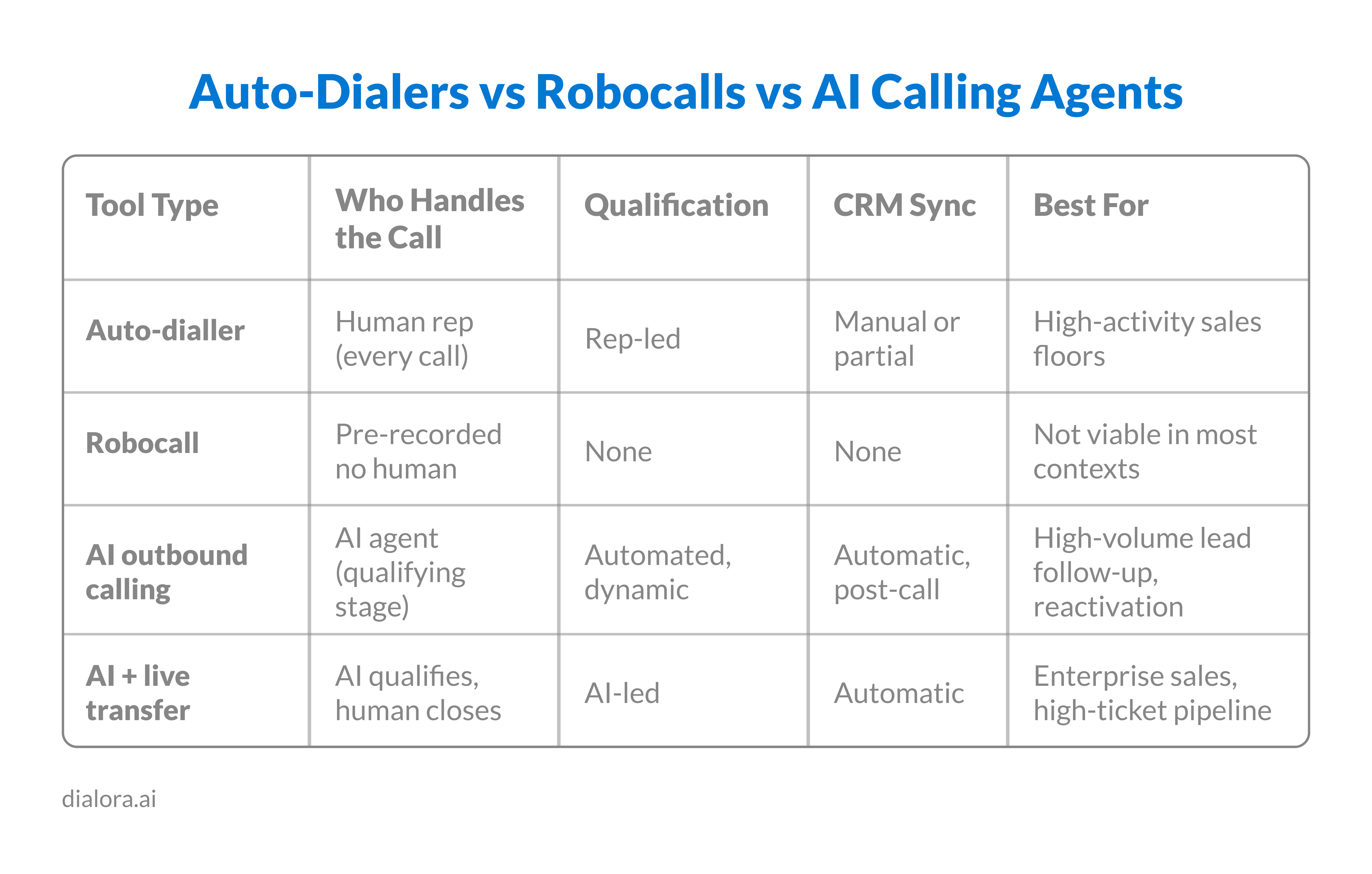
- Auto-diallers connect a rep to a live call the moment someone picks up. The rep is still on every call. The AI just removes the manual dialling. This is not AI outbound calling; it is a dialling efficiency tool.
- Robocalls play a pre-recorded message regardless of whether anyone picks up. They are largely regulated out of B2B and B2C contexts alike. They do not qualify, listen, or respond.
- AI outbound calling, the actual category runs a live, dynamic voice conversation. The AI agent dials the number, delivers an opening, listens to the response, handles objections, and qualifies intent. It books meetings, transfers hot leads live, or logs outcomes and schedules follow-ups. Every call is transcribed and synced to your CRM.
The rep is only involved after the AI has determined the prospect is worth their time.
How AI Outbound Calls Work From Dial to CRM Entry
The workflow is more consistent than most sales leaders expect. Here is the full sequence on a standard AI outbound call:
- Campaign is loaded prospect list, a qualifying script, calendar integration, and CRM connection
- The AI dials at the programmed time or trigger (form submission, lead score threshold, scheduled campaign)
- Prospect picks up. The AI introduces itself in most compliant deployments as an AI assistant
- The AI runs the qualifying sequence: confirms identity, delivers opening, listens for intent
- Based on response: books a meeting, transfers live, logs objection and schedules follow-up, or marks as not qualified
- Post-call: full transcript, sentiment score, and outcome are pushed to CRM within seconds
For debt collection, the flow adapts the AI, confirms identity, states the purpose of the call, and either collects payment information or routes to a human agent for negotiation. Every interaction is recorded for compliance.
For B2B SaaS sales, the most common deployment is lead reactivation dialling a 60–90 day old list that is too old for ads but still warm enough to convert on a phone conversation.
Read more: How to Import Contacts and Launch Outbound Campaigns
What Outcomes Sales Teams Actually See From AI Outbound Calling
Results vary by vertical, list quality, and script design. These are realistic benchmarks from enterprise and mid-market deployments not best-case figures.
Contact rate: AI outbound campaigns consistently achieve higher contact rates than manual dialling because the bot dials at scale immediately after list upload not hours later when a rep gets to it. Speed-to-dial from list load to first ring is seconds, not hours.
Qualified conversations per day: A sales team of 5 reps manually dialling might generate 30–50 qualified conversations per week on a warm list. The same team with an AI outbound layer running alongside them can triple that number without adding headcount because the reps handle only the warm handoffs.
Cost per qualified conversation: For most enterprise sales and B2B SaaS teams, AI outbound reduces cost per qualified conversation by 40–70% versus fully manual outbound when you factor in rep hours per qualified outcome.
Debt collection recovery rates: AI outbound is particularly effective in right-party contact for debt recovery, reaching more accounts per day, with consistent scripting that handles early objections and routes recovery-ready contacts to a human agent faster than a manual dialling queue would.
Read more: AI Outbound Calls vs Traditional Calls
How to Set Up AI Outbound Calling for Your Sales Team Without Disrupting Your Current Process
The deployment that works fastest is the one that runs parallel to your existing team not the one that replaces it.
- Start with one use case - Do not try to automate your entire outbound motion on day one. Pick the highest-friction, lowest-rep-value part of your process: lead reactivation, post-webinar follow-up, or renewal reminder calls. Run AI outbound on that list for 30 days. Measure contact rate, qualified conversion rate, and rep time freed.
- Connect the calendar and CRM before the first dial - AI outbound only saves time if the handoff is clean. A warm transfer that sends the prospect to a rep who cannot see the call transcript is not a warm transfer; it is a cold call with extra steps.
- Build the qualifying script around your top rep's opener - The AI is consistent. Your job is to consistently mean "good." Record your highest-converting rep's first 60 seconds and build the AI script around that structure, not around a generic template.
For enterprise sales teams running long sales cycles: use AI outbound for pipeline acceleration reactivating stalled deals, confirming next step timings, and surfacing buyer intent signals before the rep gets on the phone. Not for top-of-funnel cold prospecting.
Read more: What is the Difference Between Inbound and Outbound Call Centers?
Conclusion
Dialora's outbound voice agent handles the full AI outbound workflow campaign setup, qualifying conversation, live transfer or calendar booking, and automatic CRM sync. For enterprise sales teams and B2B SaaS businesses running lead reactivation campaigns, it connects to Google Calendar, Cal.com, and TidyCal out of the box. Debt collection and financial services deployments run on SOC 2-ready infrastructure with encrypted call handling. Your reps stop dialling lists. They start handling conversations that are already warm.
If those contact rate and cost-per-conversation numbers landed — here is what a 30-day AI outbound pilot looks like on your team's current list.
FAQ
What is AI outbound calling?
AI outbound calling is an automated calling system where an AI voice agent dials prospects, runs a live qualifying conversation, and routes warm leads to a human. Unlike auto-diallers, the AI handles the entire qualifying stage, listening, responding to objections, and booking without a rep on the call.
How does AI make outbound calls?
An AI outbound system dials from a campaign list, connects to a prospect when they pick up, and runs a dynamic script based on their responses. It qualifies intent, books meetings or transfers live, and logs the outcome to CRM automatically. The rep receives a warm handoff, not a cold lead.
What are the best AI outbound calling tools?
The best tools depend on your vertical, CRM stack, and whether you need live transfer capability or calendar booking. Evaluate based on voice quality, CRM integration depth, compliance posture for your industry, and post-call analytics quality. For sales teams, warm transfer and calendar integration are non-negotiable.
Is AI outbound calling effective for sales?
Yes, particularly for lead reactivation, post-event follow-up, and pipeline acceleration. Teams using AI outbound alongside their reps, not as a replacement, report significantly higher qualified conversation volume without adding headcount. Effectiveness depends heavily on list quality and script design.
How do I set up AI outbound calling?
Start with one high-friction, low-rep-value use case, lead reactivation or post-webinar follow-up. Connect your CRM and calendar before the first campaign. Build the qualifying script around your best-converting opener. Run for 30 days on that single use case before expanding. Clean data and fast deployment are the two variables that most affect early results.