TL;DR
- Monday CRM does not have native lead scoring. Lead qualification in Monday.com runs through custom status columns, number columns, and automation recipes that create routing logic based on column values.
- Monday.com automation recipes trigger rep assignment, status changes, and activity creation when column values change. They are the qualification engine inside a Monday CRM board.
- Dialora connects to Monday CRM via API to sync phone-based lead qualification data, adding a voice qualification layer to the form and manual leads that the CRM already manages.
The operations director at a 14-person creative agency set up Monday CRM because the team already ran projects on Monday. Every new lead became an item in a CRM board. Every team member could see it. Nobody had established ownership. Nobody had written down what a qualified lead looked like inside a Monday column. The leads accumulated. The columns are filled with blanks. The first client who called back got the response. The clients who submitted a form and waited heard back when someone noticed the item.
Monday CRM can run a systematic qualification process. The board architecture has to be designed for it first.
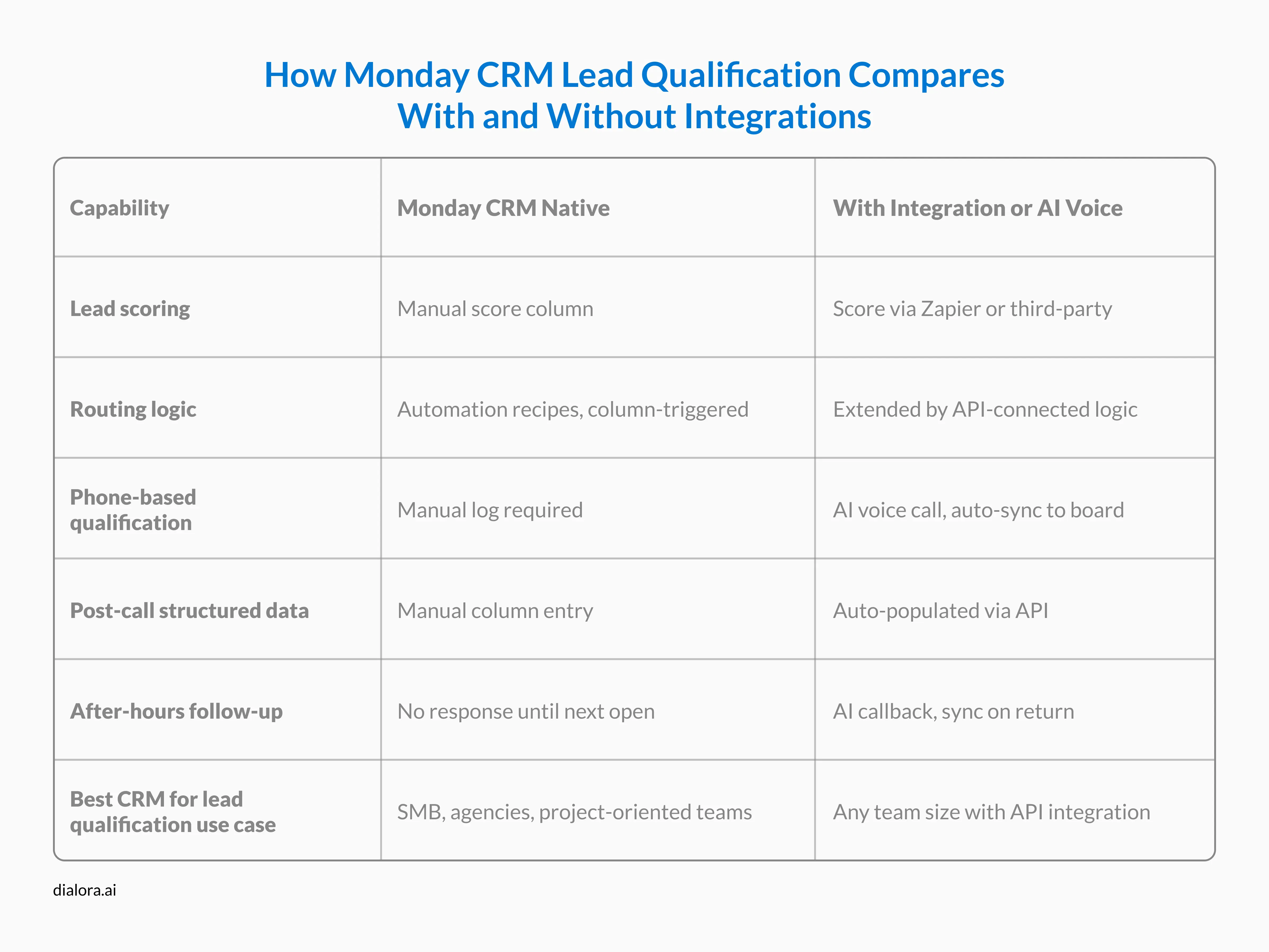
Monday CRM lead qualification uses custom status columns to define qualification stages, number columns to score leads by weighted criteria, and automation recipes to route leads and create follow-up activities based on column values. There is no native lead scoring feature. Qualification logic is built through Monday's column types and automation builder, then extended by integrations for AI voice qualification or third-party scoring tools.
What Monday CRM Lacks for Lead Qualification and How to Design Around It
Monday CRM does not have a native lead scoring module. There is no numeric score property that updates automatically based on fit criteria or behavioral signals. Monday's architecture is built for visual workflow and project management, not for automated scoring pipelines.
That is a design constraint, not a disqualifier.
The CRM lead qualification process in Monday CRM runs through three column types that replace what a scoring model would typically produce:
- Status columns define where a lead sits in the qualification process. Create a Lead Status column with values: New, Contacted, Qualified, Disqualified, and Nurture. Automation recipes trigger when a value changes.
- Number columns create a qualification scoring proxy. Add a Priority Score column with values 1, 2, or 3. Build automation recipes that set the score based on field combinations: if the Company Size column is above the threshold AND the Decision Maker column is marked Yes, set the Priority Score to 3.
- Person columns handle rep assignment automatically. Build a recipe that assigns the rep when Priority Score reaches the qualifying value or when Lead Status changes to Qualified.
This setup is not as automated as a native scoring model. For the qualification volumes that most small businesses, professional services firms, and creative agencies process, it is sufficient.
Pro-tip: Monday CRM's automation recipes are the qualification engine. Without them, Monday is a visual database. With them, it is a functional lead management and routing system.
How to Qualify Leads in Monday CRM Using Automation Recipes
Monday.com automation recipes live inside the Automations panel on any board. Access through the Automations button in the board toolbar.
Qualification recipes follow a trigger-action structure. Build them in this sequence:
Recipe 1 New lead intake.
Trigger: When an item is created on the Leads board. Action: Assign to intake rep, set Lead Status to New, create a qualification task due today.
Recipe 2 Qualification criteria met.
Trigger: When the Priority Score column changes to 3. Action: Change Lead Status to Qualified, reassign to the appropriate closer, and send a Slack or email notification.
Recipe 3 Disqualifying criteria detected.
Trigger: When the Industry column changes to a non-target value. Action: Change Lead Status to Disqualified, move the item to an archived group on the board.
Recipe 4 Stale lead follow-up.
Trigger: When Lead Status is New and no activity for 2 days. Action: Create a re-qualification task assigned to the intake rep.
The project manager at a professional services consultancy built her Monday CRM qualification workflow in one afternoon. She moved her team off a shared spreadsheet where leads were tracked by date added in a single column. Her first recipe eliminated the daily question of whose job it was to follow up. Three months after setup, she noted that the team had stopped discussing lead priority entirely. The column value decided it.
How to Set Up Lead Management in Monday.com for Consistent Qualification
Monday.com CRM for lead management at higher volume requires board architecture decisions made before the first lead is created.
Separate boards for separate stages: A Leads board for unqualified leads. A Qualified Leads board or Deals board for leads that have cleared the qualification threshold. An automation recipe handles the move between boards when Priority Score reaches the qualifying value. Monday.com CRM convert opportunity to lead flows run in reverse: a Lost item on the Deals board connects back to the Leads board via a board connection and triggers a re-qualification task when the opportunity is archived.
Consistent intake columns: Every lead item should have the same minimum field set filled at intake. Missing data is what breaks automation recipes. A recipe that triggers on Company Size above threshold cannot fire when the column is empty. Build an intake form using Monday's form view or connect a lead capture tool to populate the required fields at the moment the lead enters the board.
How Dialora Works with Monday CRM
Dialora connects to Monday CRM via API. Inbound calls and callbacks to form-submitted leads run through a configured voice qualification flow. Qualification data from the call, including company size confirmed on the call, stated budget, decision authority, and timeline, populates the Monday board item columns directly. Automation recipes fire on the new column values. Lead Status updates. Rep ownership assigns. Follow-up activities are created. The rep opens the item to find a lead that is already qualified, already assigned, and already accompanied by a structured call summary.
Pro-tip: Monday CRM's power is visual pipeline management. Adding an AI voice qualification closes the data gap between a lead item existing and a lead item being ready to work.
Ready to See Dialora Sync Phone Qualification Data to Your Monday CRM Board?
What the Best CRM for Lead Qualification Actually Requires
The question of best CRM for lead qualification comes from teams who have a CRM set up but are not seeing qualification outcomes from it. The platform is rarely the problem. The qualification logic is.
Monday CRM, Pipedrive, HubSpot, and Salesforce all produce accurate qualification outcomes when the criteria are defined, the automation logic is built, and the intake data quality is consistent. Top AI-powered CRMs for lead qualification are distinguished by how much of that definition work they automate. Einstein Lead Scoring infers it from historical data. HubSpot predictive scoring learns it over time. Monday CRM and Pipedrive require you to define it explicitly in column values and automation rules.
That is not a disadvantage. Explicit qualification criteria are often more precise than inferred ones, especially in the first year of CRM use when the closed-won history is too thin for AI models to learn from.
Automate lead qualification with AI by combining Monday's automation recipes with a voice qualification tool that handles the phone channel, and the qualification workflow runs at the intake layer, the routing layer, and the follow-up layer simultaneously.
What Does This Mean for Your CRM
Monday CRM qualifies leads well when the board is designed for it. The recipes run consistently. The column values determine the outcome.
CRM software with lead qualification built natively scores leads automatically. Monday CRM requires explicit criteria definition in its column and automation structure. Sales lead qualification improves when that criteria definition is precise and reviewed quarterly against actual conversion data. Automated lead qualification bot behavior in Monday terms is a set of automation recipes that run without rep involvement.
Lead capture and qualification automation tools like Dialora extend those recipes to the phone channel. AI lead qualification and lead qualification best practices converge at the same point: every lead should arrive in the pipeline with consistent, structured data, regardless of which channel it came from.
The phone channel is where most of those column values get confirmed in the real world. That is what Dialora adds.
Why Dialora
Dialora handles inbound and outbound qualification calls in English, Spanish, French, Portuguese, and Turkish across 30+ countries. Post-call data syncs to Monday board item columns via API without manual entry. Calendar integrations confirmed for Google Calendar, Cal.com, and TidyCal for post-qualification appointment booking. The platform runs on SOC 2-ready infrastructure with GDPR compliance and BAA availability for healthcare customers.
Frequently Asked Questions
Does Monday CRM have lead scoring?
Monday CRM does not have a native lead scoring feature. There is no numeric score property that updates automatically based on fit criteria or behavioral signals. Lead qualification in Monday.com is built through custom number columns used as scoring proxies, status columns that define qualification stages, and automation recipes that trigger routing and follow-up actions when column values change. For numeric scoring, Monday integrates with third-party tools via Zapier, Make, or direct API.
How do you qualify leads in Monday CRM?
Qualifying leads in Monday CRM involves building a board with dedicated qualification columns: a Lead Status column with defined qualification stages, a Priority Score number column, and a Person column for rep assignment. Automation recipes handle routing: when Priority Score changes to the qualifying value, Lead Status updates to Qualified, the rep is assigned, and a follow-up task is created. Leads that do not meet criteria stay in the Leads Inbox with a data-gathering task.
How do you automate lead qualification in Monday CRM?
Monday CRM lead qualification automation runs through the Automations panel on the Leads board. Create recipes with trigger-action structure for each qualification scenario: criteria met (status update, rep assignment, task creation), disqualifying criteria detected (archive to nurture group), and stale leads with no activity (re-qualification task creation). Integrate with API-connected tools like Dialora to auto-populate qualification columns from phone-based leads.
Can Monday CRM integrate with lead qualification tools?
Monday CRM integrates with lead qualification tools through the Monday.com App Marketplace, Zapier, Make, and direct API connections. Integrations can push numeric scores from dedicated scoring tools, structured call data from AI voice qualification platforms like Dialora, and enrichment data from prospecting tools. All of these push data to Monday board item columns, which then trigger the automation recipes built into the board.
What is the best CRM for automated lead qualification?
The best CRM for automated lead qualification depends on team size, technical resources, and data maturity. Salesforce with Einstein Lead Scoring is best for enterprises with large closed-won data sets. HubSpot suits B2B SaaS teams running combined manual and predictive scoring. Zoho CRM works well for mid-market teams needing built-in scoring without custom development. Pipedrive and Monday CRM work for SMB and agency teams that prefer simpler interfaces and are willing to define qualification criteria explicitly through automation rules.