TL;DR
- Pipedrive does not have native lead scoring. Automated lead qualification in Pipedrive runs through custom fields, automation rules, and the Leads Inbox to create structured qualification logic without a numeric score property.
- Pipedrive automation rules trigger rep assignment, label changes, activity creation, and pipeline progression based on field criteria you define. They replace manual triage with rules-based qualification logic.
- Dialora handles phone-based inbound lead qualification and pushes structured call data to Pipedrive via API, adding a voice qualification layer to the form and chat-based leads already entering the system.
The agency owner who moved her team to Pipedrive from a spreadsheet 18 months ago still runs lead triage the same way she did before the CRM. She opens the Leads Inbox every morning and works through it in order. High-fit and low-fit leads look identical in the inbox. She qualifies by memory: recognizing a company name, noticing a budget field that got filled in, or spotting a title that looks right. One week she was traveling, and the leads sat for four days. Two of them were referrals who had specifically asked for same-day follow-up. One of those referrals signed with the first agency that called.
Pipedrive can run a qualification process that prevents this. The logic has to be built.
Pipedrive does not include a native lead scoring feature. Automated lead qualification in Pipedrive uses custom fields to capture qualification criteria, automation rules to route and prioritize leads based on those field values, and the Leads Inbox to stage leads before they enter the deals pipeline. Third-party integrations via Zapier or direct API extend the qualification layer to include AI voice tools and numeric scoring.
Does Pipedrive Have Lead Scoring?
Pipedrive does not have a native lead scoring property. There is no numeric field that automatically assigns a qualification value to a lead based on fit criteria or behavioral signals. This is a genuine difference between Pipedrive and CRMs like Salesforce, HubSpot, and Zoho that have dedicated scoring modules built into the platform.
The practical gap is smaller than it appears. Pipedrive's automation rules, custom fields, and Leads Inbox structure can replicate most of the outcomes that lead scoring produces for SMB and agency sales workflows. The mechanism is different. The result is the same.
What the Pipedrive lead scoring feature actually means in practice:
- Custom fields capture the qualification data points a scoring model would evaluate.
- Automation rules route and label leads based on field criteria in place of score thresholds.
- Labels in the Leads Inbox surface priority leads without a numeric rank.
- LeadBooster's chatbot and web forms pre-qualify leads before they reach the inbox.
None of this is as automated as Einstein or HubSpot predictive scoring. For the volumes that most SMB and agency sales teams process, it works.
Pro-tip:
Pipedrive's automation rules do the same job as lead scoring thresholds when the qualification criteria are explicitly defined. The tool is different. The outcome is the same.
How to Set Up Lead Qualification in Pipedrive
A functional lead qualification workflow in Pipedrive starts with the Leads Inbox architecture. All new leads land in the Leads Inbox before entering any deals pipeline. This separation is where qualification runs.
Step 1: Define qualification fields.
Go to Settings > Data Fields and add custom fields to the Leads object. The fields should capture the criteria your qualification decision depends on: company size, industry, estimated budget range, decision-maker identified (yes/no), and timeline. These fields appear on every lead record. The more completely they are filled at intake, the more accurately the automation rules can route.
Step 2: Build automation rules.
Go to Settings > Automations. Create trigger-action rules based on field values. A rule that fires when Lead Status changes to New and all qualification fields are populated: set label to High Priority, assign to the appropriate rep, and create a follow-up call task for today. A rule that fires when required fields are blank: create a data-gathering task with a two-day due date.
Step 3: Define the lead qualification criteria explicitly.
B2B lead qualification in Pipedrive works when the criteria are written down before the automations are built. What fields must be populated for a lead to be routed to a rep? What field values disqualify a lead from active pursuit? Document the answers. Build the rules against that document, not from intuition.
Step 4: Use LeadBooster if available.
Pipedrive's LeadBooster chatbot runs on your website and captures qualification fields through a conversational form before the lead enters the Leads Inbox. The chatbot populates those fields directly into the lead record on creation. Your automation rules run immediately with real intake data rather than blank fields.
The sales manager at a real estate consultancy with nine agents built her Pipedrive qualification workflow over a weekend. Six custom fields. Four automation rules. Three label types: High Priority, Needs Data, and Nurture. By the following week, her agents had stopped discussing which lead to call next. The High Priority label decided it. She had been running the same conversation every Monday morning for 14 months.
How to Automate Lead Qualification in Pipedrive With Integrations
Pipedrive's native automation handles field-based routing and activity creation. Numeric scoring and AI-based qualification require integrations.
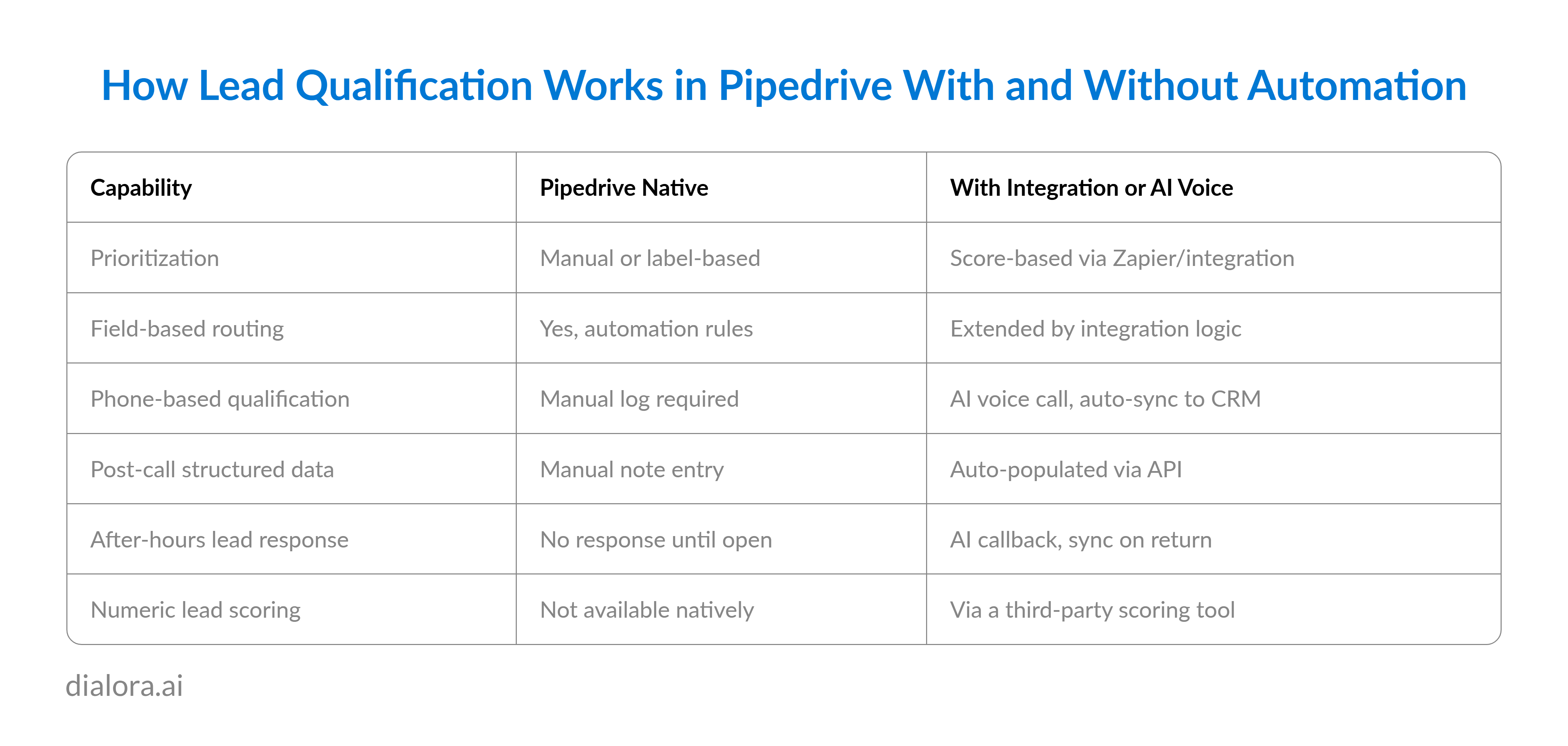
Zapier and Make connect Pipedrive to scoring platforms. A lead created in Pipedrive triggers a Zapier workflow that pushes the record to a scoring tool, evaluates the field criteria against defined weights, and returns a numeric value to a custom Priority Score field in Pipedrive. The automation rules watch that field. When it reaches the qualifying threshold, the routing runs.
Dialora connects to Pipedrive via API. Inbound calls and callbacks to form-submitted leads run through a configured voice qualification flow: company size, budget indication, decision authority, timeline, and current solution in use. The structured call output pushes to the corresponding Pipedrive lead record. Automation rules fire on the updated fields. Labels apply. Activities create. The lead moves toward the pipeline with phone-verified qualification data attached.
For real estate and agency teams where most initial client contact still happens by phone, adding Dialora to the Pipedrive qualification workflow closes the gap between form-based leads (which automation can handle natively) and phone-based leads (which used to require manual logging every time).
Pro-tip:
For SMB and agency teams, most qualified leads confirm their qualification on a call, not through a form. The qualification workflow that does not handle phone-based leads handles half the pipeline at best.
Lead Qualification Best Practices for Pipedrive Users
Pipedrive's simplified architecture pushes teams toward cleaner qualification process design. Three principles that hold consistently across SMB, agency, and real estate workflows:
Define the minimum qualification bar, not the ideal customer profile. The minimum bar is what a lead must have before a rep's time is worth spending. The ideal profile is aspirational. Build automation rules around the minimum, not the ideal, or the automation routes too few leads.
Use the Leads Inbox as a filter, not a holding area. Leads that meet qualification criteria move to a deal. Leads that cannot be qualified from available data stay in the inbox with a data-gathering task assigned. Nothing enters the deals pipeline unqualified.
Review label accuracy quarterly. Check whether leads labelled High Priority by your automation rules are converting at a higher rate than Standard Priority labels. If the gap is small, the criteria need tightening. The inbound lead qualification checklist evolves as the sales data accumulates.
Conclusion
Pipedrive's qualification workflow runs on criteria, not scores. For most SMB and agency sales processes, that is precise enough. The criteria determine the outcome when they are well-defined.
Lead scoring in Pipedrive is a workaround built from custom fields and automation rules rather than a native module. Lead scoring Pipedrive teams actually need is practical qualification routing that produces consistent rep behaviour. That is what the automation setup above delivers. CRM software with lead qualification built natively handles the scoring layer automatically. For Pipedrive, third-party integrations handle it.
Automate lead qualification revenue operations in Pipedrive by reviewing label accuracy quarterly. Are High Priority leads converting at a meaningfully higher rate than Standard? AI lead qualification tools like Dialora extend the system to the phone channel. Sales lead qualification improves when phone-based leads enter the CRM with the same structured data quality as form-submitted leads.
The phone channel is where those criteria still get confirmed most of the time. That is what Dialora handles.
Ready to See Pipedrive Lead Qualification Running on Inbound Phone Leads?
Frequently Asked Questions
Does Pipedrive have lead scoring?
Pipedrive does not have a native lead scoring property or a numeric qualification score feature. Lead prioritization in Pipedrive is built through custom fields that capture qualification criteria, automation rules that route and label leads based on those field values, and the Leads Inbox label system that surfaces priority leads. For numeric scoring, Pipedrive integrates with third-party tools through Zapier, Make, or direct API connections.
How do you set up lead qualification in Pipedrive?
Setting up lead qualification in Pipedrive requires four steps: adding custom fields for qualification criteria in Settings > Data Fields > Leads, building automation rules in Settings > Automations that trigger routing and labelling when field criteria are met, defining label types in the Leads Inbox for visual prioritization, and using LeadBooster or API-connected tools to pre-qualify leads at intake. Phone-based qualification can be added through Dialora's Pipedrive API integration.
How do you automate lead qualification in Pipedrive?
Lead qualification automation in Pipedrive runs through the Automations feature in Settings. Create trigger-action rules for three scenarios: qualification criteria met (route and label as High Priority), required fields blank (create data-gathering task), and disqualifying criteria present (apply Nurture label and remove from active queue). Third-party integrations extend this to include numeric scoring and AI voice qualification with automatic field sync back to the lead record.
What CRMs support automated lead qualification?
CRMs with native automated lead qualification include Salesforce (Einstein Lead Scoring), HubSpot (manual and predictive scoring), and Zoho CRM (scoring rules). Pipedrive and Monday CRM support automated lead qualification through automation rules and third-party integrations rather than native scoring modules. The qualification outcome is comparable for most SMB sales volumes when the criteria and automation logic are well defined.
How do you set up lead routing in Pipedrive?
Lead routing in Pipedrive runs through automation rules in Settings > Automations. Create a trigger when a lead is created or a qualifying field changes, then add an action to assign the lead to a specific user or team based on the criteria. For territory-based routing, use custom field values representing territory to route leads to the appropriate regional rep. For score-based routing, use a numeric custom field (populated by a Zapier integration with a scoring tool) as the trigger threshold.