TL; DR
- Most business owners think building an AI voice agent requires a developer. It does not.
- Build AI voice agent no-code platforms that let operations leads and founders set up a working voice AI in a single session.
- This guide shows exactly what the process looks like from first call type to full deployment.
How to Build an AI Voice Agent Without Writing a Line of Code
You have a phone line. Calls come in. Some get answered. Some do not.
The ones that do not are the ones costing you revenue.
How to build an AI voice agent: Workflows used to mean hiring a developer, integrating voice APIs, and spending months in testing. That barrier is gone. DIY AI voice agent platforms have made it possible for a founder or operations lead to create AI voice agent instances in an afternoon. The ops lead at one mid-market dental network spent her first Wednesday after lunch building three different agents for inbound, outbound, and reminders. All three went live before Friday.
This guide walks through exactly what that looks like.
To build an AI voice agent without code, follow seven steps. Connect a phone number to an AI voice agent builder, define the call purpose, build the call script, integrate your calendar, configure escalation rules, test live, and deploy. Most founders complete the full process in a single session. Build an AI voice agent with no-code workflows on managed platforms that cost a fraction of a custom build and go live in 2 to 8 hours instead of 3 to 6 months.
What a Voice AI Agent Actually Is Before You Build One
A voice AI agent is software that handles phone conversations using natural language. It listens to the caller, understands what they are saying, responds in real-time, and takes action. Booking an appointment. Collecting a lead. Routing a call to the right person.
It is not a phone tree. It does not ask the caller to "press 1 for sales."
It holds a conversation.
Understanding that distinction matters before you pick a platform. Most of the tools marketed as AI voice agents are still running on static decision trees. Modern LLM voice agent stacks use language models for real intent understanding, not keyword matching against menu options.
What You Need to Clarify Before You Start Building
The build itself is fast. The clarity you bring into it determines how well the agent performs.
Before you open any platform, answer three questions.
- What is the one job this agent handles on every call? Booking, intake, lead qualification, or reminder?
- What information does it need to collect to do that job?
- What happens when the call needs a human? Who is it escalated to, and when?
Your answers become the agent's script and logic. Most no-code platforms turn those answers into a working call flow in under an hour.
The No-Code Steps to Create an AI Voice Agent
You do not need to write a single line of code to create an AI voice agent flow for your business.
Here is what the process looks like on a no-code AI builder.
- Connect your phone number: Port an existing number or get a new one through the platform.
- Define the call purpose: Inbound booking, outbound follow-up, lead qualification, or appointment reminders.
- Build the call script: The questions the AI asks and the logic behind each answer.
- Set up calendar integration: Connect Google Calendar, Cal.com, or TidyCal for direct booking.
- Configure escalation rules: When does the AI hand off to a human, and how?
- Test live: Call the number yourself, run through the script, and adjust what breaks.
- Deploy: The agent goes live on your phone line.
Most founders complete steps 1 through 7 in a single session. This is the core of how to make an AI calling bot without engineering involvement.
Pro-tip: The build is the easy part. The clarity on the call type and escalation logic is the work.
How Long Does Building an AI Voice Agent Actually Take
The honest answer depends on how clearly you defined the job before you started.
A simple inbound booking agent can be live in two to four hours. A more complex agent with multi-path qualification, escalation logic, and CRM sync typically takes one to three days of configuration and testing.
The testing phase is where most first-time builders spend their time. Call the agent yourself. Have someone else call it. Find where the conversation breaks. Fix those points one at a time.
No-Code vs Coded vs Custom: What the Build Options Actually Cost
Most business owners over-engineer the first version.
A no-code AI builder gets you to deployment faster and at a fraction of the cost of a custom build. The right question is not "how much control do I want?" It is "what does this agent actually need to do?"
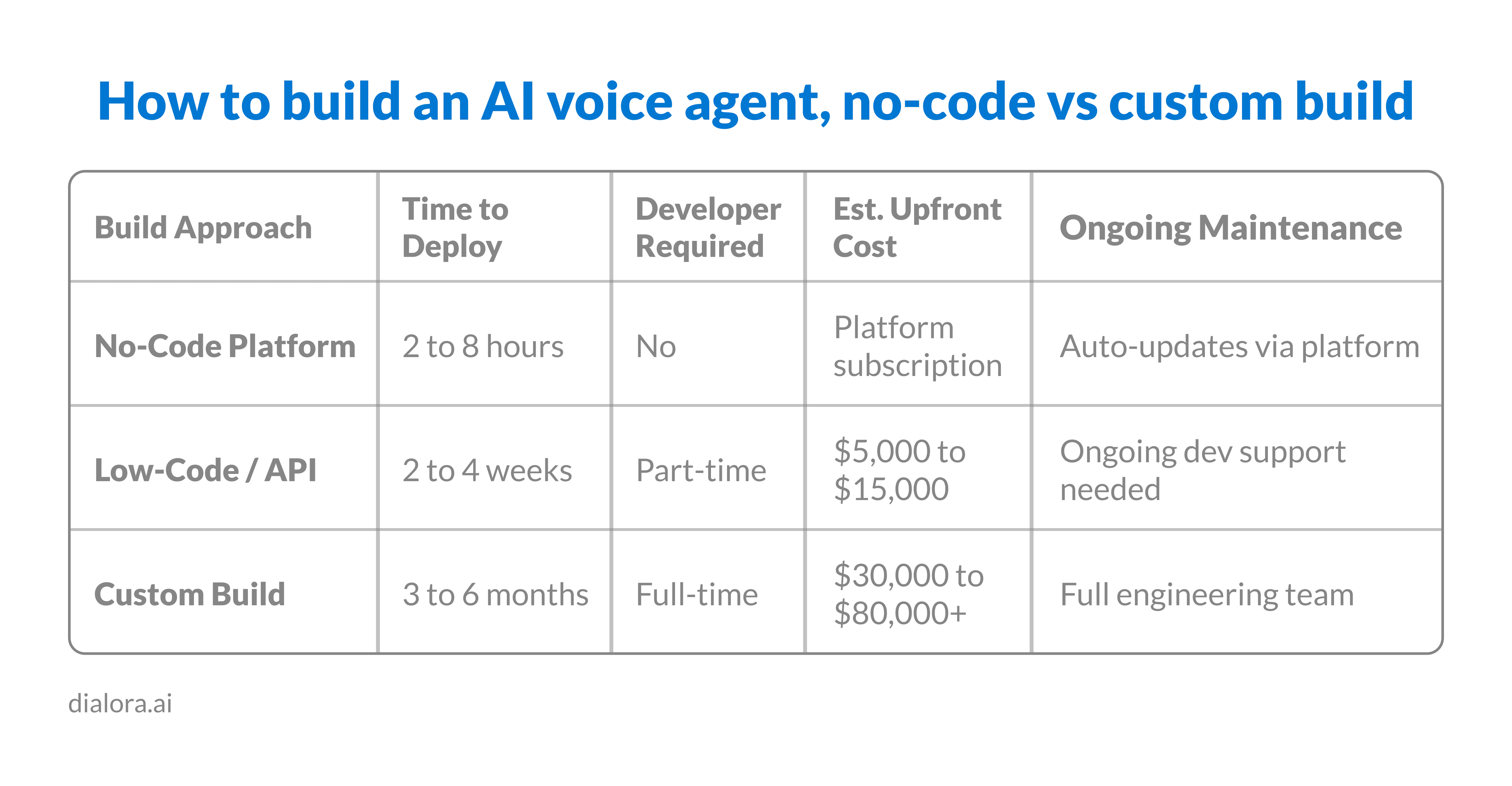
Custom builds often use Twilio AI voice infrastructure paired with an LLM orchestration layer. The flexibility is real. So is the engineering overhead. Most SMBs don't need either.
What Tools Can You Use to Build a Voice AI Agent
The AI voice agent builder market has expanded. The right tool depends on your use case.
For businesses that want a fully managed agent, Dialora removes the build entirely. Configure the script, connect the calendar, and the agent is live. For founders who want to control the underlying workflow, voice API integration options and AI workflow tool stacks offer more flexibility, but require technical comfort. Builders coming from the chatbot world sometimes start with a voice bot builder before stepping up to a full agent platform. That works, but the upgrade path usually means redoing the call logic.
For most SMB owners, the choice is straightforward. Use a platform built specifically for your call type rather than a general-purpose builder that was designed for something else.
Common Mistakes When Building Your First AI Voice Agent
Most problems that appear after launch are visible in testing if you look for them.
The most common mistakes.
- Writing a script that sounds like a website FAQ: The agent needs to sound like a person, not a help article.
- Skipping escalation rules: If you do not define when it hands off, callers will find the edge case for you.
- Testing only the best-case call: Test the worst version of each call type, not the smoothest one.
- Building one agent that tries to do everything: One clear job per agent outperforms a multi-function setup every time.
Pro-tip: The first call your AI handles in production won't be the one you tested. Test the messy ones. Always.
What Changes Once Your AI Voice Agent Is Live
The first week after deployment usually produces one of two surprises.
Either the call volume being handled surprises you, because you did not realize how many calls were coming in unmanaged. Or the quality of the transcripts surprises you, because you now have structured data on every call that you never had access to before.
Either way, the question shifts from "how do I build this?" to "how do I get more out of it?" That is the right question. That is when you start tuning the agent on real call data.
What Happens After You Deploy
Building the agent is the start, not the finish.
The businesses that see the most impact from AI voice agents are the ones that treat the first deployment as version one and improve it based on what the transcripts show. Call patterns, drop-off points, and escalation triggers tell you exactly where to tune.
The no-code platforms make iteration as fast as the initial build. Most adjustments take less than 30 minutes.
Ready to see what an AI voice agent looks like on your call line?
How Dialora Removes the Build Step Entirely
For founders who want to create an AI voice agent for business workflows without configuring infrastructure, Dialora handles the full stack.
- Connect a phone number
- Define the call type (the agent is live the same afternoon)
- Inbound call answering 24/7
- Outbound campaigns
- Appointment booking with Google Calendar, Cal.com, and TidyCal
- Lead qualification.
- Warm and cold transfers
- Post-call transcripts, recordings, sentiment analysis, and CRM data sync
- Multilingual support across English, Spanish, French, Portuguese, and Turkish.
- Coverage in 30+ countries.
- GDPR compliant
- SOC 2 ready
- BAA is available for healthcare customers
- PCI compliance for payment-related calls
Most teams skip the voice API integration layer entirely and pick Dialora when their actual goal is operational outcomes, not technical control.
What Building an AI Voice Agent Means for Your Business in 2026
The decision in 2026 isn't whether to create an AI voice agent workflow for your phone line. It's the path that matches your team's capacity. Build an AI voice agent; no-code platforms cover 80 to 90 per cent of SMB call patterns without engineering involvement. Voice API integration and LLM voice agent stacks make sense for teams with engineering capacity and a need for custom logic that the managed platforms don't support.
Custom builds make sense for enterprises with regulatory or workflow requirements that no platform handles. Most founders land on the no-code path because the build cost (2 to 8 hours plus a platform subscription) is a fraction of the alternative. The 2026 baseline isn't whether the technology works. It works. It's whether your call line is still relying on a human answering every ring.
Building it is simpler than you think. Deploying it changes what your team has to handle every day. Ready to see it on your call line? See How Dialora Works
Frequently Asked Questions
How do I build an AI voice agent?
Define the call job, choose a no-code AI builder, build the script, connect your calendar, configure escalation rules, and test live. How to build an AI voice agent workflows on a no-code platform takes a single session for most SMBs. No developer needed. The clarity on call type and escalation rules matters more than the tool choice.
Can I create an AI voice agent without coding?
Yes. DIY AI voice agent platforms let you build a working voice AI through a visual interface. No programming knowledge required. Configuration only. The trade-off versus custom builds is less flexibility on edge cases, but the speed-to-deployment difference (hours vs months) makes no-code the right choice for 80 to 90 per cent of SMB call patterns.
What tools can I use to build a voice AI agent?
Managed platforms like Dialora handle the full stack for SMBs. For custom builds, voice API integration options paired with an AI workflow tool give more control but require technical setup. The voice bot builder category overlaps with full agent platforms but usually targets simpler use cases. Pick on call type and integration needs, not feature lists.
How long does it take to build an AI voice agent?
A simple inbound booking agent can go live in two to four hours. More complex agents with multi-path logic and CRM sync typically take one to three days of configuration and testing. How to make an AI calling bot that handles outbound campaigns at volume usually takes the longer end of that range because the testing surface is larger.
What is the best no-code AI voice agent builder?
The best AI voice agent builder is one designed specifically for your call type. Generic workflow tools can work, but require significantly more configuration. Industry-specific platforms reduce setup time and produce better call quality out of the box. Healthcare practices, law firms, and dealerships each have different call patterns that benefit from purpose-built platforms.
Should I use Twilio AI voice or a managed platform to build my agent?
Twilio AI voice infrastructure is the foundation many managed platforms build on. Going direct gives you flexibility on call routing, voice provider choice, and custom logic. The trade-off is engineering overhead. Most SMBs pick a managed platform because the time-to-value is faster. Teams with engineering capacity and a need for custom workflows the platforms don't support, pick Twilio direct.
What does an LLM voice agent architecture actually look like?
An LLM voice agent uses a large language model for intent understanding and response generation, paired with a speech-to-text layer for incoming audio and a text-to-speech layer for output. The orchestration runs in near real time. Modern platforms also add named-entity flagging, calendar integration, and CRM sync on top. The LLM is one component. The orchestration is what makes the agent useful.