TL;DR
- The number is 150 milliseconds, one way, mouth to ear. Jitter under 30 ms, packet loss under 1%. Everything else is detailed.
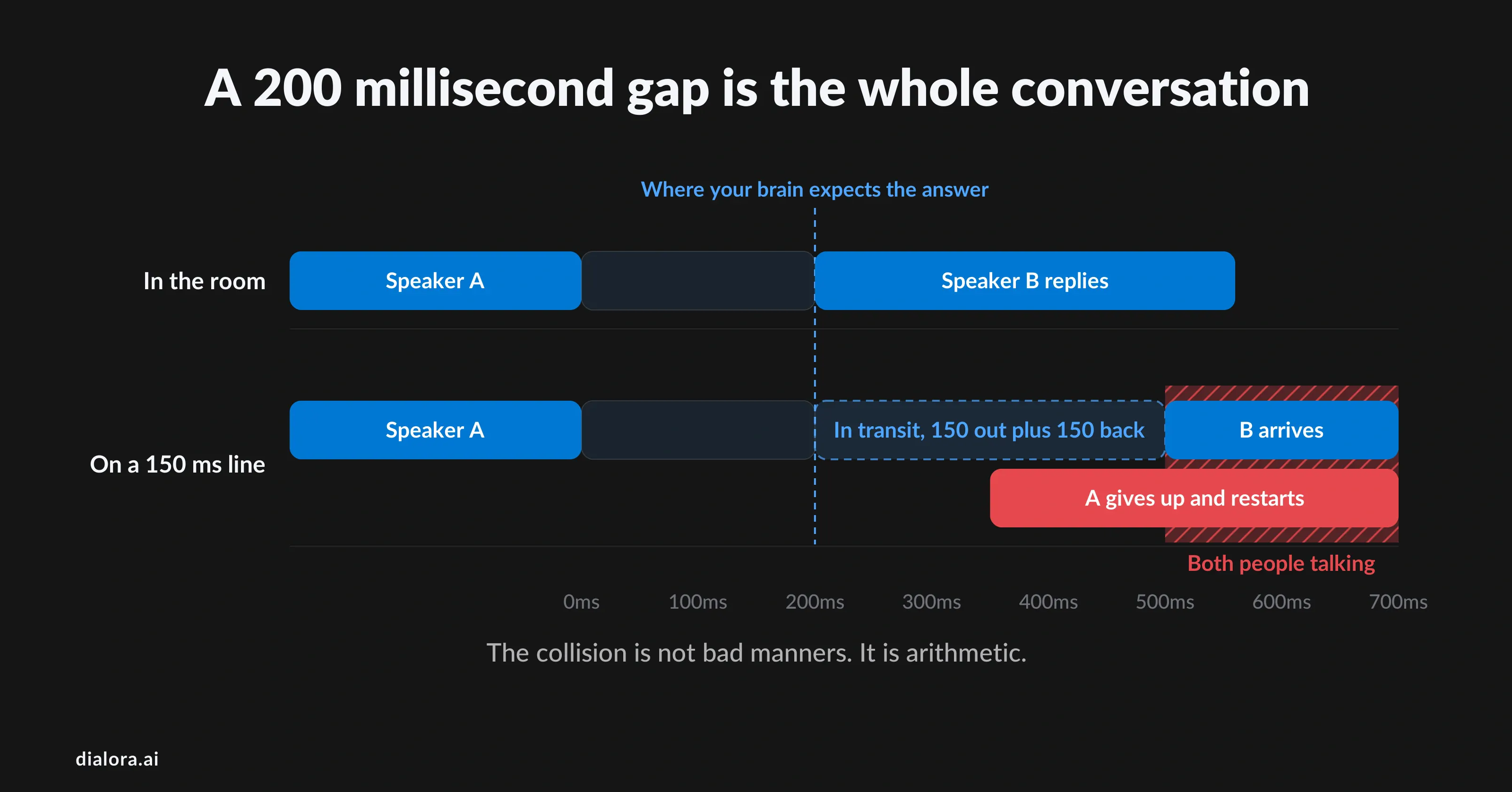
- Why 150 and not some rounder figure: people reply about 200 ms after you stop talking. Add 150 each way and their answer lands at 500, which your brain reads as hesitation, so you start talking over them.
- Your ping is round trip. Halve it before comparing it to anything.
- Latency and jitter break calls differently. Late replies with clean audio are latency. Warbling and stuttering mid-word is jitter. Missing syllables is packet loss.
- Test the path your calls actually take, at your busiest hour, against your provider's media server. Not a quiet-evening ping to Google.
- When an AI answers, the network is one slice of a much longer loop. Ask any vendor for end-of-speech to first audible response on a real phone call, not a browser demo.
"Sorry, you go."
"No, you go."
Both people start again at the same time, both stop, and someone laughs to cover it. Everyone has had that call. What is happening under it is simple. In ordinary conversation, people reply about 200 milliseconds after the other person stops talking.
That figure comes from a study of ten languages across five continents, and it barely moves between them. We do not wait for a sentence to end and then decide to answer. We predict the ending and start our reply just after it.
So when a phone line adds delay of its own, that prediction lands early. You hear silence where the answer should be, assume the other person is done, and start talking exactly as their words arrive. The collision is not bad manners. It is arithmetic.
That arithmetic is why acceptable latency for VoIP is a number and not a feeling. This guide gives you the number, the thresholds around it, a voip latency test that means something, and the fixes in the order they usually work.
How much latency is acceptable for VoIP?
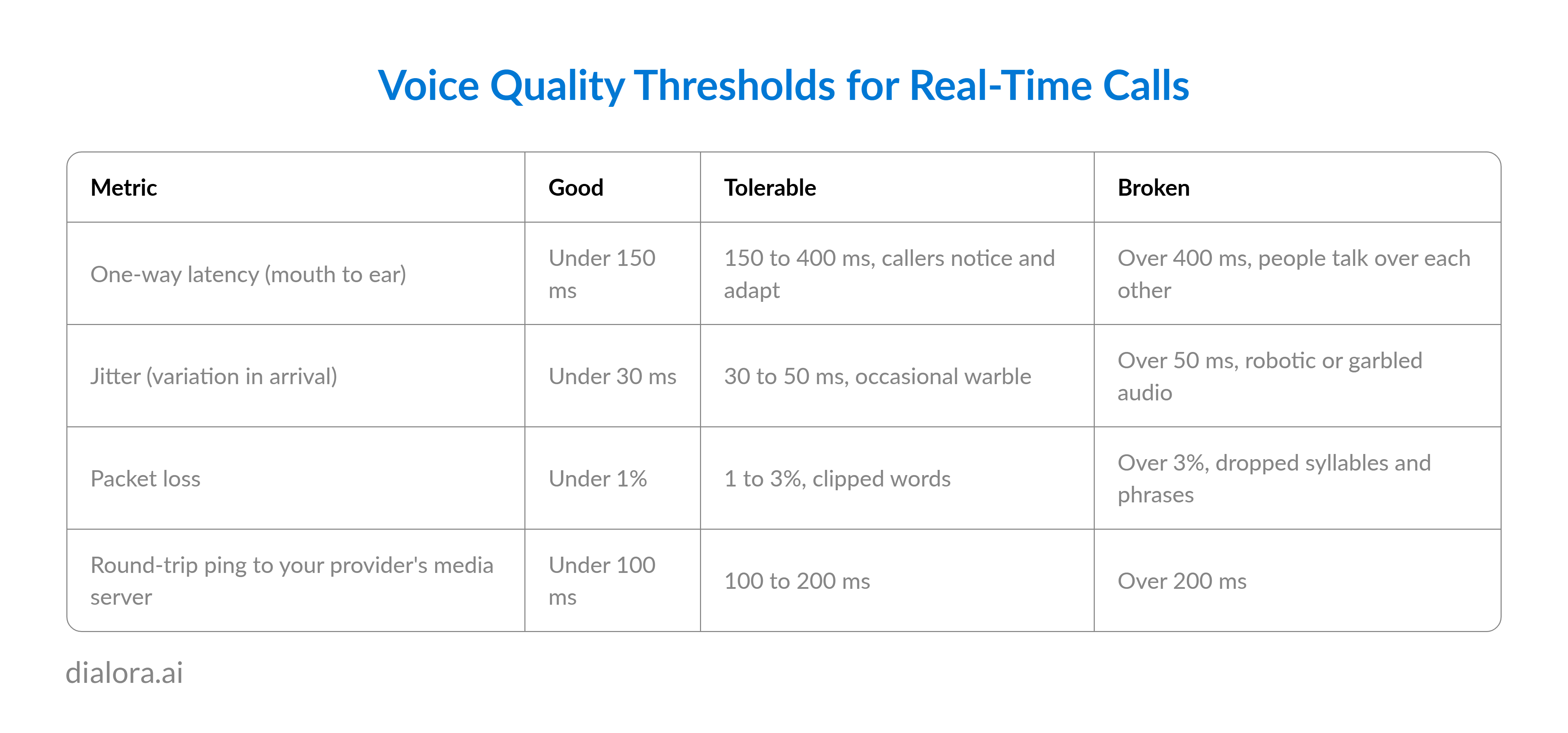
Under 150 milliseconds one way, mouth to ear. That is the voip latency threshold in the ITU-T G.114 recommendation, and the Cisco VoIP latency requirements use the same figure as the design target. Two companion numbers decide voip call quality just as much: jitter under 30 milliseconds and packet loss under 1%. Together they are the acceptable jitter and latency for VoIP that every serious deployment plans against.
Why 150 milliseconds and not some rounder number
Because it sits under the human turn-taking gap. If people reply around 200 milliseconds after you finish, and the line eats 150 each way, the reply lands at 500 milliseconds instead of 200. That is long enough to read as hesitation. G.114 puts it plainly: below 150 most applications feel transparent, 150 to 400 is workable if everyone knows the delay is there, and 400 is the maximum latency for VoIP before planning calls it unacceptable. Cisco's phrase for what happens past 150 is a walkie-talkie conversation.
One way, not round trip
Every number above is one way. A ping is round trip, so a 120 millisecond ping is roughly 60 each way. People compare a ping to the 150 threshold and panic or relax for the wrong reason. Halve it first.
What "20 milliseconds is normal" actually means
Several guides call 20 milliseconds normal VoIP latency. That is a LAN ping, not a phone call. Packetising audio alone takes 20 milliseconds per packet and the far end's jitter buffer holds more. A clean call on a good path is 60 to 120 milliseconds mouth to ear.
Jitter vs latency: which one is wrecking your calls?
People searching what is internet jitter usually want the difference stated once. Latency is how late every packet is. Jitter is how much that lateness varies from packet to packet. They break a call in different ways, and you can usually tell them apart by ear before you open a tool.
- High latency sounds like hesitation
Answers arrive late, both people start at once, and the person who sounds slow is not slow. The audio itself is clean.
- High jitter sounds robotic
Packets arrive bunched and gapped, the playout buffer runs dry, and voices warble or stutter mid-word. Timing of replies may be fine.
- Packet loss sounds like missing pieces
Whole syllables vanish. Cisco's guidance for the default G.729 codec is loss under 1% before errors become audible, and the honest target is zero.
The link between them matters for fixes. Every VoIP endpoint runs a jitter buffer that holds packets briefly so they play out evenly. It smooths jitter by adding latency. G.114's planning guidance is to assume the buffer adds about half its peak size to one-way delay, so a 60 millisecond buffer costs roughly 30 of your 150. Turn it up to hide jitter, and you spend the budget you were protecting. The cure for jitter is a steadier path. The buffer is a bandage.
What causes latency in VoIP?
A call is a chain of small delays, and the useful thing is to know roughly how big each link is.
- Codec and packetisation, 20 to 35 ms
Audio is cut into 20 millisecond packets, so the first sample waits 20 milliseconds before the packet leaves. G.711 and Opus add almost nothing on top. G.729 processes 10 millisecond frames with look-ahead and adds 10 to 15 more, which is why it saves bandwidth and costs time.
- Propagation, about 5 ms per 1,000 km
Light in fibre moves at roughly 200,000 kilometres a second, so New York to London is around 28 milliseconds one way before any router touches the packet, and real routes run longer than the map. You cannot fix distance. You can choose where your provider anchors the media.
- Queuing, 0 to 200 ms and rising under load
This is where most voip latency issues live. On a congested link a voice packet waits behind bulk data. Cisco's classic example: one 1,500-byte packet on a 64 kbps link makes a voice packet wait up to 187 milliseconds. Modern links are faster, but home routers with deep buffers do the same during a big download, a problem called bufferbloat.
- Wi-Fi, 10 to 15 ms plus variance
Wireless adds a little delay and a lot of jitter, especially on crowded 2.4 GHz channels.
- The jitter buffer, 20 to 60 ms
Necessary, and not free.
- The provider's media path, 0 to 100 ms
If calls are relayed through a data centre on another continent, you inherit that distance twice per call. Ask where RTP is anchored rather than where the company is headquartered.
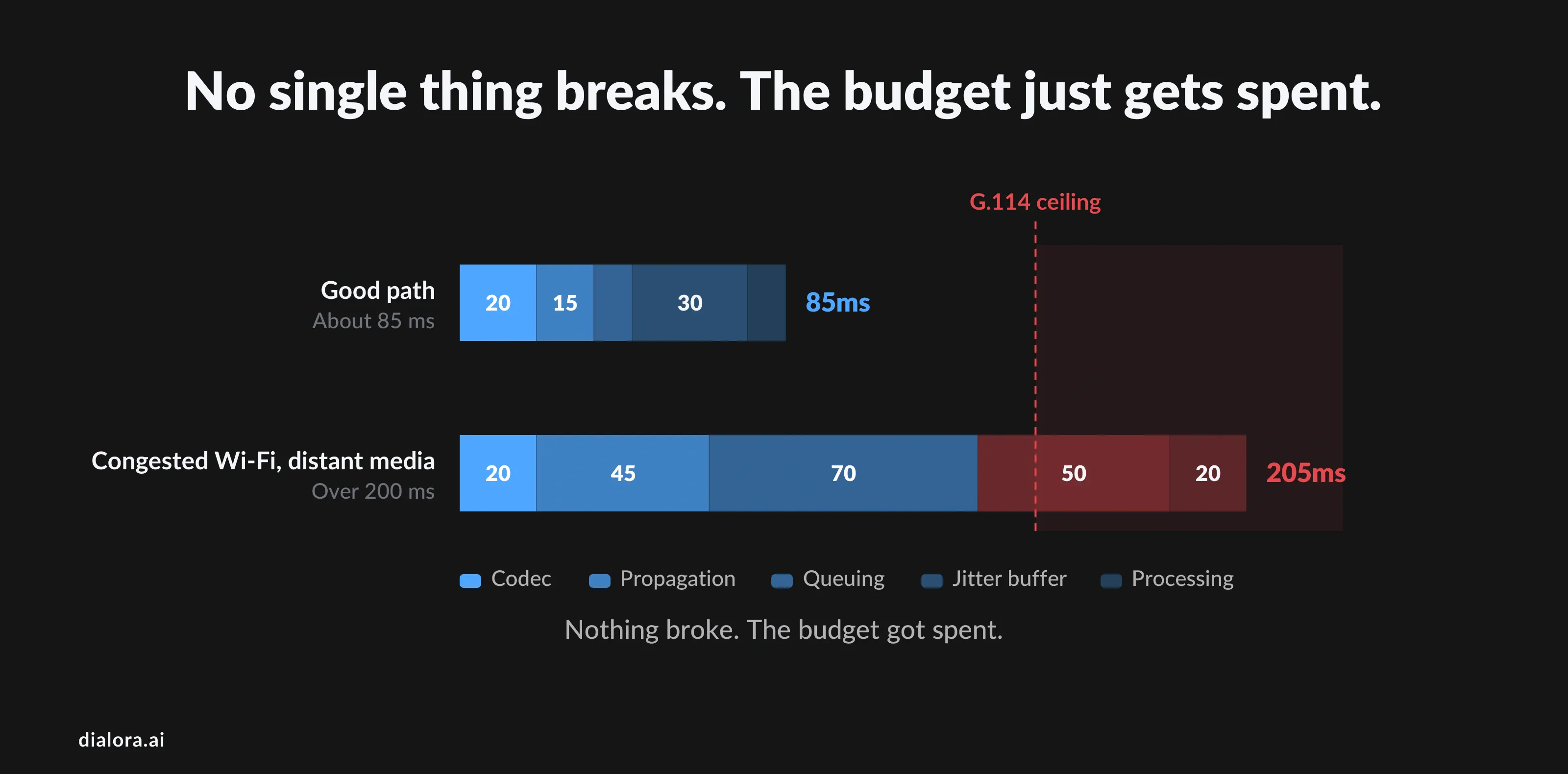
Add the good case together, 20 codec, 15 propagation, 10 queuing, 30 buffer, 10 processing, and you land near 85 milliseconds. Comfortable. Add congested Wi-Fi and a media server 4,000 km away and the same call is over 200. Nothing broke. The budget got spent.
How do you run a VoIP latency test that means something?
Test the path your calls take, at the time they happen. Most people ping Google over Wi-Fi on a quiet evening and conclude the network is fine.
- Ping the right target
Your provider's SIP or media server, not a public DNS. Send at least 100 pings and read the average, the maximum and the loss line. A low average with 300 millisecond spikes is a jitter problem hiding in a latency test.
- Trace the hop where it jumps
Traceroute or MTR shows delay per hop. If it doubles at your own router, that is congestion or bufferbloat at home. If it doubles at the ISP's first hop, that is a conversation with the ISP.
- Run a voip speed test that reports jitter
A decent voip bandwidth test shows ping, jitter and loss alongside throughput. Read jitter against 30 milliseconds and ignore the download figure, which is almost never the constraint. A call needs roughly 100 kbps each way, so a 50-seat office needs about 5 Mbps of headroom, not a bigger pipe in general.
- Test wired and wireless from the same desk
If the wired result is clean and the wireless is not, you have your answer without opening the router.
- Read the per-call stats your PBX already collects
Most cloud phone systems and softphones log RTCP statistics per call: latency, jitter, loss, often a MOS score. That is the truest voip latency and jitter test because it measures the audio path itself.
- Test at 10am on your busiest weekday
Congestion is a peak-hour problem. A quiet-hour result proves nothing about the calls customers complain about.
How do you fix VoIP latency and packet loss?
In this order, because it is the order that usually works, and each step is cheap next to the one after it.
- Move desk phones to Ethernet. The most common fix and the least glamorous. Wireless can be fine for a laptop softphone. It should not carry the reception line.
- Turn on QoS end to end. Voip qos means the router recognizes voice packets, usually by DSCP marking (EF, value 46), and sends them ahead of bulk traffic. Mark at the phone, honour at the router, confirm the firewall does not strip the tag. Many ISPs ignore marking on the last mile, but your own gateway is where the worst queuing happens anyway.
- Kill bufferbloat. Enable smart queue management on the router, or replace a router that lacks it. This alone often takes peak-hour spikes from 300 milliseconds to under 40.
- Fix codec order. Make G.711 or Opus first in the negotiation list. Let G.729 be the fallback for constrained links rather than the default.
- Turn off SIP ALG. Many routers ship with SIP application layer gateway enabled, and it mangles registration and media in ways that look like latency and one-way audio. Off is correct for almost every hosted VoIP deployment.
- Move the media closer. If tests show 100 milliseconds to the provider's server, no local fix recovers it. Ask about regional media points of presence, or change provider. Low latency voip is mostly geography plus queuing, and only one of those is in your building.
- Set the jitter buffer to adaptive. A fixed 200 millisecond buffer hides jitter by adding a fifth of a second to every call. Adaptive buffers grow only when the path is rough.
Why does latency matter more when an AI answers the phone?
Because network delay is one slice of a longer loop, and the caller judges the whole loop against the same 200 millisecond reflex.
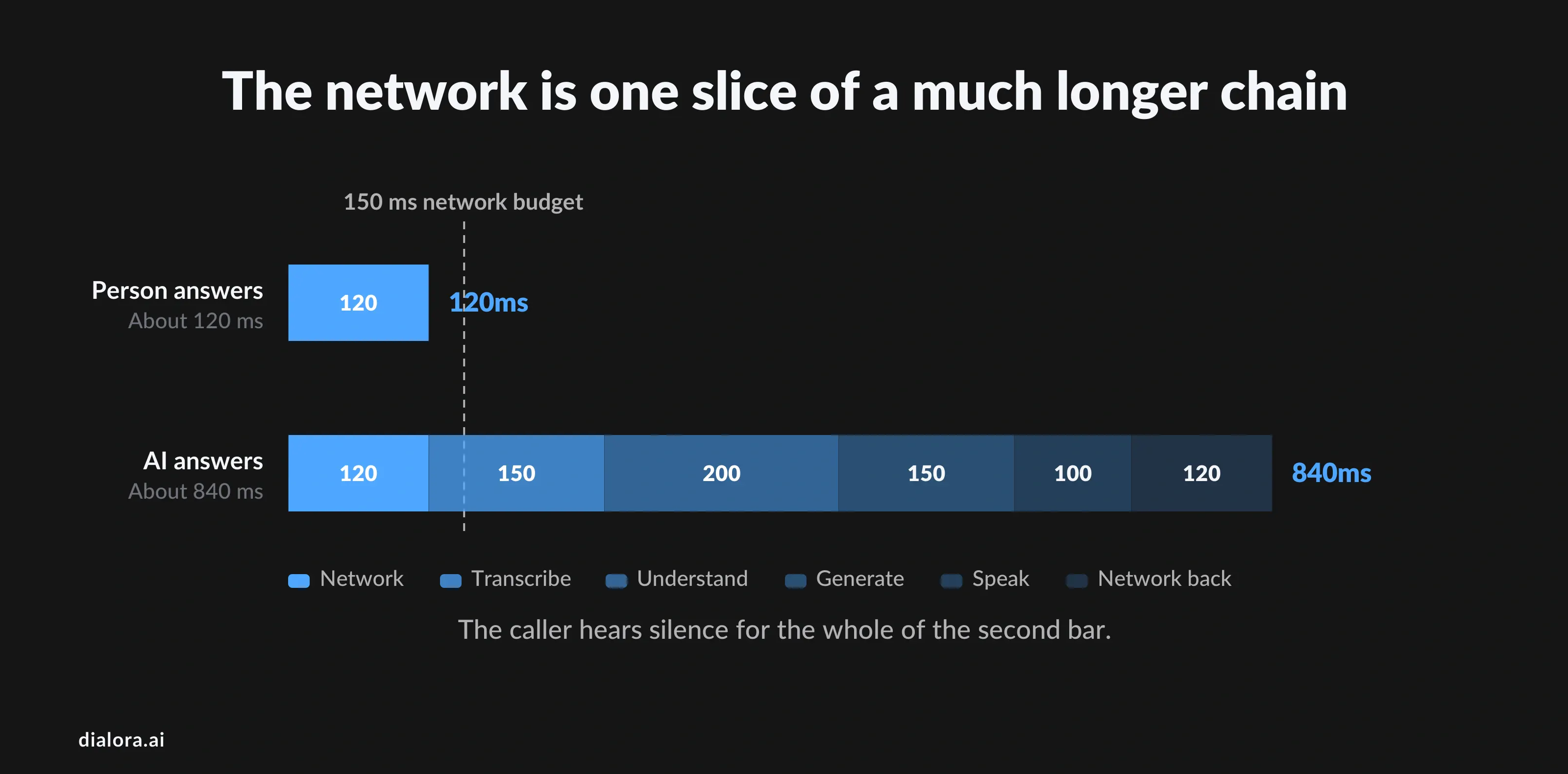
When a person answers, the path is microphone, network, ear, and even the device end adds delay through echo cancellation and noise suppression, which is why audio design engineering matters on hardware endpoints. When an AI voice agent answers, the audio crosses the network, is transcribed, is understood, generates a reply, is spoken back and crosses the network again, every stage in sequence. If the network takes 120 milliseconds each way and the processing stack takes 600, the caller sits in nearly a second of silence after they stop talking, reads it as the system failing, and starts repeating themselves, which restarts the loop.
When a person answers, the path is microphone, network, ear, and even the device end adds delay through echo cancellation and noise suppression, which is why audio design engineering matters on hardware endpoints. When an AI voice agent answers, the audio crosses the network, is transcribed, is understood, generates a reply, is spoken back and crosses the network again, every stage in sequence. If the network takes 120 milliseconds each way and the processing stack takes 600, the caller sits in nearly a second of silence after they stop talking, reads it as the system failing, and starts repeating themselves, which restarts the loop.
Two things follow. The network floor still matters: nothing an AI vendor does to recover 150 milliseconds lost to congested Wi-Fi or a distant media server, so every fix above applies before you evaluate any agent. And when you compare AI voice platforms, ask for the number nobody volunteers: end-of-speech to first audible response, measured on a real phone call rather than a browser demo. At Dialora we engineer against that whole loop, with recognition and synthesis placed near the media edge and interruption handling that stops the agent mid-sentence when the caller speaks. We still cannot fix your Wi-Fi.
What should VoIP reseller providers and white-label operators watch?
If you sell voice under your own brand, latency is what customers churn over and blame you for, whoever owns the network. Three habits protect a white label voip reseller better than any feature.
- Publish your voip latency requirements. A stated target of under 100 milliseconds round trip to media, jitter under 30 and loss under 1%, with a way for customers to test it, converts voip provider leads more reliably than a longer feature list, and sets the terms of the support conversation before it starts.
- Check where recording happens. White label call recording that forks the stream server-side adds nothing to the caller's path. Recording that hairpins media through a separate relay adds a hop and, in the wrong region, a lot of milliseconds. Ask your upstream which you are reselling.
- Test the upstream like a customer would. Run the tests above from a customer site in each region you sell into, on a peak-hour weekday, before signing the wholesale contract. Those results belong in due diligence, not in your first escalation.
Conclusion
Nobody on the other end of a bad call thinks about milliseconds. They think the person they are talking to is slow, or distracted, or that the line is broken. That is the whole reason the number matters: 150 milliseconds one way, jitter under 30, loss under 1%, because past that a reflex that has fired the same way in every language ever measured starts landing on the wrong side of the other person's answer.
Most of the delay is not mysterious. It sits in queues at your own router during the busy hour, and in the distance between your callers and wherever your provider anchors its media. Wire the desk phones. Turn on QoS. Halve your ping before you compare it to anything. Then test at 10am on your busiest weekday, because a quiet-evening result describes a call nobody complained about.
Do that, and you will know within an afternoon whether the problem is in your building or in your contract. Both are fixable. Neither gets fixed while everyone is still guessing.
Dialora answers the calls your team can’t. We measure end-of-speech to first response on real phone lines, not browser demos, because callers judge the entire loop, not just the network. Start a 7-day free trial and hear exactly what your callers would hear.
Frequently asked questions
What is VoIP latency?
The time from a word leaving one person's mouth to arriving in the other's ear over an internet call. It is the sum of codec and packetisation delay, propagation across distance, queuing at routers, the receiving jitter buffer, and any relay through the provider's servers. Clean calls land between 60 and 120 milliseconds.
How much latency is acceptable for VoIP?
Under 150 milliseconds one way, per ITU-T G.114 and Cisco's VoIP QoS guidance, with jitter under 30 milliseconds and packet loss under 1%. Between 150 and 400 calls work but feel delayed. Above 400, people talk over each other. A ping figure is round trip, so halve it before comparing.
How does latency affect VoIP?
Mostly through timing rather than sound. Humans reply about 200 milliseconds after the other person finishes, so added delay makes replies arrive late, causes both parties to speak at once, and makes the slow end sound hesitant. Audio can be perfectly clear and the call still feels broken.
What causes latency in VoIP?
Distance to the provider's media server, queuing behind other traffic on a congested link, Wi-Fi, a compressing codec such as G.729, and an oversized jitter buffer. On most small-business networks the biggest single cause is queuing at the local router during busy hours.
How do you reduce latency in VoIP?
Put desk phones on Ethernet, enable QoS with DSCP EF marking for voice, turn on smart queue management to stop bufferbloat, disable SIP ALG, prefer G.711 or Opus over G.729, set the jitter buffer to adaptive, and choose a provider with a media point of presence in your region.
What is the maximum latency for good VoIP?
150 milliseconds one way is the accepted maximum for a natural conversation. Well-run systems aim for 60 to 100 to leave headroom for busy-hour spikes. Past 400 milliseconds the ITU calls it unacceptable for planning purposes.