TL;DR
- All ten do the same things on the base tier. Unlimited domestic calling, a menu, ring groups, voicemail to email, a mobile app. Features won't decide this for you.
- Compare inside a group, not across. Suites (RingCentral, 8x8, Vonage, GoTo) if you want one contract and have an admin. Bundled (Zoom, Teams, Google Voice) if you already live in that suite. SMB and sales-first (Nextiva, Dialpad, Aircall) if the phone is how you talk to customers.
- Teams Phone at $10 can't dial outside your company. Add a licence beneath and a calling plan on top and the real seat is $25 to $35.
- Leaving is slower than joining. Simple ports take a day by law, business ports four, and one paperwork error adds a week or more.
- Before you compare anything, pull last quarter's call log and call your own number at 7pm. Whatever happens to you happens to your customers.
- None of the ten covers what happens after the last phone stops ringing. That's a separate decision, and below about a dozen calls a day it isn't worth making.
A plumbing company's phone system did everything it was sold to do.
A homeowner whose kitchen ceiling was leaking water called at 6:40 on a Friday evening. The system rang the office line, then all five technicians' mobiles at once, dropped her into a queue with hold music, rolled to voicemail after forty seconds, and fired off the automatic missed-call text. Every feature on the comparison sheet performed exactly as specified.
She never read the text. By then she was talking to the next plumber on Google.
Nothing in that chain was broken, and that is the point of this guide. The lists ranking the best cloud phone system for 2026 measure routing, minutes, integrations and price per seat. None measures the thing that lost the job: what happens after the last human device stops ringing.
So this is a slightly different version of the list. Ten cloud telephony providers, grouped by the kind of team each one suits, with a plain right-fit and wrong-fit call on every entry, and one honest section on where the phone system ends and a different layer of software begins. It is written by a company that sells that other layer, which is why we have no reason to put ourselves at number one and every reason to be straight about the ten.
What does a cloud phone system actually replace?
The box in the cupboard, and the phone company's grip on your numbers. A cloud phone system, also sold as cloud telephony, hosted VoIP or a cloud PBX, is routing software that runs in a vendor's data centre instead of on a unit in your office. Your team makes and takes calls through an app on a laptop or mobile; the vendor handles the numbers, uptime, updates and the connection to the public phone network.
Every guide agrees on that much. What most of them blur is that a business phone setup is three separate layers, and buyers who treat them as one product end up disappointed.
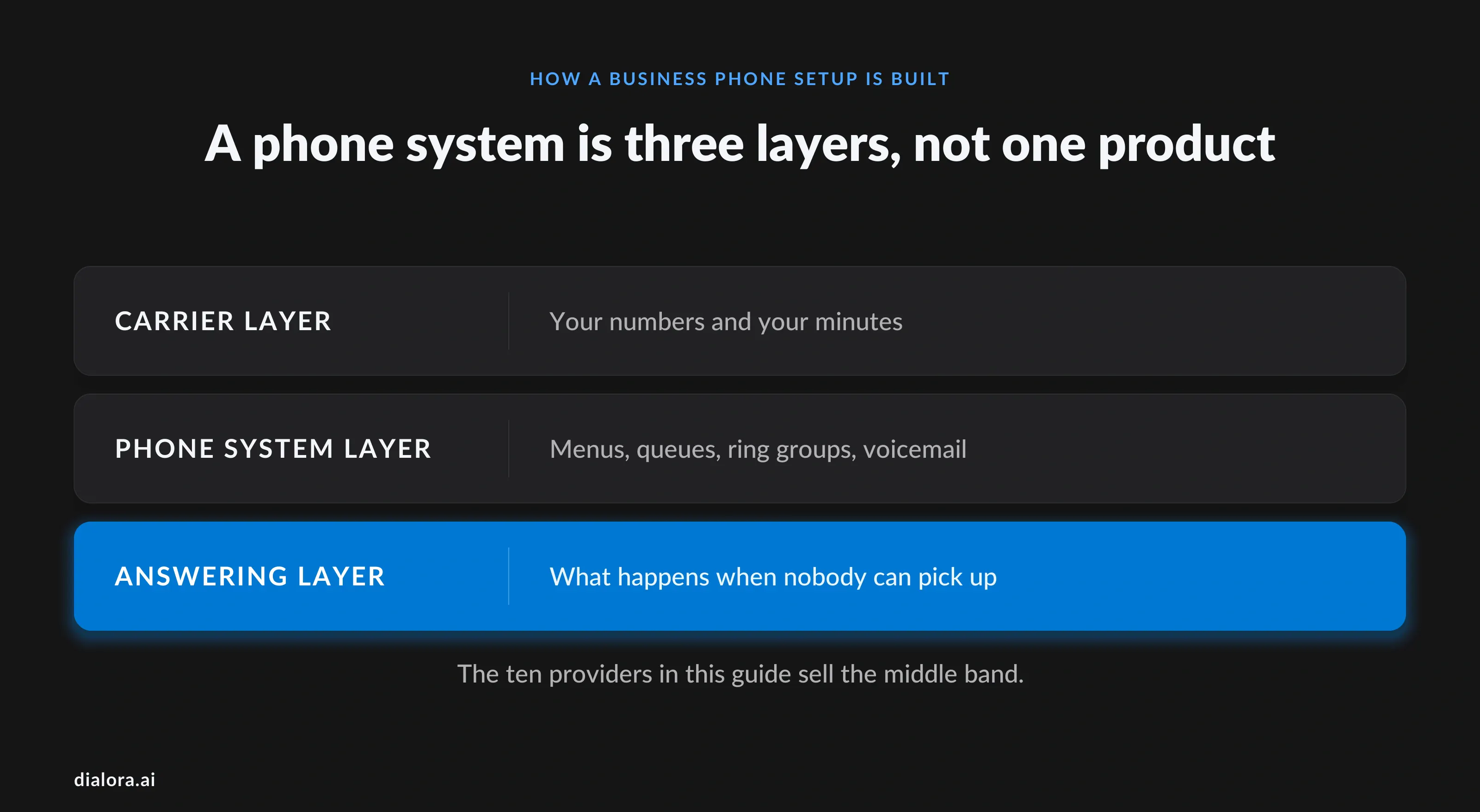
- The carrier layer: numbers and minutes
Someone has to own your numbers and carry your calls to the outside world. Every provider here either does that itself or wholesales it from a carrier. It is the least differentiated layer and the one with the most fine print: international per-minute rates, toll-free caps, and the regulatory recovery fees that appear on the invoice and never on the pricing page.
- The phone system layer: what happens while a human is available
This is the product the ten providers below actually sell. Ring groups, IVR menus, call queues, voicemail to email, business-hours rules, recording, analytics, a screen pop from the CRM. All of it assumes a person will eventually pick up. When nobody can, its job ends at voicemail and, on newer plans, a text-back.
- The answering layer: what happens when nobody can
Nearly every vendor now offers something called an AI receptionist. Most greet the caller and route by spoken intent instead of a keypad. Some take a message. Very few complete the task the caller rang about, and almost none does it inside the base price. Keep this layer separate in your head and the pricing pages get much easier to read.
What actually separates cloud telephony providers in 2026?
Not features. On the base tier, parity across the ten is close to total: unlimited domestic calling, an auto attendant, ring groups, voicemail transcription, a mobile app. Four things separate them once the invoice arrives.
- How the price is structured
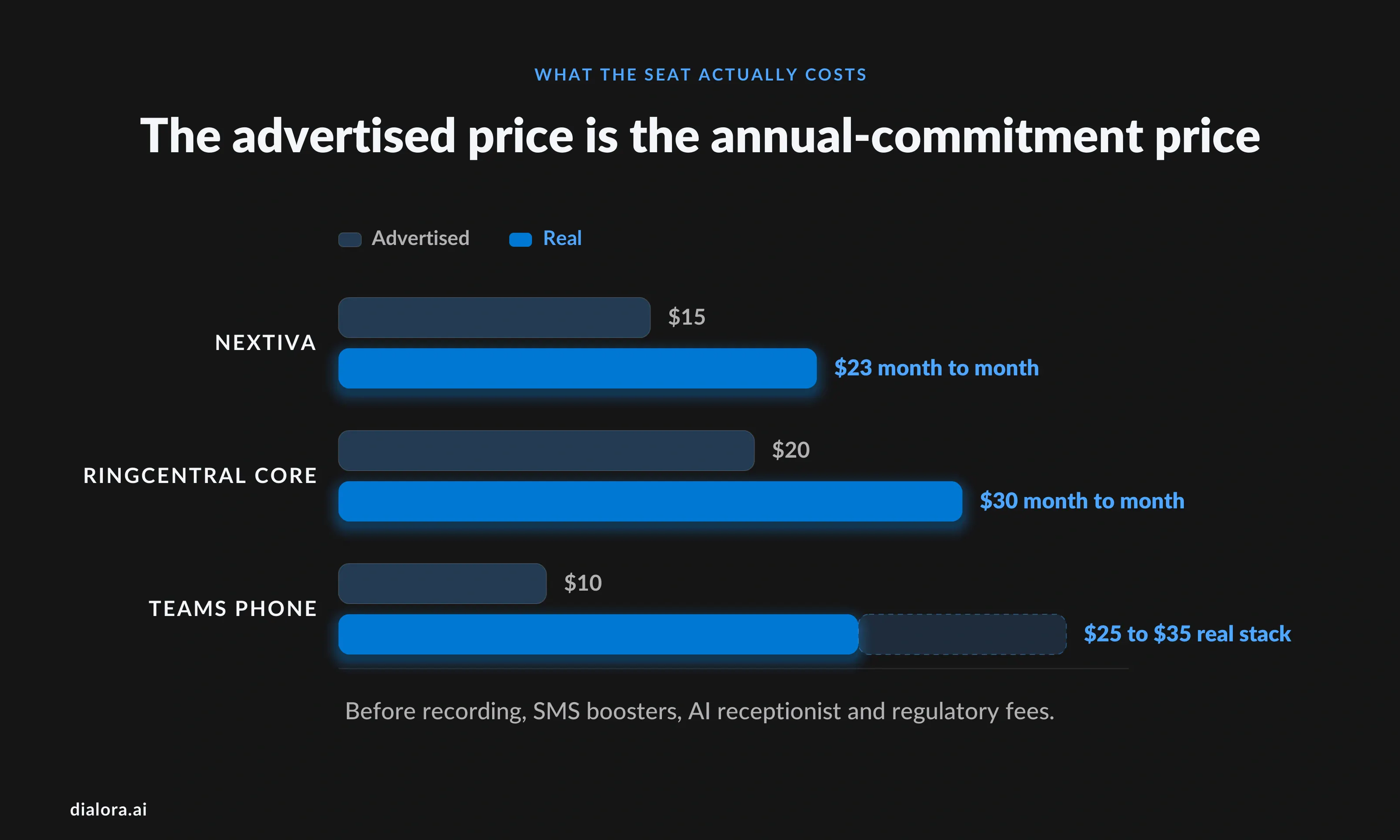
The headline number is almost always the annual-commitment rate. Nextiva's advertised $15 per user is annual only; month-to-month it is $23. RingCentral's $20 Core seat is $30 monthly. Vonage's 30% discount needs a 12-month contract. None of this is hidden, exactly. It is just not on the first screen.
- Whether AI is bundled or billed
RingCentral's AI Receptionist is a paid add-on on every RingEX tier including Ultra, from $39 a month for roughly 100 minutes. Dialpad includes live transcription and call summaries in its $15 base plan and has no AI receptionist at all. Zoom Phone gives you AI Companion notes and nothing that answers a call. "AI" on a pricing page tells you almost nothing about which layer it belongs to.
- How deep the CRM integration goes
A native integration logs the call, the recording and the outcome against the contact record without anyone touching a keyboard. A connector logs that a call happened. Both appear as "integrates with HubSpot" in the grid. Ask which one you get on the tier you can afford; Vonage's Salesforce integration, for instance, is a $4.99 monthly add-on.
What it takes to leave
Nobody reads exit terms at signup. FCC rules require simple ports to complete within one business day, but a business number with several lines is usually a "non-simple" port on a four-business-day interval, and first submissions are often rejected on address or account mismatches, adding three to ten days each time. Your old provider cannot refuse the port even if you owe them money, though it can bill early termination fees. In 2022 the FTC ordered Vonage to refund $100 million to customers over its cancellation practices. Read that section of the contract first.
One market note before the list. Published size figures for this category disagree by a factor of four or five depending on definition, so we will not lead with one. The number worth knowing comes from Gartner, whose July 2026 Magic Quadrant cut the share of organisations it expects to run calling through their collaboration suite by 2028 from 90% to 70%. The move to Teams and Zoom as the phone system is real, and slower than the vendors say.
Which are the best cloud phone systems for business in 2026?
The right one depends on where your calls come from and how much administration you will tolerate. Compare inside a group, and treat the table as a shortlist rather than a ranking. Prices are published starting rates on annual billing as of August 2026; where a vendor has pulled public pricing, we say so.
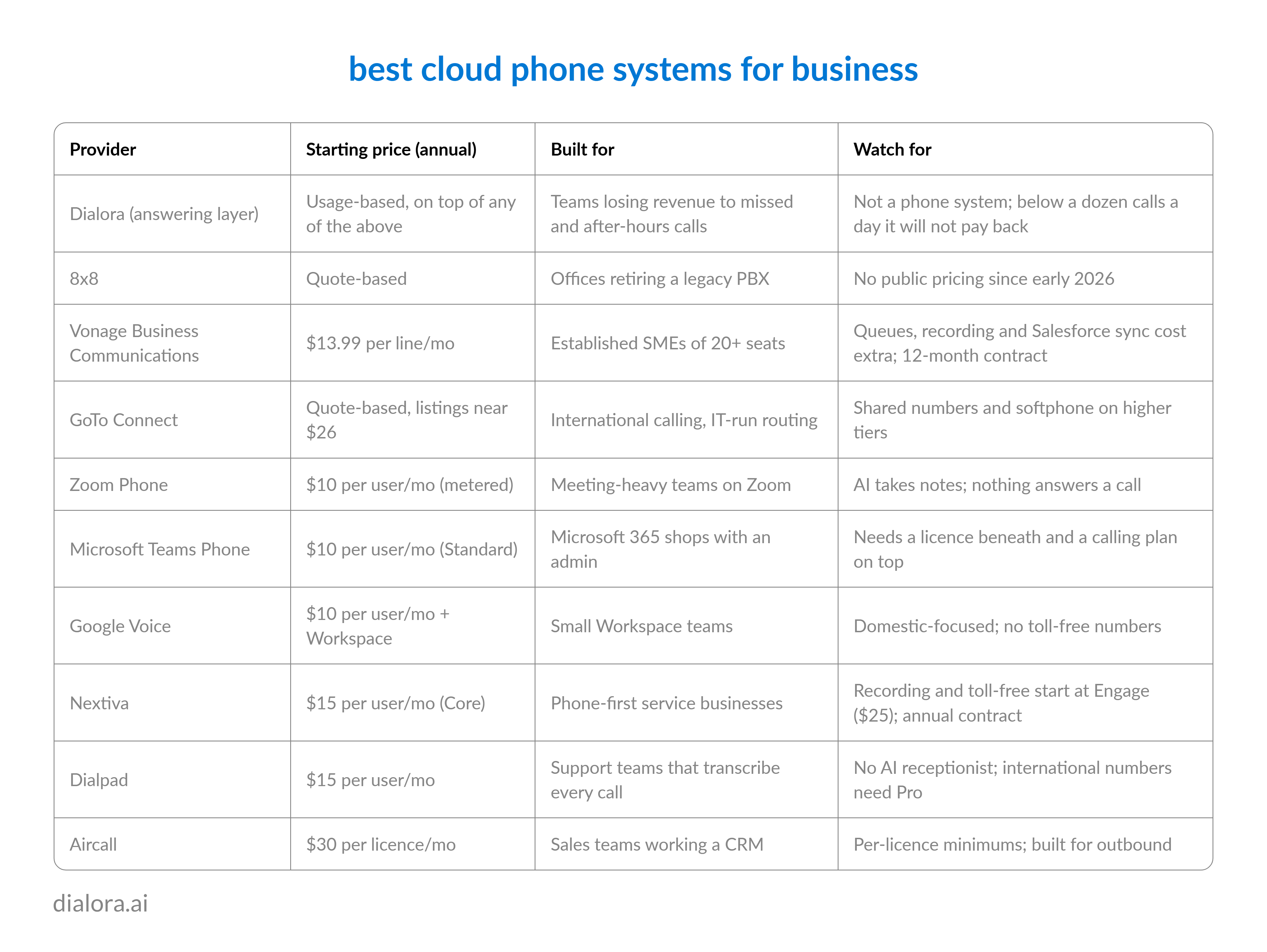
At the moment the last device stops ringing. Everything before that is routing. Everything after it is voicemail, a text-back, or software that can hold the conversation itself.
The phrase "AI receptionist" now appears on most of the pricing pages above, and it means different things. Usually it means natural-language routing: the caller says "billing" instead of pressing 2. Very few of these products complete a multi-step task, and none of the ten includes that in the base price. Buyers see the checkbox and assume they have bought an answering layer, then discover in week six they have bought a menu with a nicer voice.
1. Dialora AI
- What it does. AI voice agents that answer on the first ring at any hour, hold a real conversation rather than a menu, and complete the task the caller rang about: booking the job, changing the appointment, giving the order status, qualifying the lead. It takes whatever your phone system forwards to it, every call, after-hours only, or overflows after a set number of rings, so it sits on top of any of the ten rather than replacing them.
- The differentiator. The handoff. When a caller asks for a person, the transfer arrives with the transcript, the intent and every detail already collected, so nobody starts the story twice. Our conversational AI statistics guide covers why that matters: only about 15% of consumers currently get a smooth AI-to-human handoff, and it is the biggest single reason people still prefer a person.
- Right fit. Businesses where volume, evenings, weekends or missed calls are costing revenue, and the top ten call reasons repeat.
- Wrong fit. Mostly typed chat support, or low-volume enterprise sales where the founder should be dialling personally.
And the honest complication, because we would rather say it than have you find it. If you are three people taking fifteen calls a day and answering fourteen, the two-layer argument does not apply to you. One bundled tool with a mediocre AI receptionist beats two vendors and an integration.
Unified communications suites
For teams that want voice, video and messaging from one vendor and are prepared to administer it.
2. RingCentral (RingEX)
- What it does. Voice, video, team messaging and SMS in one platform, with the most mature admin console and multi-site management here. Core from $20 per user on annual billing, Advanced $25, Ultra $35.
- Watch for. Nearly everything labelled AI is billed separately: the AI Receptionist from $39 a month with about 100 minutes, conversation intelligence from $60 per user. Core caps SMS at 25 messages per user.
- Right fit. Mid-size and multi-location businesses that want one contract for calling and meetings, with someone to run it.
- Wrong fit. Teams that assumed the AI was included, or that text customers heavily.
3. 8x8
- What it does. Unified communications plus a contact centre, with the office plumbing others dropped: paging, intercom, fax, desk-phone support.
- Watch for. No public pricing since early 2026, no published tier comparison, and reviewers describe setup as involved.
- Right fit. Offices retiring a legacy PBX that still need paging and hardware handsets.
- Wrong fit. Small teams that want to know the price before the sales call.
4. Vonage Business Communications
- What it does. A long-standing cloud voice platform with three tiers: Mobile at $13.99, Premium at $20.99, Advanced at $27.99 per line on annual billing, roughly 30% more month to month.
- Watch for. Basics arrive as add-ons. Call queues are $14.99 a month, automatic recording $49.99, and the discount needs a 12-month contract. Read the cancellation terms with the FTC's 2022 order in mind.
- Right fit. Established SMEs of 20-plus seats that want a known name and may later use Vonage's APIs.
- Wrong fit. Anyone who needs queues and recording inside the sticker price.
5. GoTo Connect
- What it does. Voice, video and messaging with deep routing controls, multi-level auto attendants, and advertised calling to 50-plus countries on the base plan.
- Watch for. Pricing is not consistently public. Third-party listings put the phone-system tier near $26 per user, but expect a quote. Shared numbers and the softphone sit on higher tiers.
- Right fit. IT and support teams calling internationally who want a visual routing editor.
- Wrong fit. Small collaborative teams that need shared numbers on day one.
Phone systems bundled into a suite you already pay for
Cheap if you are already inside the suite. Expensive to discover the limits.
6. Zoom Phone
- What it does. The calling arm of Zoom Workplace. Metered US and Canada calling from $10 per user, unlimited from about $15, with recording and the ability to lift a call into a Zoom meeting.
- Watch for. AI Companion takes notes; nothing answers a call. Desk phones and several integrations need a sales conversation.
- Right fit. Meeting-heavy companies already standardised on Zoom that make relatively few external calls.
- Wrong fit. Inbound-heavy customer lines.
7. Microsoft Teams Phone
- What it does. Cloud PBX inside Teams. Standard is $10 per user, up from $8 in 2025, and gives you voicemail, auto attendants and call queues.
- Watch for. Standard alone cannot call outside your organisation. You need a Microsoft 365 or Teams licence underneath and a calling plan on top, $13 to $34 per user, which is why analysts put the real stack at $25 to $35 a seat.
- Right fit. Microsoft shops with an admin, especially where most calling is internal.
- Wrong fit. Small customer-facing teams without an M365 administrator.
8. Google Voice
- What it does. Starter at $10, Standard at $20, Premier at $30 per user, on top of a Google Workspace subscription. Ring groups, a multi-level auto attendant from Standard up, and the simplest admin experience here.
- Watch for. Domestic-focused, thin on integrations beyond Google, and no toll-free numbers.
- Right fit. Workspace-based small teams that want a business number and basic routing without running a project.
- Wrong fit. Anyone likely to outgrow it inside a year; leaving means porting like any other move.
SMB and sales-first phone systems
Built for teams that live on the phone with customers rather than colleagues.
9. Nextiva
- What it does. Restructured to three plans in early 2026: Core at $15 per user annually ($23 monthly), Engage at $25, Scale at $75. Unlimited calling, video and team chat from Core; recording, a toll-free number and reporting from Engage.
- Watch for. Most customer-facing teams end up on Engage, and the $15 requires an annual contract. The contact centre is a separate per-agent product from $75.
- Right fit. Service businesses, clinics and professional firms that want 24/7 support and a phone-first product.
- Wrong fit. Buyers budgeting on the $15 headline.
10.Dialpad
- What it does. Voice with proprietary AI on every plan: real-time transcription, call summaries and voicemail transcripts on the $15 Standard tier, Pro at $25, Enterprise by quote. Numbers in 50-plus countries.
- Watch for. Little inbound automation. No AI receptionist, no auto-replies, and international numbers need Pro.
- Right fit. Support teams that want every call transcribed and coached.
- Wrong fit. Teams that want the phone answered when they cannot.
11.Aircall
- What it does. A calling platform built for sales teams: automatic call distribution, power dialling, and CRM sync that puts contact context in the phone window. Essentials listed at $30 per licence, Professional at $50.
- Watch for. Priced per licence with a minimum seat count, and built for outbound.
- Right fit. SDR and account teams working lead lists out of a CRM.
- Wrong fit. Solo operators and inbound-heavy service desks.
How do you choose a cloud phone system you will not regret in 18 months?
Work backwards from your calls, not forwards from the demo.
- Pull last quarter's call log first. Where calls come from, when they arrive and how many were missed decides which group above you are shopping in, before any vendor conversation.
- Price the seat you will actually be on. Add the AI receptionist, the SMS booster and the recording add-on, then use the monthly rate if you will not sign for a year. Compare that number, never the headline.
- Read the exit before the entry. Contract length, early termination fees, and whether porting out is free. If cancellation means a call to a retention desk, budget the afternoon.
- Test the after-hours path yourself. During the trial, call your own number at 7pm. Whatever happens to you happens to your customers.
- Ask which integration you are getting. Native two-way sync or a connector, and on which tier.
Conclusion
Ten good phone systems, and the plumbing job still went to whoever answered first.
Pick the group by where your calls come from, pick the vendor by the invoice you will actually pay, and treat the AI receptionist checkbox as routing until a vendor proves otherwise on your own line at 7pm. Then decide, separately, whether the calls nobody can pick up are worth putting software on.
Dialora builds AI voice agents that answer every call your phone system cannot, complete the routine ones, and pass the rest to your team with the full context attached. If missed calls are costing you jobs, we would rather show you on your own line than in a deck. Test Dialora on Your Calls
Frequently asked questions
What is the best cloud telephony service for a small business in 2026?
It depends on where you already live. Google Workspace teams usually do best on Google Voice, Microsoft shops on Teams Phone once the licence stack is understood, phone-first service businesses on Nextiva or Dialpad, and CRM-driven sales teams on Aircall. If the real problem is calls going unanswered after hours, none of those fixes it alone.
How much does a cloud phone system cost per user?
Published tiers run from $10 to $35 per user per month on annual billing. A customer-facing team should budget $25 to $40 a seat once recording, an AI receptionist, SMS allowances and regulatory fees are added, and about a third more if it pays monthly.
Can I keep my business phone number when I switch cloud telephony providers?
Yes. Under FCC rules a simple port must complete within one business day and a non-simple port, which most multi-line business numbers are, within four. Your old provider cannot refuse the port even if you owe money, though it can bill early termination fees. Do not cancel the old service until the port completes, and expect a rejected first submission to add three to ten days.
What is the difference between a cloud phone system and an AI voice agent?
A cloud phone system routes calls to people: menus, queues, ring groups, voicemail. An AI voice agent answers the call itself, holds the conversation, completes routine tasks such as booking or order status, and transfers to a person with the context attached. Different layers, and most businesses that need the second keep the first.
Do cloud phone systems include an AI receptionist?
Some do, usually as a paid add-on and usually as routing rather than task completion. RingCentral's is from $39 a month on top of the seat, Dialpad and Zoom Phone do not offer one, and Nextiva and Vonage sell AI on higher tiers or as extras. Ask what it can finish without a human, then test it on your own number.
Which cloud voice platform is best for a team already on Microsoft 365 or Google Workspace?
Teams Phone and Google Voice respectively, with one caveat each. Teams Phone Standard cannot dial externally without a calling plan, so the real cost is $25 to $35 a seat, and Google Voice tops out quickly for teams that need toll-free numbers or deeper integrations. Both suit internal-heavy calling and run thin on a busy customer line.