TL;DR
- You may already own one. Every business phone system here ships a multi-level IVR in its base plan. If you pay for RingCentral, Nextiva, Dialpad or Zoom Phone, buying separate IVR software is paying twice for the same IVR phone system.
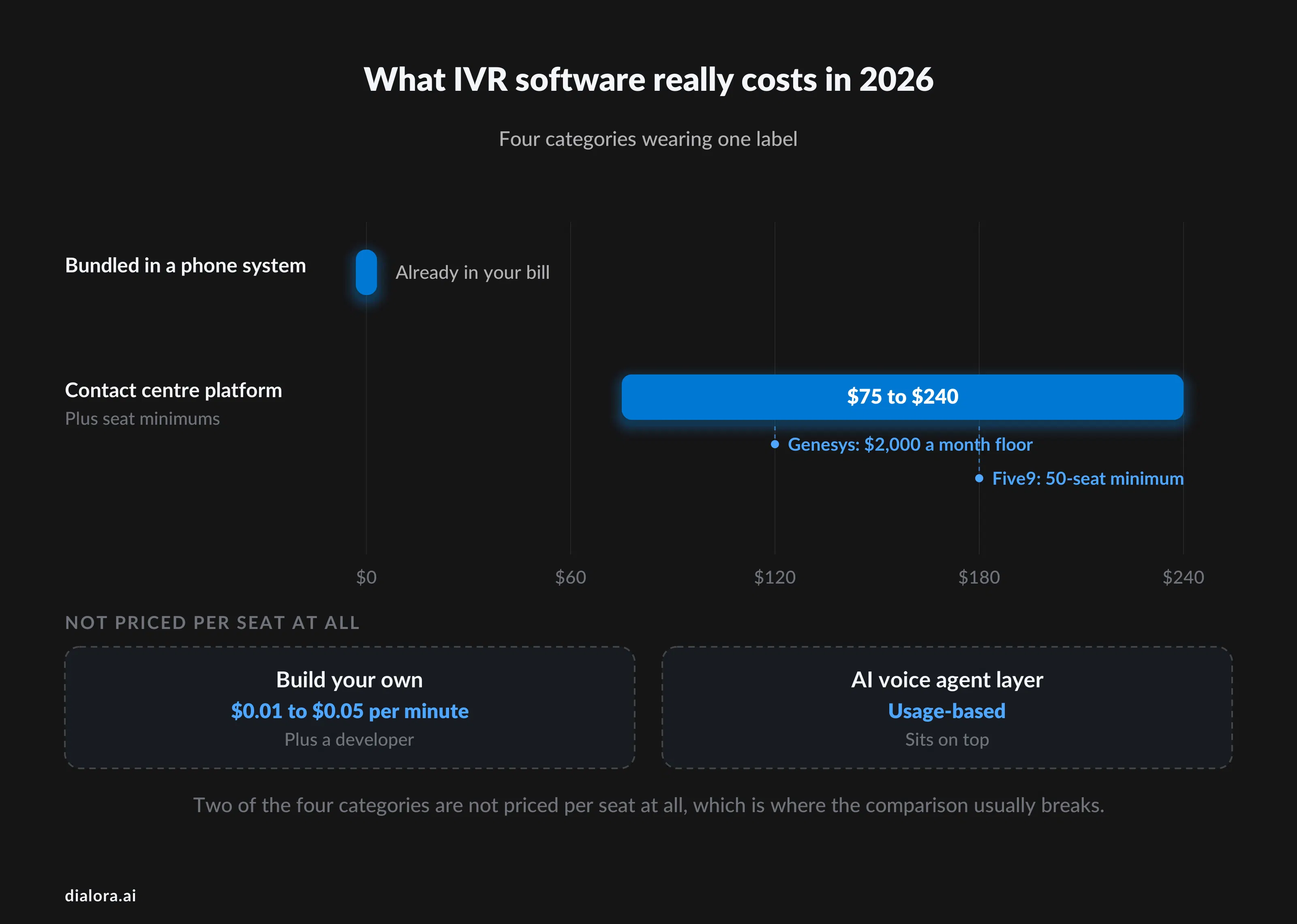
- Price ranges are wide because the categories are different. A bundled IVR system costs nothing extra. A contact centre platform starts at $75 to $119 per agent per month with seat minimums. A build-your-own stack is pennies per minute plus a developer.
- Menu depth is the thing to control. Keep it to one level and five options where you can. Callers who cannot find themselves in the list press zero or hang up.
- The honest complication: IVR is a menu, and nobody has ever enjoyed one. If your top call reasons repeat, an AI voice agent that answers in plain language usually beats a better-designed tree.
- Compare inside a group, never across. Twilio and Genesys are not competitors, and a price comparison between those two IVR systems is meaningless.
What is an IVR system, and what does IVR stand for?
IVR stands for interactive voice response.
It is the automated voice that answers a business number, plays a menu, and routes the caller based on what they press or say. Press 1 for sales, press 2 for support: that is an IVR system, and the basic mechanic has not changed since touch-tone menus arrived in the 1970s.
What has changed is everything behind the menu. A modern IVR platform can look up the caller's record before it speaks, recognise a spoken sentence instead of a keypress, take a card payment without an agent hearing the number, and hand the whole context to a person when the automation runs out of road.
What is IVR in a call center, and what does IVR stand for in call center use?
The front door. IVR meaning in call center terms is the layer that runs before a call reaches a queue: it identifies why the person is calling, sometimes verifies them against a CRM record, and sends them to the right team. It also carries self-service, from balance checks to order status to payments.
Anything the caller finishes without an agent is a contained call, and containment is the number the whole category is measured on. A well-tuned IVR call flow on a narrow intent, such as checking an order or resetting a password, routinely contains most of the volume. The same flow applied to a billing dispute contains almost none, because the caller wants a decision rather than information.
What is the difference between IVR, auto attendant and an AI voice agent?
Three different things, sold with overlapping words.
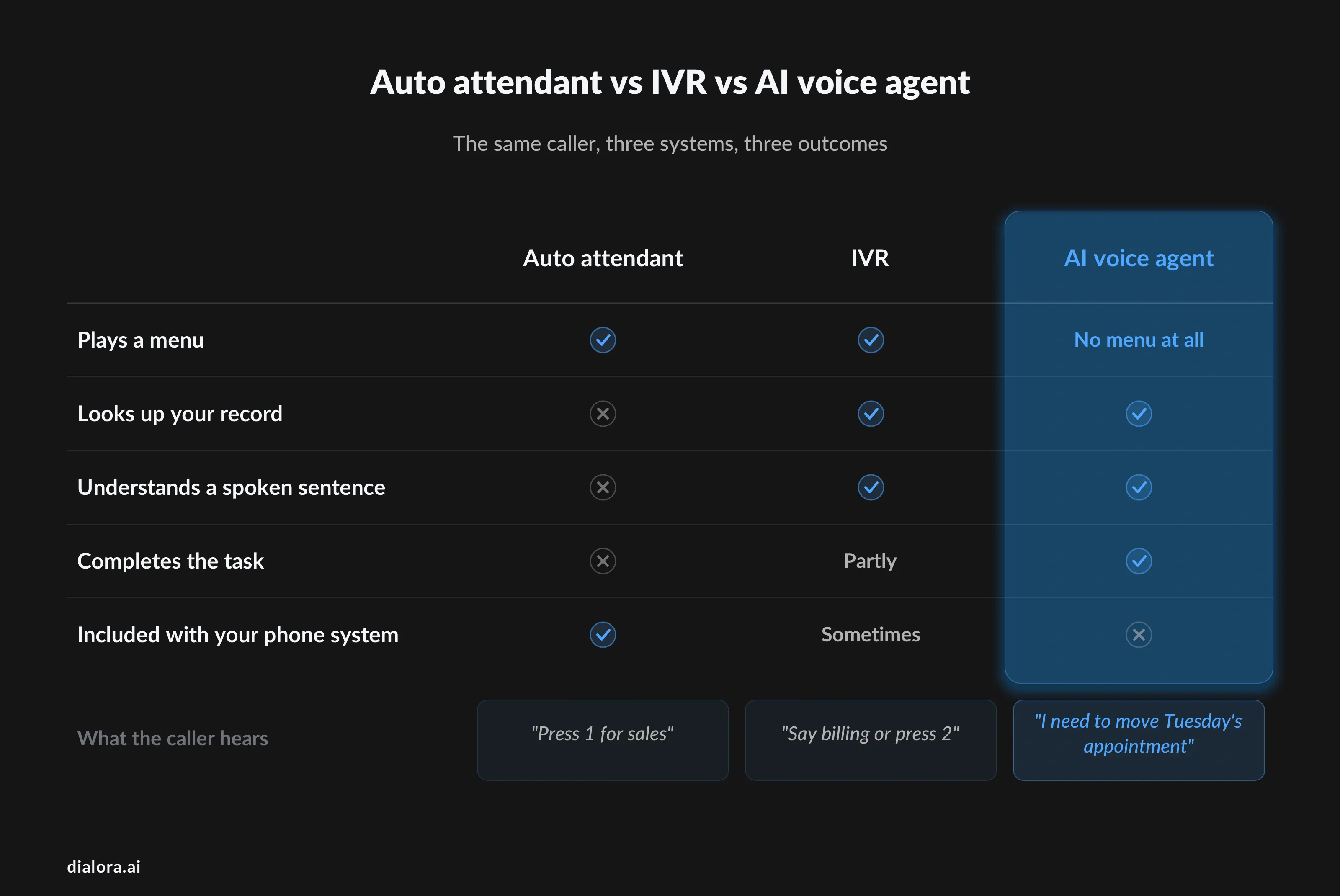
- Auto attendant. A greeting and a simple menu, usually one or two levels deep. Every cloud phone system includes one. No CRM lookup, no self-service, no speech recognition. This is what most small businesses actually need.
- IVR. The same idea with depth: database lookups, speech recognition, payment handling, conditional routing on time of day or caller ID. This is what interactive voice response software adds over an auto attendant, and what most hosted IVR solutions actually sell.
- AI voice agent. No menu at all. The caller says what they want in a sentence and the system handles it, or transfers with the context attached. It replaces the tree rather than improving it.
Most searches for IVR solutions are really after one of these three. Working out which one you need removes about two thirds of this list before you compare a single feature, and it is the difference between shopping for automated IVR menus and shopping for something that answers.
What are the real benefits of IVR service?
Four things, and it is worth being precise because vendor pages inflate all of them.
- Calls reach the right person first time. Fewer transfers means fewer repeated explanations, which is the single most common complaint about phone support.
- Simple requests never touch an agent. Order status, opening hours, balance checks and appointment confirmations are answerable from a database. Every one that self-serves is an agent minute back.
- The line is answered outside office hours. Even a menu that only takes a message beats a ring-out, and most cloud IVR solutions cost nothing extra to run at 2am.
- You get data you did not have. Which option callers choose, where they abandon, and which prompt precedes a transfer are all measurable once a menu exists.
The benefit vendors oversell is cost reduction. A menu does not reduce headcount on its own. It moves work, and only the intents that genuinely self-serve produce savings.
How much does IVR software cost in 2026?
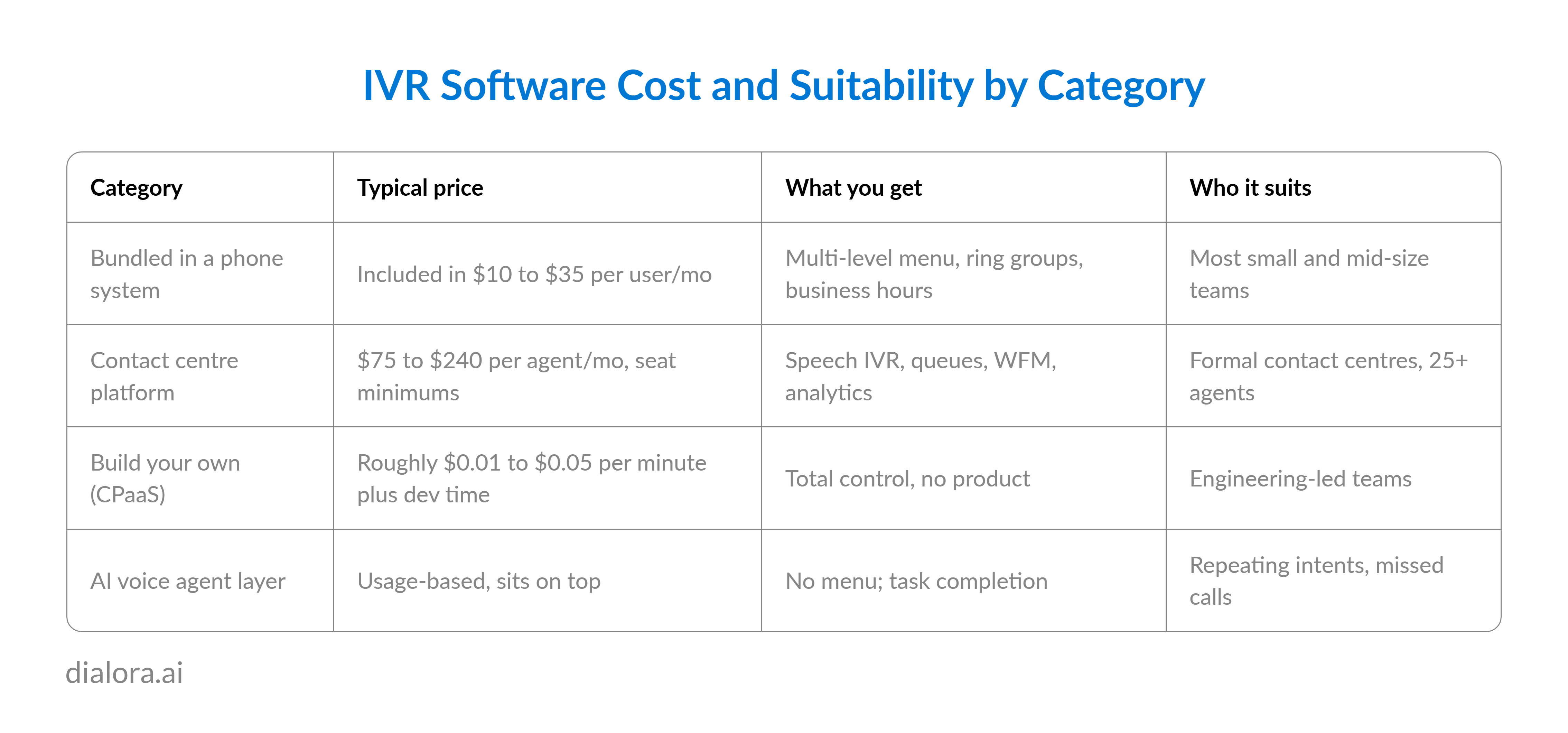
It depends on which category you buy from, which is why published figures for interactive voice response systems range from zero to $240 per seat.
Three cost notes that catch buyers out.
Contact centre platforms carry minimums that do not appear in the seat price. Genesys Cloud CX has a $2,000 monthly floor, so a ten-agent team pays for roughly 27 seats whether it uses them or not. Five9 publishes a 50-seat minimum on top of a per-user rate. Talkdesk defaults to three-year terms.
On the build-your-own side, the per-minute rate is a small number. Amazon Connect bills per minute with no seat licences and Twilio publishes its voice rates openly, but neither includes conversation design, reporting or the engineer who maintains the flow when a policy changes.
And in the bundled group, the advertised rate is nearly always the annual-contract rate. Nextiva's $15 is $23 month to month. RingCentral's $20 Core seat is $30 billed monthly.
15 best IVR service providers in 2026?
Best 15 IVR service providers, grouped by what they actually are. Compare inside a group. Prices are published as starting rates as of 2026 and move quarterly.
AI voice agents that replace the menu
Not IVR. These answer in plain language and complete the task, then hand over with context. Worth comparing if your top call reasons repeat.
1. Dialora
- What it does. AI voice agents that answer on the first ring at any hour, hold a real conversation instead of a menu, and finish the job the caller rang about: AI IVR, booking, Call Transfer, post-call analysis, lead qualification. It takes whatever your phone system forwards to it, whether that is every call, after-hours only, or overflow after a set number of rings, so it sits on top of anything in Group 1 rather than replacing it.
- The differentiator. The handoff. When the caller asks for a person, the transfer carries the transcript, the intent and everything collected, so nobody repeats the story. Our conversational AI statistics guide covers why that matters more than the automation rate itself.
- Best for. Businesses losing revenue to missed, after-hours or overflow calls where the top ten call reasons repeat.
- Wrong fit. Typed chat support, or fewer than about a dozen calls a day, where a person answering is still better and cheaper.
2. Bland AI
- What it does. Developer-oriented voice platform with conversational pathways, letting you draw the call as a graph of nodes and conditions, plus self-hosting for teams with data residency requirements.
- Watch for. Someone on your side designs the pathway, tests every branch and maintains it as policy changes. That is a real ongoing role, not a setup task.
- Best for. Engineering teams wanting fine control, and regulated organisations that need to host it themselves.
- Wrong fit. Operations teams without engineering support.
3. Vapi
- What it does. Voice AI infrastructure with the speech-to-text provider, language model and voice all left open, and tool calling mid-conversation so the agent can query a system while the caller waits.
- Watch for. Maximum flexibility, maximum ownership. Model selection, prompts, testing and monitoring sit with your team, and swapping models is a benefit only if someone is watching quality.
- Best for. Engineering-led teams with requirements an off-the-shelf platform cannot meet.
- Wrong fit. Anyone who needs predictable behaviour on day one.
IVR included with your phone system
For most businesses this is the answer, because these cloud IVR solutions are already in the price of a phone service you need anyway. All five give you a visual builder, multi-level menus, business-hours rules and ring groups without a separate purchase.
4. RingCentral
- What it does. Drag-and-drop multi-level IVR inside RingEX, with visual flow editing, multi-site rules and the most mature admin console in this group. You can build separate trees per location, route on time of day and holiday schedules, and push changes live without a ticket. Core starts at $20 per user per month on annual billing, Advanced $25, Ultra $35.
- IVR specifics. Unlimited menu depth, dial-by-name directory, prompt recording or text-to-speech in dozens of languages, and conditional routing on caller ID. Reporting shows menu selections and abandonment per node, which is the data most teams need and few use.
- Watch for. Nearly everything labelled AI is billed separately, including the AI Receptionist from $39 a month for roughly 100 minutes. Core caps SMS at 25 messages per user. Advanced analytics sit on higher tiers.
- Best for. Multi-location businesses that want one contract for calling, meetings and routing, with an administrator who owns it.
- Wrong fit. Teams that assumed the AI features were included in the seat price.
5. Nextiva
- What it does. Speech-enabled routing and multi-level menus with a built-in CRM view, so the agent sees caller history on pickup rather than alt-tabbing to find it. Core runs $15 per user per month annually and $23 monthly, Engage $25, Scale $75.
- IVR specifics. Visual call-flow builder, skills-based routing, business-hours and holiday rules, and voicemail-to-email on every tier. Call recording and reporting, which most IVR services buyers assume are standard, start at Engage.
- Watch for. Most customer-facing teams end up on Engage rather than Core, so budget $25 rather than $15. The advertised rate requires an annual contract. The contact centre is a separate per-agent product.
- Best for. Phone-first service businesses, clinics and professional firms that want a human at the other end of support.
- Wrong fit. Buyers budgeting from the headline price without pricing the tier they will actually be on.
6. Dialpad
- What it does. Natural-language routing rather than keypad menus, so a caller can say "I need to reschedule" instead of hunting through options. Live transcription, call summaries and voicemail transcripts are included on the $15 Standard plan rather than sold as AI add-ons, which is unusual in this group.
- IVR specifics. Visual routing, speech recognition on the menu, real-time transcription visible to the agent while the call is live, and automatic post-call summaries that cut after-call work.
- Watch for. Little inbound automation beyond routing. There is no true AI receptionist that completes tasks, and international numbers need the $25 Pro tier.
- Best for. Support teams that want every call transcribed and coached without buying a separate analytics product.
- Wrong fit. Teams that need the phone answered and the job finished when nobody is free.
7. Aircall
- What it does. A quick visual IVR builder aimed at sales teams, with automatic call distribution, power dialling and CRM sync that puts contact context in the phone window before the rep says hello. Essentials from $30 per licence, Professional $50.
- IVR specifics. Multi-level menus, business hours, call queuing with position announcements, and routing rules by team or skill. Setup is genuinely a few minutes rather than a project.
- Watch for. Priced per licence with a minimum seat count, and the platform is built around outbound rather than deep self-service. International rates add up quickly.
- Best for. SDR and account teams working lead lists out of a CRM.
- Wrong fit. Inbound-heavy service desks and solo operators.
8. Zoom Phone
- What it does. Auto attendant and multi-level IVR inside Zoom Workplace, from $10 per user metered and around $15 unlimited, with the ability to lift a call into a meeting mid-conversation.
- IVR specifics. Visual auto-attendant designer, holiday and business-hours routing, voicemail transcription and call recording. Adequate rather than deep, which matches the price.
- Watch for. AI Companion writes notes; nothing answers a call. Desk phones and several integrations need a sales conversation.
- Best for. Meeting-heavy companies already standardised on Zoom with modest external call volume.
- Wrong fit. High-volume inbound customer lines.
Contact centre platforms
Cloud based IVR solutions for formal contact centres with queues, workforce management and compliance requirements. All four price per agent with minimums, and all four are overkill below roughly 25 seats.
9. Genesys Cloud CX
- What it does. Speech-enabled IVR, predictive routing, native voice bots and interaction analytics in one platform, with more than 600 integrations. CX 1 is $75 per user per month annually, CX 2 $115, CX 3 $155, CX 4 $240.
- IVR specifics. Architect, its flow designer, handles complex conditional logic, data dips into external systems, and natural-language bots on the same canvas as the menu. Journey data lets you see what the caller did on the website before they rang.
- Watch for. The $2,000 monthly minimum, telephony billed separately from seats, an AI Experience add-on on top, and implementation costs that scale with complexity.
- Best for. Mid-market and enterprise centres that need deep analytics and can staff the implementation.
- Wrong fit. Teams under 25 agents, who pay the floor regardless.
10. NICE CXone Mpower
- What it does. Strong speech recognition and intent handling on one cloud IVR platform, with the compliance posture regulated industries ask for and workforce management built in rather than bolted on.
- IVR specifics. Conversational IVR with intent models, screen pops carrying caller context, and quality management that scores the automated portion of the call as well as the human portion.
- Watch for. The tier structure is hard to read, and the Ultimate suite runs about $249 per agent per month plus a per-AI-session fee. Smaller teams find the admin surface daunting.
- Best for. Regulated contact centres in finance, healthcare and utilities where the audit trail decides the purchase.
- Wrong fit. Anyone who wants to configure it without a specialist.
11. Five9
- What it does. Cloud contact centre with intelligent virtual agents, ACD and outbound dialling in one licence, aimed at operations that run inbound and outbound side by side. Published entry runs about $119 to $159 per user per month depending on tier.
- IVR specifics. Studio-based flow design, IVAs that handle routine intents conversationally, and speech analytics that flag sentiment shifts during the call.
- Watch for. A 50-seat minimum, and speech-enabled IVR is an add-on rather than part of the base licence on lower tiers. Higher tiers are quote-based.
- Best for. Outbound-heavy operations that need campaign dialling alongside inbound routing.
- Wrong fit. Teams under 50 agents, who cannot buy it at all.
12. Talkdesk
- What it does. A friendlier IVR designer than its enterprise peers, with conversational routing, virtual agents and automatic post-call summaries. Plans run roughly $85 to $225 per user, with industry editions for healthcare, financial services and retail.
- IVR specifics. Studio flow builder that non-engineers can actually use, generative summaries that cut after-call work, and prebuilt vertical flows that shorten deployment.
- Watch for. Three-year contracts are the default term, so a 50-agent signature commits real money before month six. True omnichannel sits at the top tier.
- Best for. Mid-market teams that want AI in the workflow without a heavy admin surface.
- Wrong fit. Fast-growing teams that will renegotiate seat counts every quarter.
Build your own
IVR tools rather than products. Cheapest per minute, most expensive in engineering time. Choose this group only if you can name the person who will maintain the flow in eighteen months.
13. Twilio
- What it does. Programmable Voice plus Studio, a drag-and-drop flow editor, so you can build any IVR call flow you can describe and wire it to any system you own. Usage-based pricing is published openly, roughly a cent per minute in the US plus number rental.
- IVR specifics. Speech recognition, text-to-speech in many languages, conditional branching, function calls out to your own code mid-flow, and full call-detail records you can pipe anywhere.
- Watch for. No CRM, no workforce management, no reporting layer. You are buying telephony primitives and building the product yourself.
- Best for. Product teams embed voice in software they already own.
- Wrong fit. Operations teams who need something live this month.
14. Amazon Connect
- What it does. AWS's contact centre service with visual contact flows, Lex-powered speech IVR and Lambda for logic. Pay per minute with no seat licences, which is the cheapest way to run a high-volume IVR call if you have engineers.
- IVR specifics. Contact Flow designer, natural-language understanding through Lex, Contact Lens for post-call analytics, and native access to every other AWS service for lookups and storage.
- Watch for. Conversation design, fulfilment code and observability are all yours to build. Costs are usage-based and genuinely hard to forecast before launch.
- Best for. Engineering teams already on AWS, particularly those modernising a legacy IVR.
- Wrong fit. Business teams expecting a configurable application rather than a toolkit.
15. Plum Voice
- What it does. Enterprise voice automation with a low-code builder and PCI-compliant voice payments that keep agents out of scope entirely, which is the reason most customers choose it.
- IVR specifics. Drag-and-drop designer with API hooks, secure payment capture where card digits never reach a recording, and prebuilt templates for common finance and healthcare flows.
- Watch for. No public pricing, so procurement takes longer, and deep integrations still need developer time.
- Best for. Finance and healthcare teams whose main requirement is taking payments over the phone safely.
- Wrong fit. Anyone comparing on price without a compliance driver.
If you operate mainly in India or Southeast Asia, add Exotel, MyOperator and CallHippo to the shortlist. Regional carrier relationships, local-language menus and rupee billing matter more than feature depth in those markets, and the global vendors above rarely win on any of the three.
How do you choose an IVR platform without regretting it?
Work backwards from your calls, not forwards from the demo. Five checks, in order.
- Check what you already pay for. Log into your IVR phone system and look for the auto attendant or IVR section. If it is there, the honest first step is to configure it properly before buying anything new.
- Pull your top ten call reasons. If three reasons cover most of your volume, you need three menu options, not eleven. If those three repeat and are answerable from a system you own, an AI agent will beat a menu.
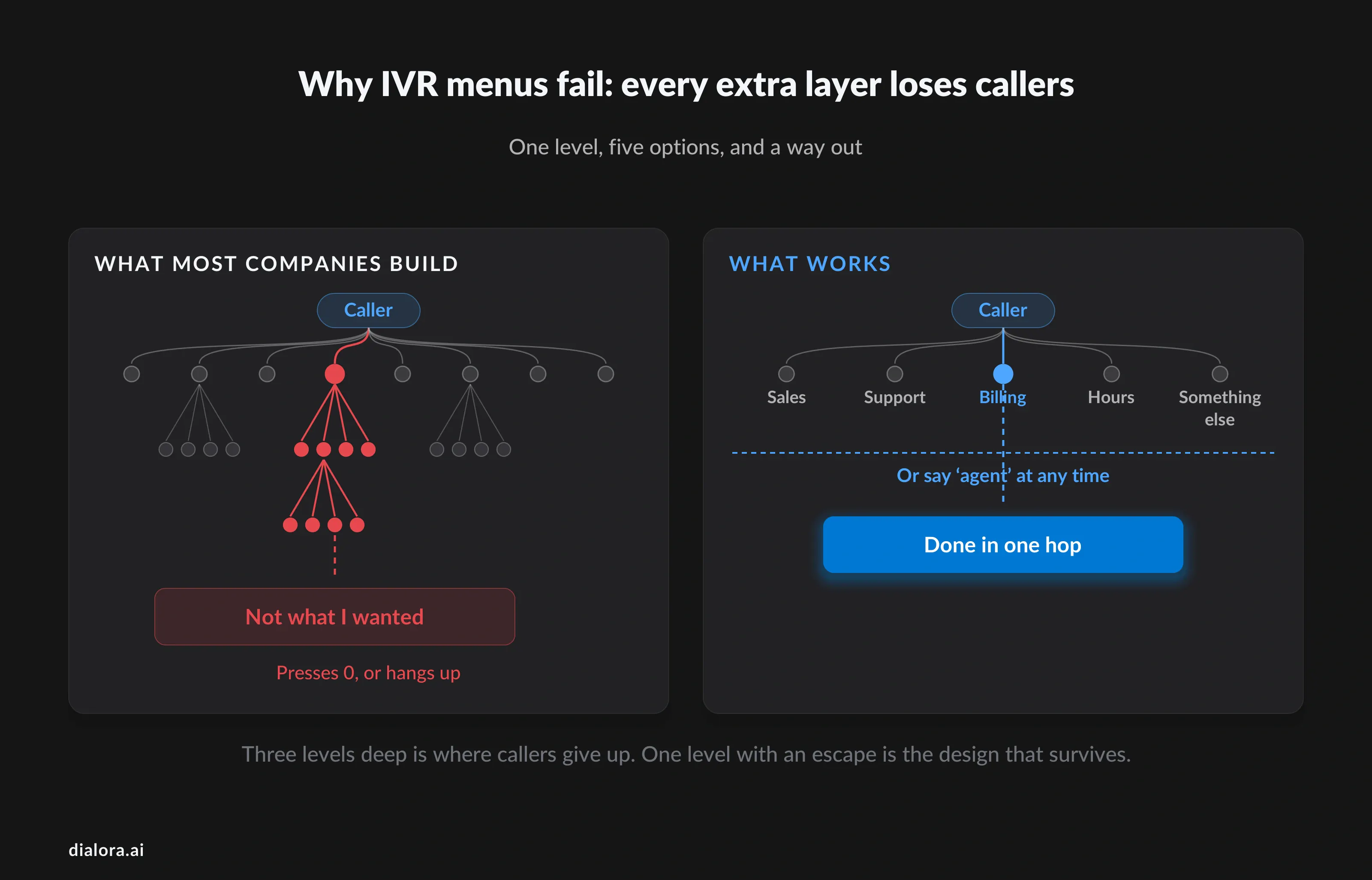
- Keep the tree to one level. Every extra layer loses callers. Five options at the top, one level deep, and a clear route to a person is the design that survives contact with real customers. Long trees are where IVR earned its reputation.
- Test the after-hours path yourself. Call your own number at 7pm during the trial. Whatever happens to you is what happens to your customers, and it is the single most revealing fifteen seconds of any evaluation.
- Confirm what a menu change costs in time. Minutes in a visual builder, or a ticket to IT and a two-week wait. That difference matters more over three years than any feature on the comparison grid.
Conclusion
The uncomfortable thing about this category is that no caller has ever wanted an IVR. They want the answer, and the menu is the tax they pay to reach it. Every list of IVR service benefits is written from the company's side of the phone.
That is worth holding on to while you compare vendors. The best IVR software is the one that gets the caller out of the menu fastest, which usually means fewer options rather than better ones, and increasingly means no menu at all for the handful of reasons most people are calling about.
So check what your phone system already includes. Fix the tree you have before you buy a new one. And if the same five questions account for most of your calls, ask whether the right purchase is a smarter menu or something that just answers.
Dialora answers the calls your team cannot, completes the routine ones, and passes the rest to a person with the full context attached. If you’re curious how it sounds, you’re welcome to test it out with a 7-day free trial.
Frequently asked questions
What does IVR stand for?
IVR stands for interactive voice response. It is the automated system that answers a phone number, plays a menu or asks a question, and routes the caller based on the keys they press or the words they say.
What is IVR in call center use, and what is IVR meaning in call center terms?
The automated layer that handles a call before it reaches an agent. It identifies the reason for the call, can verify the caller against a CRM record, handles self-service such as order status or payments, and routes the rest to the right queue. The share it finishes without a human is called containment.
What is the difference between IVR software and an auto attendant?
An auto attendant plays a greeting and a short menu, and comes with essentially every cloud phone system. Interactive voice response solutions add database lookups, speech recognition, conditional routing and self-service transactions. If you only need "press 1 for sales", you already have it and do not need to buy voice response software at all.
How much does an IVR system cost?
Nothing extra if it is bundled with your phone system, which costs $10 to $35 per user per month. IVR services inside a contact centre platform run $75 to $240 per agent per month with seat minimums. A build-your-own stack on Twilio or Amazon Connect costs roughly a cent per minute plus the engineering time to build and maintain it.
Do I need IVR if I only have a few staff?
Usually not. Below roughly fifteen calls a day, a person answering beats any menu, and a two-option auto attendant covers the rest. IVR earns its place when call volume, opening hours or missed calls exceed what your team can cover, and at that point the question is whether you need a better menu or no menu at all.