TL; DR
- Yes, ChatGPT can listen to audio. You can upload MP3, WAV, M4A, and WebM files up to 25 MB. ChatGPT processes the file through Whisper and returns a text transcript.
- The accuracy ceiling sits around 86 per cent. There are no speaker labels, no timestamps, and the gpt-4o-transcribe model caps single files at 1,500 seconds (25 minutes).
- ChatGPT cannot answer your business phone. For real-time voice conversations on inbound and outbound calls, you need a voice AI agent, not a transcription tool.
The question shows up in search hundreds of thousands of times a month. Can ChatGPT listen to audio? People frequently wonder, can ChatGPT listen to audio files that are saved on their phones? The short answer is yes, but the longer answer matters more, especially if you are an SMB owner trying to figure out whether ChatGPT is the tool to handle your customer calls. This guide walks through exactly what ChatGPT does with audio, where it works well, where it breaks, and what category of tool you actually need if the goal is having an AI talk to your customers in real time.
Yes, ChatGPT can listen to audio. Since GPT-4o launched in 2024, introducing advanced ChatGPT multimodal functions, ChatGPT accepts audio uploads in MP3, WAV, M4A, and WebM formats up to 25 MB per file, transcribing them through OpenAI's Whisper model. ChatGPT does not handle live phone calls or real-time voice conversations. Those require a dedicated voice AI agent platform.
What ChatGPT Actually Does With Audio Files
ChatGPT processes audio in two ways. The first is uploaded files. The second is voice mode inside the app.
The upload path works like this. You drag an audio file into the chat. When you use ChatGPT audio input this way, ChatGPT runs it through Whisper, OpenAI's speech recognition model, performing rapid AI audio processing. The transcript comes back as plain text inside the conversation. You can then ask ChatGPT to summarize it, extract action items, translate it, or rewrite it as a blog post.
That is what most people mean when they ask if ChatGPT can transcribe audio or ask, Can ChatGPT listen to audio and transcribe a meeting directly. According to OpenAI's documentation, the supported formats are MP3, MP4, MPEG, M4A, WAV, and WebM. Users testing this GPT-4o audio input will find that the file cap is 25 MB per upload.
The voice mode path is different. You speak directly into the app on mobile or desktop. ChatGPT transcribes your voice in real time and replies with a generated voice answer. This is the ChatGPT voice mode users see when they tap the microphone icon. Because of this highly responsive ChatGPT voice feature, many users assume it can handle business routing. It is conversational. It is fast. It is not designed to answer your customers' phone calls.
Worth knowing.
What ChatGPT Cannot Do With Audio
The limits matter more than the broad ChatGPT audio capabilities for SMB owners. Five constraints come up repeatedly in production use.
- The 25 MB file size cap: A standard MP3 recording at 128 kbps hits 25 MB at roughly 26 minutes. Anything longer needs to be compressed or split.
- The gpt-4o-transcribe model has a 1,500-second hard cap per file (25 minutes): Files longer than that fail with an explicit error.
- No speaker labels: Even with powerful ChatGPT speech recognition, Whisper returns a continuous block of text with no indication of who said what. A three-person meeting comes back as one undifferentiated transcript.
- No timestamps in standard ChatGPT audio input mode: If you need subtitles or time-coded references, you have to use the Whisper API directly or a different tool.
- The accuracy ceiling: Independent testing shows ChatGPT transcription accuracy tops out around 86 per cent on clean audio. Telephony-quality audio with background noise drops accuracy to 75 to 85 per cent. Background noise hits accuracy harder than accent does.
The receptionist who tested this on her own phone calls had been transcribing voicemails by hand for eight months. She was running on five hours of sleep and had her parents' wedding coming up that weekend. She tried ChatGPT for two weeks. The summaries were decent. The names were wrong. The phone numbers were wrong half the time. She went back to hand transcription for anything she had to act on.
That is the gap.
How ChatGPT Audio Differs From a Voice AI Agent
The category confusion costs SMBs real money. ChatGPT is a transcription and reasoning tool. A voice AI agent is a phone-handling system. Different products. Different jobs.
ChatGPT Audio vs Voice AI Agent. Side by Side
This matrix breaks down what each tool is built to do and what it is not.
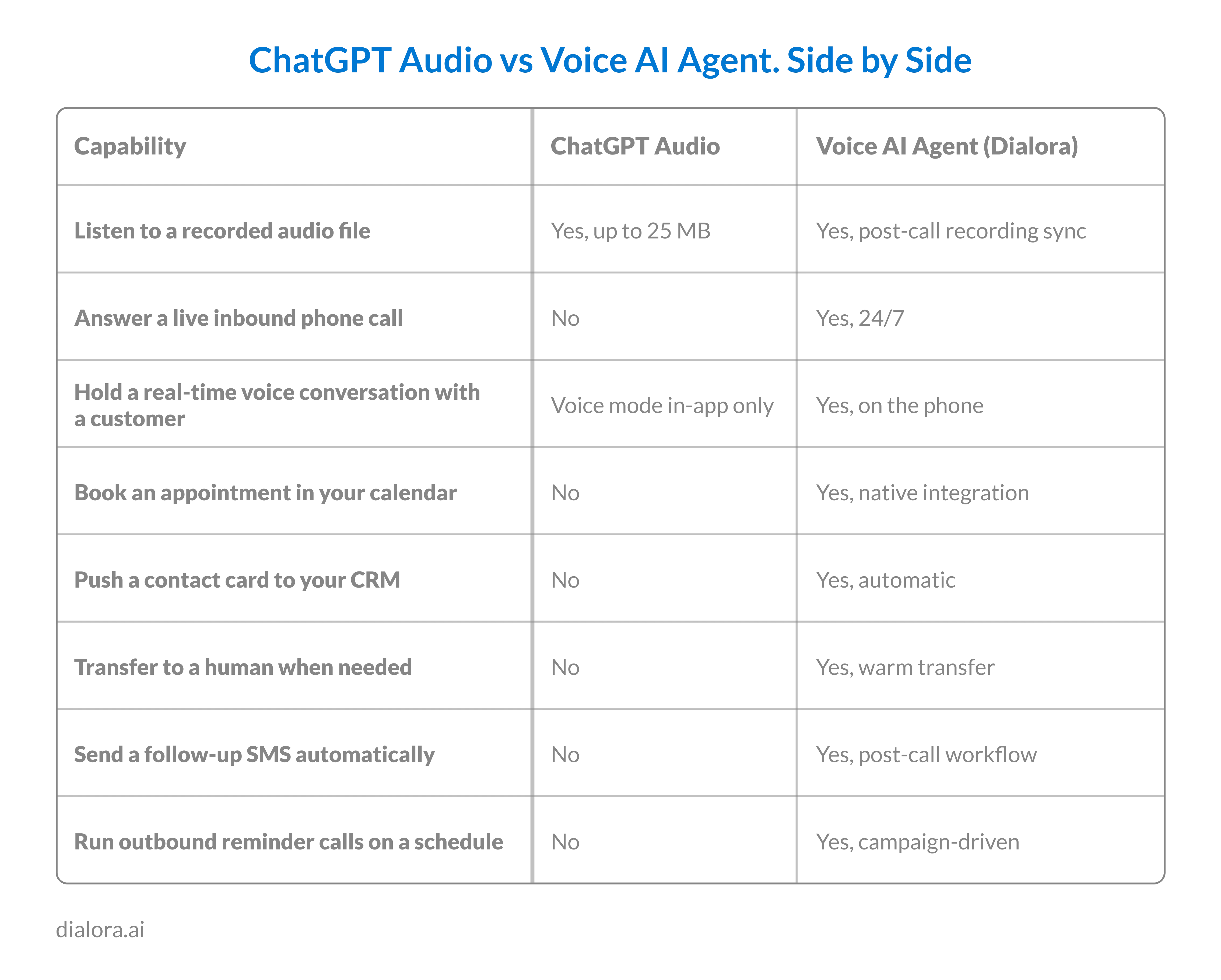
The two tools answer different questions. Use ChatGPT to understand a recording. Use a voice AI agent to handle the call.
Facts:
ChatGPT can transcribe a 25 MB recording. It cannot pick up your phone at 6:47 pm. Different category of tools entirely.
Where ChatGPT Audio Genuinely Helps SMB Owners
The upload path is genuinely useful for a few SMB workflows. Three are worth naming.
Voicemail review. Drop a batch of voicemails into ChatGPT and ask for a summary plus contact details. You will need to verify the phone numbers manually because of the accuracy ceiling, but the time savings on triage are real.
Sales call review. Record a sales call. Upload the recording. Having ChatGPT listen to recording files allows you to ask for a summary, the prospect's main objection, and three follow-up questions. The OpenAI speech-to-text engine handles this well for clean audio under 25 minutes.
Internal meeting notes. Run a recording through ChatGPT for action items and decisions. This kind of deep AI audio analysis is where the tool excels. The summaries are reliable. The verbatim quotes are not.
What ChatGPT will not do is handle the inbound calls in the first place. The voicemails it transcribes are the calls you already missed.
Pro-tip:
Use ChatGPT to triage the calls you missed. Use a voice AI agent to stop missing them in the first place.
Why SMBs Confuse ChatGPT With a Voice AI Agent
The confusion is understandable. Both involve voice. Both involve AI. When business owners search, can ChatGPT listen to audio recording files? They often mix up transcription with automation. Both are trending in search. The ChatGPT voice feature in particular feels conversational enough that people assume it could just answer the business line.
It cannot. ChatGPT voice mode runs inside the ChatGPT app on the user's device. It is not connected to a phone number. It cannot receive an inbound call. It cannot make outbound calls. It does not integrate with a calendar or CRM.
A voice AI agent platform like Dialora handles the phone-call workflow. Inbound calls answered in two rings. Outbound campaigns are running on a schedule. Calendar bookings. CRM sync. Multi-language coverage. Compliance-ready audit trails.
Same underlying technology family. Different products solve different problems.
Key Numbers
- 86% Maximum transcription accuracy ceiling for ChatGPT audio uploads on clean audio.
- 25MB Maximum single-file size for ChatGPT audio uploads.
- 1,500s Hard cap on gpt-4o-transcribe single-file duration (25 minutes)
What Most SMBs Actually Need
If your goal is to understand a recording you already have, ChatGPT works. Use it. The upload path is fast, and the summaries are good for triage.
If your goal is to make sure no customer call goes to voicemail again, ChatGPT is not the tool. You need a voice AI agent that picks up the phone, holds the conversation, books the appointment, and pushes the contact to your CRM before the caller hangs up.
Dialora handles the inbound and outbound call workflow that ChatGPT cannot touch. The platform answers calls 24/7, books directly into Google Calendar, Cal.com, or TidyCal, and syncs every contact to your CRM through API and webhook. Multi-language support covers English, Spanish, French, Portuguese, and Turkish on the same deployment. Compliance posture includes SOC 2-ready infrastructure, full GDPR compliance, and BAAs available for healthcare workloads. The setup runs in days, not weeks. The phone is the channel ChatGPT was never built to cover.
Ready to Hear What an Actual Voice AI Agent Sounds Like on the Phone?
Where ChatGPT Audio Belongs in Your SMB Workflow in 2026
Despite impressive GPT audio understanding, ChatGPT audio is the right tool for understanding a recording you already have. It is not the right tool for handling the calls that produce those recordings. The 86 per cent accuracy ceiling, the 25 MB file cap, the lack of speaker labels, and the absence of any phone number connection mean ChatGPT was built for a different job. Use it to triage voicemails, summarize sales calls, and pull notes from internal meetings. Use a dedicated voice AI agent platform when the goal is that the phone never goes to voicemail in the first place. Different categories. Different problems. Different answers.
Ultimately, businesses need outcomes, not just standalone transcription tools. If you want a reliable AI sales rep that picks up the phone, reasons through conversations, and closes deals without a massive engineering headache, Dialora AI is the Gen-3 alternative built specifically for you. Ready to stop losing leads to voicemail and launch a fully functional agent in hours, not weeks? Let Dialora handle your phone line. Start your free trial today.
Frequently Asked Questions
Can ChatGPT listen to audio files I upload?
Yes. ChatGPT supports MP3, MP4, MPEG, M4A, WAV, and WebM uploads up to 25 MB per file. The file is processed through OpenAI's Whisper speech recognition model and returned as a plain text transcript. Paid ChatGPT plans support direct file upload. The transcript can be summarized, translated, or analyzed inside the same conversation immediately after upload completes.
Can ChatGPT listen to audio and transcribe it accurately?
Yes, but with limits. Independent testing shows accuracy tops out around 86 per cent on clean studio-quality audio. Telephony audio with background noise drops accuracy to 75 to 85 per cent. There are no speaker labels and no timestamps in the standard chat interface. For professional transcription work, dedicated tools or the Whisper API with diarization usually deliver better results.
Can ChatGPT listen to an audio recording from a phone call?
ChatGPT can transcribe a phone call recording you upload as a file. It cannot listen to a live phone call as it happens, and it cannot pick up your business line. For real-time voice handling on inbound and outbound calls, you need a voice AI agent platform that connects directly to a phone number and runs the conversation end-to-end.
Can ChatGPT process voice input directly through its app?
Yes. ChatGPT voice mode lets you speak into the app on mobile or desktop. ChatGPT transcribes your voice in real time and responds with a generated voice answer. This is conversational and fast. It is designed for personal interaction with the assistant, not for answering customer phone calls. The voice mode does not connect to phone numbers or external telephony systems.
Does ChatGPT support multilingual audio input?
Yes. Whisper supports transcription across roughly 100 languages with varying accuracy. ChatGPT voice mode currently works best in English, with growing support for Spanish, French, German, and other major languages. Accuracy in non-English languages is generally lower than in English. Confirm language support against your specific need before relying on it for production work.
Is Dialora a better fit than ChatGPT for handling business phone calls?
For business phone calls specifically, yes. Dialora is a voice AI agent platform built for inbound and outbound calling. It connects to a phone number, answers in two rings, books appointments, qualifies leads, and syncs every contact to your CRM. ChatGPT is a general-purpose AI assistant. Different categories of tools. The platforms complement each other. They do not replace each other.