TL;DR
- Visual voicemail displays your messages as a visual inbox no dial-in, no PIN, no sequential listening
- Messages include timestamps, caller information, and the option to have the message read to you in text form
- Voicemail-to-email, syncing across devices, smart notifications, and CRM integration are some of the most important features
- Businesses benefit from faster response times, better team coordination, and searchable call records
- It's a strong foundation, and AI-powered tools like Dialora.ai take it even further by handling calls before they ever reach voicemail
Introduction
Picture this. A possible customer calls your business at 6:47 PM. No one picks up. They leave a voice message. The next morning, your team has 11 voicemails in the box, and someone has to listen to each one, PIN and all, until they hear the beep.
That's a problem that's been solved for years. Most businesses just haven't noticed.
Visual voicemail is the upgrade from that old dial-in process. It turns your voicemail inbox into something that actually works for you organized, readable, and manageable, without spending twenty minutes listening to audio menus. If you've ever wondered what your phone's voicemail feature could be doing better, this is the answer.
What Visual Voicemail Actually Means
So, what is visual voicemail, exactly?
Instead of making you call and listen to your voicemails in order, this system shows them as a visual list, much like an inbox.. Each message shows you the caller's name or number, the timestamp, and the length of the message. You touch the one you want. You can listen to it, read the transcript, delete it, save it, or send it on. Finished.
No PIN. No waiting through previous messages. No "press 7 to delete, press 9 to save."
The visual voicemail app is usually included in your smartphone's phone app (both iOS and Android have it built in), or it's part of a business phone system or VoIP platform. For businesses running on a multi-line phone system, it becomes especially powerful.
How It Works Behind the Scenes
When a caller leaves a message, here's what actually happens with a visual voicemail service:
- The caller speaks their message after the tone
- The message is saved on your carrier's or phone system's server
- Your device receives the voicemail data over Wi-Fi or mobile data
- The message shows up in your visual inbox with the caller's information and a time stamp
- When transcription is turned on, speech-to-text transforms audio into legible text
- You can manage it the way you want: listen, read, delete, archive, or forward
The key shift here is storage and delivery. Traditional voicemail sits in a central phone system box; you call the box to access it. Visual voicemail delivers the message directly to your device in a format you can navigate like email. That one change in architecture makes the whole experience different.
Traditional Voicemail vs Visual Voicemail What's Actually Different
Here's a side-by-side that makes the gap obvious:
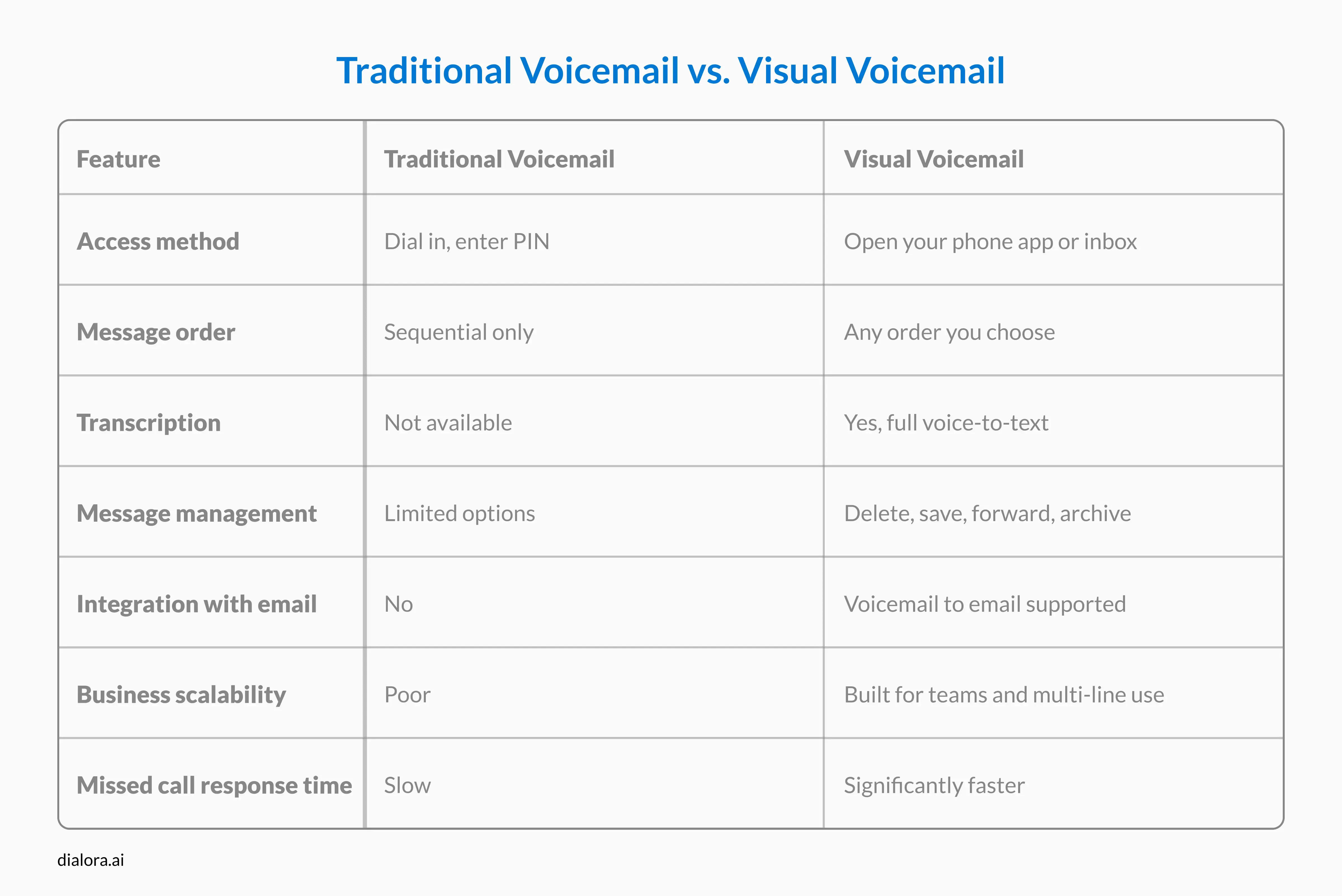
If you're running a business and still relying on traditional voicemail, you're introducing unnecessary friction into every missed call and missed calls cost you.
The Features Worth Knowing About
Not all visual voicemail applications are built the same. Here's what the good ones include:
- Voicemail Transcription: The audio message gets converted to text in real time. This implies that you can listen to a voicemail anywhere audio cannot be played, such as during a meeting or while traveling by train. Additionally, it facilitates later searching for particular messages.
- Voicemail to Email: Messages (along with their transcripts) are automatically sent to your inbox. This is a game-changer for teams anyone with access can see and respond to messages without needing the physical device.
- Smart Notifications: Smart notifications often include the caller's name, a preview of the transcript, and the length of the message instead of a generic "you have voicemail" alert. You know before you even open it whether it needs attention now or later.
- Multi-Device Sync: Listen on your phone, check again on your laptop, have your team access it through a shared dashboard. When you read or delete a message, it updates everywhere. This is important for businesses with teams that work from different places or anyone who leaves a voicemail outside of business hours.
- Configuring Visual Voicemail for Business: Most business VoIP platforms allow you to create custom greetings, define routing rules (so that callers go to the correct mailbox), and integrate with CRM tools so that voicemail data flows directly into your contact records. This kind of configuring visual voicemail setup takes about 20 minutes and pays dividends immediately.
Read more:
- What Is Voicemail and How Does It Work for Your Business
- Voicemail Greeting Scripts for Medical and Dental Offices
Why Businesses Are Switching and Why It Matters
Let's be honest about our pain point. Most businesses do not lose customers because their product is inferior. They lose them because they're hard to reach.
When someone calls outside of business hours and hits a wall of traditional voicemail, they may not call back. They move on. A visual voicemail service doesn't fix your availability problem on its own but it does mean that when someone does leave a message, your team sees it fast, responds fast, and makes the caller feel like they were heard.
A few concrete reasons teams make the switch:
- Faster response times: Visual inboxes mean that no one has to listen to a lot of audio to find the important call from this morning's hot lead.
- Better team coordination: Voicemail-to-email forwarding lets everyone on the team get the message without having to share phones.
- Reduced friction for managers: Opening voicemail on a multi-line phone system used to require sitting at a desk. Now it's three taps from anywhere.
- Searchable history: Transcribed voicemails can be searched by keyword, date, or caller try doing that with a traditional system.
- Cleaner call records: A visual inbox helps you keep track of things when you get dozens of calls every day. Spam and messages that don't matter are deleted quickly, so no one has to waste time.
Conclusion
Visual voicemail isn't a luxury feature. It's the baseline for any business that takes missed calls seriously. When clients can't reach you, the least you can do is make sure their messages don't get buried in an audio pile you'll get to eventually.
If you're still managing voicemail the old way, you already know how much time it wastes. What are you going to do about it?
At Dialora.ai, we take it a step further. Our AI voice agents take over when your team can't answer questions, qualify leads, or route messages intelligently. This makes sure that no calls are missed. Visual voicemail is a great start. An AI voice system that works around the clock is what comes next.
Ready to stop missing leads? Call Dialora ai to set up a free demo and find out how AI-powered call handling can change your business for the better.
FAQ
What does visual voicemail mean for my phone plan?
Most phone companies, such as AT&T, Verizon, and T-Mobile, include basic visual voicemail in their regular plans. Typically, in order to enable business-level features like team access, transcription, or CRM integration, you would require a VoIP or business phone platform in addition to your carrier.
What is the visual voicemail app on my phone?
It is integrated into the native Phone app on iPhones, located under the "Voicemail" tab. It depends on your carrier and device on Android. Some have built-in apps, while others use carrier apps like Visual Voicemail by AT&T or Google's own system. Business users often rely on a separate visual voicemail application through their VoIP provider.
Can visual voicemail work on a multi-line phone system?
Yes, and it works better there than on a single line. You can have separate voicemail boxes for each extension, shared voicemail inboxes, and team-wide access with business VoIP platforms. This is very helpful for sales or customer service teams that answer calls on more than one line.
Is visual voicemail secure?
Most enterprise-level visual voicemail services encrypt messages while they are being sent and when they are stored. Prior to signing up with a provider, confirm that they are certified to handle sensitive client information, such as financial, legal, or medical statistics.
Does visual voicemail work without internet?
Messages can frequently be played offline after they are downloaded to your device, but initial setup and syncing require data. You do need an active connection to do transcription and email forwarding.