TL;DR
- Einstein Lead Scoring in Salesforce uses AI trained on your historical closed-won data to rank every lead by its predicted conversion probability. The model updates automatically as new closed deals accumulate.
- Salesforce lead assignment rules route scored leads to the correct rep or queue the moment a lead is created. Rules are criteria-based and are evaluated in a defined order, from most specific to most general.
- Dialora handles phone-based inbound lead qualification and syncs structured call data to Salesforce lead records before Einstein scores them, improving model accuracy over time by adding a verified phone-based qualification signal to the training data set.
The VP of Sales Operations at an enterprise FinTech company had 14,000 leads in Salesforce and three SDRs running a round-robin assignment-no-scoring model. No prioritization logic beyond date created. The team called leads in the order they arrived. A batch import of conference attendees from six months ago sat above last week's inbound demo requests in the default queue sort. One of those conference leads was a procurement director at a target account. His company had since closed a $50M Series B and was actively running a vendor evaluation.
Her team discovered the lead 19 days after his company signed with a competitor.
This is how to make sure that does not happen again.
Salesforce lead scoring and automated lead assignment are the two tools that prevent it. Neither requires custom development. Both are available on the platform today.
Automatically qualifying leads in Salesforce uses Einstein Lead Scoring to rank leads by AI-predicted conversion probability, combined with lead assignment rules to route high-scoring leads to the correct rep without manual triage. Einstein lead scoring Salesforce deploys as part of Sales Cloud Einstein and trains on your historical closed-won data. Salesforce Einstein lead scoring updates its model as new conversions accumulate. Assignment rules use criteria you define in Setup and run at the moment a lead is created or transferred.
Why the Salesforce Lead Qualification Process Breaks Without Automation
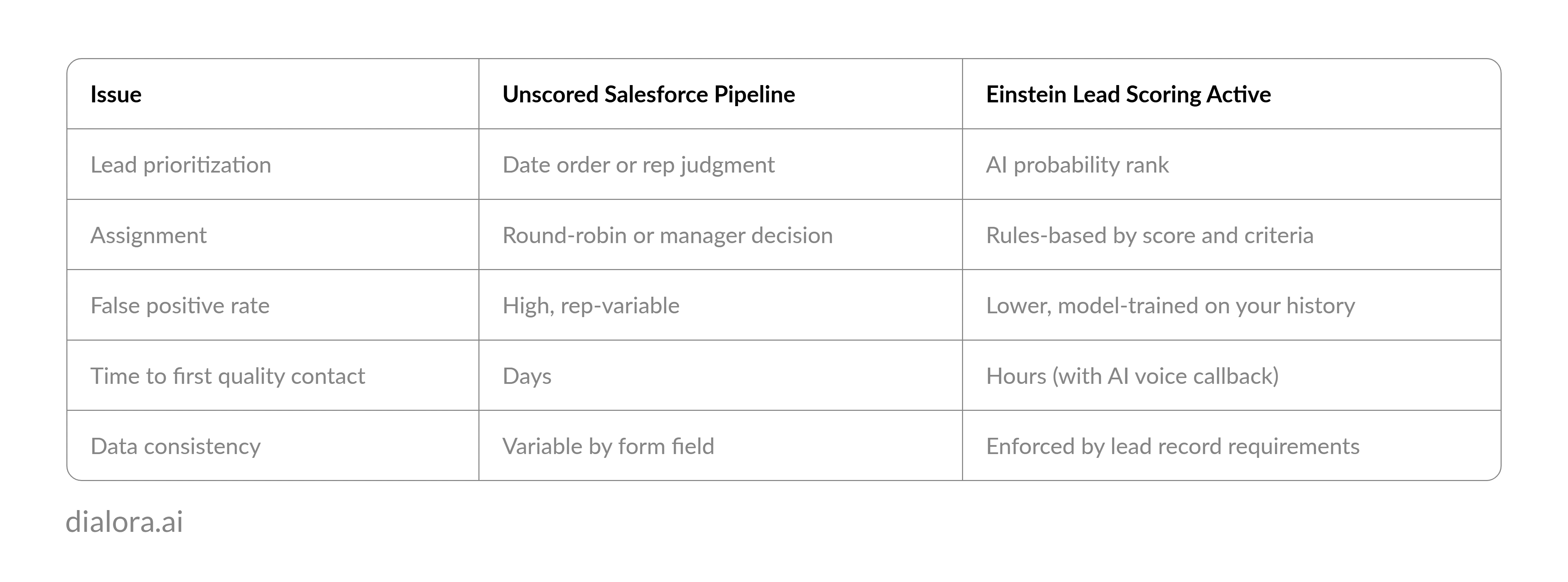
The Salesforce lead qualification process at enterprise scale exposes the limits of rep judgment immediately. A queue of 500 leads looks identical at every rank position. Without scoring, the rep prioritizes based on whatever stands out: a familiar company name, a recent entry timestamp, a title that sounds senior. That decision is not consistent across reps and is not correlated with conversion probability.
The enterprise cost of unscored Salesforce leads compounds over time. High-fit leads who do not get contacted within 24 hours respond to the first vendor who does reach them. Low-fit leads who get called in the first hour consume SDR capacity that produces no pipeline. The qualification problem does not stay the same size. It scales with lead volume.
Automate lead qualification in Salesforce, and the problem changes shape. The scoring model ranks the leads. The assignment rules route them. The rep calls in priority order. The decision that was variable by rep becomes consistent by rule.
Pro-tips: An unscored Salesforce lead database is not a pipeline. It is an inventory problem that grows every time marketing runs a campaign.
Salesforce lead scoring removes the inventory problem. Automated lead qualification removes the routing decision. Both are available natively once configured.
What Is Einstein Lead Scoring in Salesforce and How Does It Work?
Einstein Lead Scoring is Salesforce's AI qualification layer for the Leads object. It is part of Sales Cloud Einstein. The model trains on your closed lead history to identify the field combinations that correlated with converted leads, then applies that pattern to every unworked lead in the pipeline.
Each lead receives a Lead Score between 0 and 99 and a set of Score Factors. Score Factors are the model's explanation of why that lead received its score: "Company size consistent with converted leads," "Job title matches high-conversion pattern," "Industry outside common conversion set." The Score Factors are as important as the score itself for rep context.
The initial setup path is App Launcher > Einstein Lead Scoring > Get Started. Salesforce requires a minimum of 1,000 leads with known converted or not-converted outcomes to train the initial model. Organizations below that threshold should use manual lead assignment rules and field-based criteria until the data set grows.
The Salesforce solutions architect at an enterprise healthcare technology company enabled Einstein Lead Scoring after a year of round-robin assignment. The model's first run identified 52 leads in the existing database with scores above 80. Her SDR team had not called 14 of them. Nine of those 14 were at companies with more than 200 employees in the platform's target industry. The team had been working through a batch of small-business imports in the same queue.
Read more:
- Automatically Qualify Leads in Monday CRM
- Automatically Qualify Leads in Pipedrive
- Automatically Qualify Leads in HubSpot
- Automatically Qualify Leads in Zoho CRM
How to Enable Einstein Lead Scoring in Salesforce
To enable Einstein lead scoring, navigate to Setup, type Einstein Lead Scoring in the Quick Find box, and select it from the results. Follow the configuration steps:
- Enable the feature for the Salesforce org.
- Select the object to score: Leads.
- Define field exclusions for any internal flags, test data fields, or classification fields that should not influence the model.
- Run the initial model training.
- Add the Lead Score field and Score Factors component to the Lead page layout.
The model trains in the background and produces initial scores within 24 to 48 hours for most orgs. After initial training, the model updates automatically on a weekly schedule as new conversion data accumulates.
Lead scoring in Salesforce does not require structural changes to the Leads object or migration of existing records. The Lead Score field appears as a new column in list views and reports. It can be used as a criteria field in assignment rules, list views, and report filters from the moment scores are generated.
How to Set Up Salesforce Lead Assignment Rules
Salesforce lead assignment rules route incoming leads to the correct owner based on field criteria you define. The path is Setup > Lead Assignment Rules.
Create a rule with multiple ordered criteria entries. Salesforce evaluates entries in sequence and assigns the lead to the first match. Structure entries from most specific to most general:
- Entry 1: Lead Score is greater than 80 AND Industry is in target list → assign to senior SDR queue
- Entry 2: Lead Score is between 50 and 80 → assign to standard SDR queue
- Entry 3: Lead Source equals Inbound Phone → assign to callback queue with qualification task
- Entry 4: All other leads → assign to nurture track
Lead assignment rules run automatically on lead creation and on lead owner transfers. They also run when the assignment checkbox is manually checked on a lead record during an update.
Pro-tip Salesforce Agentforce extends assignment rules by adding autonomous AI qualification outreach before routing occurs, not just after scoring completes.
What AI-Powered Lead Qualification Adds to Salesforce Over Time
The Salesforce lead qualification process with Einstein and Dialora running in parallel produces a compounding accuracy improvement. Einstein trains on form field data in the initial model. As phone-based qualification calls sync structured data to lead records, the training set expands to include phone-verified fields: stated budget, confirmed company size, decision timeline, and current vendor situation. Those inputs are more reliable than self-reported data.
The lead capture and qualification automation tools that connect to Salesforce over time produce a data quality floor. Every lead that enters the scoring model has the same minimum field set. The score becomes more predictive. The assignment rules route more accurately. The rep's first call is more likely to reach a qualified lead.
Automate lead qualification with AI across both the scoring layer and the phone channel, and the speed advantage compounds. Top AI-powered CRMs for lead qualification separate themselves on exactly this dimension: not just scoring leads after they arrive, but qualifying them faster at arrival. Salesforce with Dialora as an automated lead qualification bot for inbound phone leads is the architecture that closes that gap.
AI lead qualification and sales lead qualification are different problems. The first sorts the database. The second converts the prospect. Salesforce handles the sort. The rep handles the conversion. Dialora handles the calls that feed both.
Lead qualification best practices at the enterprise level add one more rule: the data the scoring model trains on determines the model's accuracy ceiling. Phone-qualified data raises that ceiling.
That is a different pipeline than the one where every lead starts equal.
Ready to See Dialora Sync Phone Qualification Data to Your Salesforce Lead Records?
Frequently Asked Questions
What is Einstein lead scoring in Salesforce?
Einstein Lead Scoring is Salesforce's AI-powered lead qualification tool, available as part of Sales Cloud Einstein. The model trains on historical lead conversion data to identify field combinations that predict which leads are most likely to convert. Each lead receives a score from 0 to 99 and a set of Score Factors explaining the primary drivers behind the score. The model updates automatically as new conversion outcomes are added to the Salesforce org.
How do you enable Einstein lead scoring in Salesforce?
To enable Einstein lead scoring, go to Setup, search for Einstein Lead Scoring in Quick Find, and follow the configuration steps to enable it on the Leads object. Define field exclusions for internal or test data fields, then run the initial model training. After training completes, add the Lead Score field and Score Factors component to the Lead page layout. Initial scores appear within 24 to 48 hours. A minimum of 1,000 leads with known conversion outcomes is required for the model to produce reliable results.
What is the lead qualification process in Salesforce?
The Salesforce lead qualification process moves a lead from raw entry to qualified contact through scoring, assignment, and conversion. Einstein Lead Scoring ranks the lead by AI-predicted conversion probability. Assignment rules route high-scoring leads to the appropriate rep. The rep reviews Score Factors, conducts the qualification conversation, and converts the lead to a Contact, Account, and Opportunity when the criteria are met. Dialora handles the initial phone qualification for inbound and callback leads before this process begins.
What is Salesforce Agentforce lead qualification?
Salesforce Agentforce is Salesforce's AI agent platform that enables autonomous qualification workflows beyond passive field scoring. Agentforce agents can conduct conversational qualification outreach via digital channels, evaluate responses against defined criteria, and route qualified leads to the appropriate rep or queue. It extends Einstein Lead Scoring with active outreach capability. Agentforce is available through Salesforce's AI agent builder on Sales Cloud and requires configuration of qualification criteria, routing logic, and escalation rules.
How do you convert a qualified lead quickly in Salesforce?
To convert a qualified lead quickly in Salesforce, open the lead record and click the Convert button. Salesforce prompts you to create or match an existing Account, create a new Contact, and optionally create an Opportunity. Setting a default conversion layout in Setup speeds the process for high-volume SDR teams. Lead assignment rules and Einstein scoring reduce the time to reach this step by surfacing the right leads first, so the conversion action runs at the right moment rather than after a delay.