Three ways to build one
| Method | When to use it |
|---|---|
| Generate with AI | You know what the tool should do but don’t want to fill in every field |
| Form view | You’re building it field by field |
| JSON | You already have the definition, or you’re copying one between agents |
All three produce the same thing — pick whichever gets you there fastest.
Generate with AI
Open the AI panel in the tool editor and describe the tool in plain language:
“Check available TidyCal slots for a given date and return the open times”
Dialora generates the endpoint, method, parameters, and descriptions for you. You can also point it at an existing tool to change it — “add a timezone parameter” — and it updates the definition in place.
AI scaffolds the tool; you own it. Check the URL, the method, and every parameter name against your API’s real contract before attaching the tool to an agent. A plausible-looking parameter your API doesn’t accept fails at call time, mid-conversation, in front of a caller.
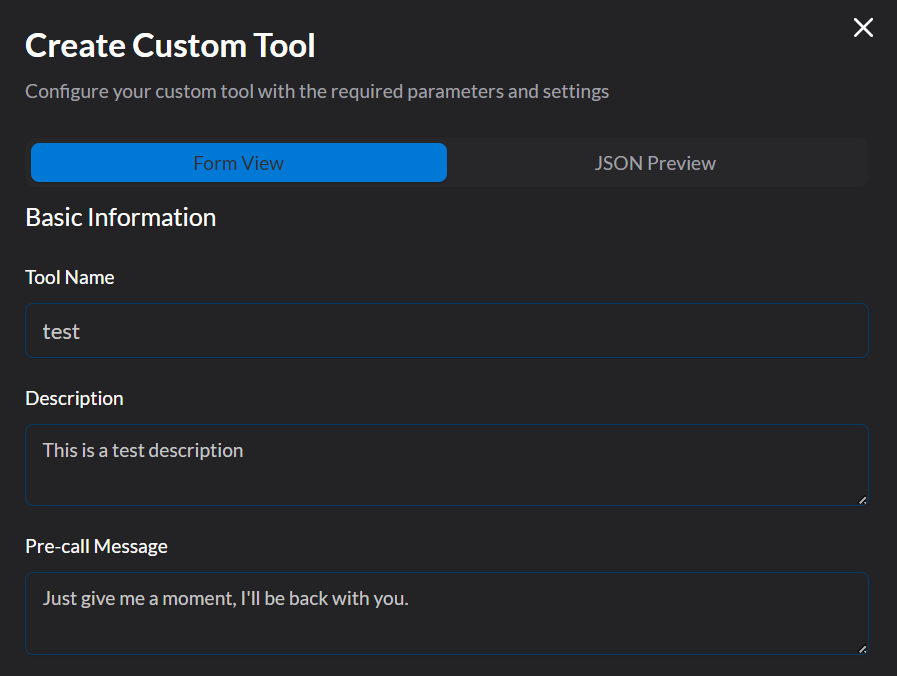
Basic Information
- Name – The label displayed in the Dialora UI and referenced in flows. Choose a name that is descriptive and unique (e.g., CheckAvailability rather than Get).
- Description – A concise explanation of the tool’s purpose. This is critical because the LLM uses the description to decide when to trigger the tool.
- Pre-call (Speech) Message – The message your agent says while the tool executes. For example: “Just a moment while I check that for you.” This keeps the conversation natural while an API request is in flight, and it’s required — a silent pause reads as a dropped call.
API Configuration
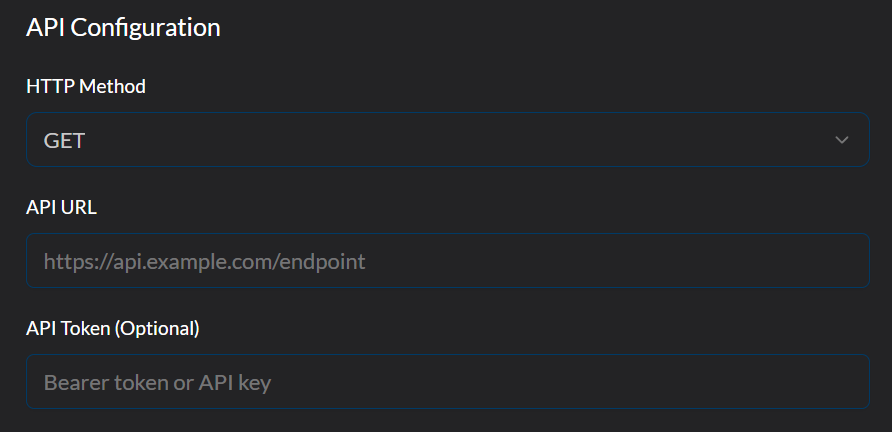
Configure how your tool communicates with external services:
This section defines how the tool communicates with external services:
- API URL – The endpoint being called (e.g., https://api.example.com/check ).
- HTTP Method – The request type:
GET,POST,PUT,PATCH, orDELETE. - API Token / Headers (Optional) – Authentication details such as bearer tokens or custom headers.
This setup ensures the tool knows exactly where to send data and how to request it securely.
Parameters Configuration
Parameters allow your tool to capture and use dynamic information gathered from the user during a conversation.
Instead of hardcoding values, parameters make your API calls flexible, reusable, and personalized.
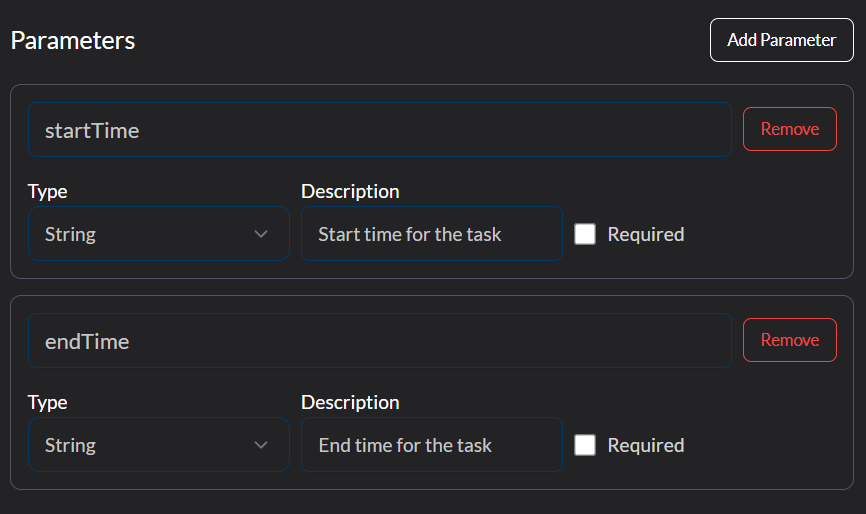
What they are: Think of parameters as input fields that the LLM will fill with user-provided values (like startTime or endTime).
Why they matter: Without parameters, every API call would return static results. With parameters, the tool can adapt to each user’s needs.
How to configure parameters:
- Assign a Name – e.g., startTime.
- Choose a Data Type –
string,number, orboolean. These are the only three supported. - Add a Description – Explain what the parameter represents so the LLM knows how and when to gather it.
- Set Required or Optional – Mark parameters that must always be collected (e.g., a booking date) versus optional ones (e.g., a note).
Example:
startTime (String, Required) → "Start time for the booking."

endTime (String, Required) → "End time for the booking."
During a call, the agent will ask for these values if they have not already been provided and then insert them dynamically into the API request.
Then hit the create tool button to save the tool to the agent.
A new or edited tool is saved to your agent’s draft. It doesn’t affect live calls until you publish the version — see Agent Versions, Draft and Publish.
Defining a Custom Tool Using JSON
You can also directly use the JSON to configure the tool.
Here’s how a tool definition might look in JSON—mirroring the Dialora UI you provided:
{
  "key": "custom_task",
  "name": "Test Task",
  "description": "Executes a test API call during the conversation.",
  "pre_call_message": "Just give me a moment--I'll be right back.",
  "parameters": {
    "type": "object",
    "required": [],
    "properties": {
      "startTime": {
        "type": "string",
        "description": "Start time for the task"
      },
      "endTime": {
        "type": "string",
        "description": "End time for the task"
      }
    }
  },
  "value": {
    "method": "GET",
    "param": {
      "startTime": "%(startTime)s",
      "endTime": "%(endTime)s"
    },
    "url": "https://api.example.com/test",
    "api_token": "Bearer YOUR_API_TOKEN"
  }
}
Let’s take some more examples.
JSON for Appointment Booking Function
{
  "key": "custom_task",
  "name": "Book Appointment",
  "description": "Schedules a new appointment for the user with the provided details.",
  "pre_call_message": "Let me schedule that appointment for you...",
  "parameters": {
    "type": "object",
    "required": [
      "customerName",
      "appointmentDate",
      "startTime",
      "endTime",
      "serviceType"
    ],
    "properties": {
      "customerName": {
        "type": "string",
        "description": "Full name of the customer booking the appointment."
      },
      "appointmentDate": {
        "type": "string",
        "description": "The date of the appointment in YYYY-MM-DD format."
      },
      "startTime": {
        "type": "string",
        "description": "Start time of the appointment in HH:MM format (24-hour)."
      },
      "endTime": {
        "type": "string",
        "description": "End time of the appointment in HH:MM format (24-hour)."
      },
      "serviceType": {
        "type": "string",
        "description": "The type of service for the appointment (e.g., consultation, photography, hair styling)."
      },
      "notes": {
        "type": "string",
        "description": "Optional additional notes or special requests for the appointment."
      }
    }
  },
  "value": {
    "method": "POST",
    "url": "https://api.example.com/appointments",
    "api_token": "Authorization": "Bearer YOUR_API_TOKEN",
    "param": {
      "customerName": "%(customerName)s",
      "appointmentDate": "%(appointmentDate)s",
      "startTime": "%(startTime)s",
      "endTime": "%(endTime)s",
      "serviceType": "%(serviceType)s",
      "notes": "%(notes)s"
    }
  }
}
JSON for Flight Search Function
{
  "key": "search_flights",
  "name": "Search Flights",
  "description": "Fetches available flights based on user input such as origin, destination, travel date, and passengers.",
  "pre_call_message": "Let me find available flights for you...",
  "parameters": {
    "type": "object",
    "required": ["origin", "destination", "departureDate", "passengers"],
    "properties": {
      "origin": {
        "type": "string",
        "description": "The departure airport code (e.g., JFK, LAX)."
      },
      "destination": {
        "type": "string",
        "description": "The arrival airport code (e.g., LHR, DXB)."
      },
      "departureDate": {
        "type": "string",
        "description": "The flight departure date in YYYY-MM-DD format."
      },
      "returnDate": {
        "type": "string",
        "description": "Optional return date for round-trip flights in YYYY-MM-DD format."
      },
      "passengers": {
        "type": "integer",
        "description": "Number of passengers."
      },
      "classType": {
        "type": "string",
        "description": "Travel class (e.g., Economy, Business, First)."
      }
    }
  },
  "value": {
    "method": "GET",
    "url": "https://api.example.com/flights/search",
    "api_token": "Bearer YOUR_API_TOKEN",
    "param": {
      "origin": "%(origin)s",
      "destination": "%(destination)s",
      "departureDate": "%(departureDate)s",
      "returnDate": "%(returnDate)s",
      "passengers": "%(passengers)s",
      "classType": "%(classType)s"
    }
  }
}
Detailed Explanation of Each Section
1. name
- Human-friendly label.
- Example: “Book Appointment” will show up in your UI or logs.
2. description
- Explains what the tool does.
- Example: “Schedules a new appointment for the user with the provided details.”
3. pre_call_message
- Message the agent says before making the API call.
- Example: “Let me schedule that appointment for you…”
4. parameters
- Defines what inputs are required from the conversation.
- type: “object” means inputs are passed as structured JSON.
- required: list of fields that must be present.
- properties: detailed definition of each input:
- customerName: Person booking.
- appointmentDate: Date (strict format YYYY-MM-DD).
- startTime, endTime: Time slots.
- serviceType: Type of service requested.
- notes: Optional free text.
5. value
- Defines how the API call is made:
- method: “POST” since booking modifies server data.
- url: The endpoint (replace with your real backend).
- api_token: Standard JSON API authentication.
- param: Actual payload sent to the API. Each field uses %(fieldName)s placeholder → replaced dynamically with user input.
Field Reference:
- key: Unique ID for internal reference.
- name: Displayed in the flow builder.
- description: Describes the tool’s intent.
- pre_call_message: Scripted voice prompt during execution.
- parameters: Defines input variables via JSON schema.
- value: HTTP execution details for the API call.
Tips & Considerations:
- Names matter: Avoid using overly common verbs like “call” or “get” that could conflict with built-in actions. Instead, choose clear and descriptive names that uniquely represent the tool’s purpose.
- Tool Description: This is one of the most important aspects for tool triggering. The LLM will only invoke a tool when the scenarios described in its description are matched during the conversation. Write the description carefully to capture the intended use cases.
- Parameter Usage: Clearly define which parameters are required and which are optional. If you reference these parameters later in response handlers or message templates, make sure they are properly mapped so the tool functions reliably.
- Security: Always store API tokens securely. Avoid embedding sensitive credentials directly in documentation, screenshots, or public UI. Instead, use environment variables or secure configuration management practices.