How to Write a High-Quality Prompt for Your AI Voice Agent in Dialora
The prompt is the single biggest lever on how your agent behaves. Dialora auto-generates one from the answers you gave when creating the agent, but that’s a starting point — customizing it is what turns a generic assistant into one that actually represents your business.
Where to find it
- Go to Agents in your dashboard and open the agent.
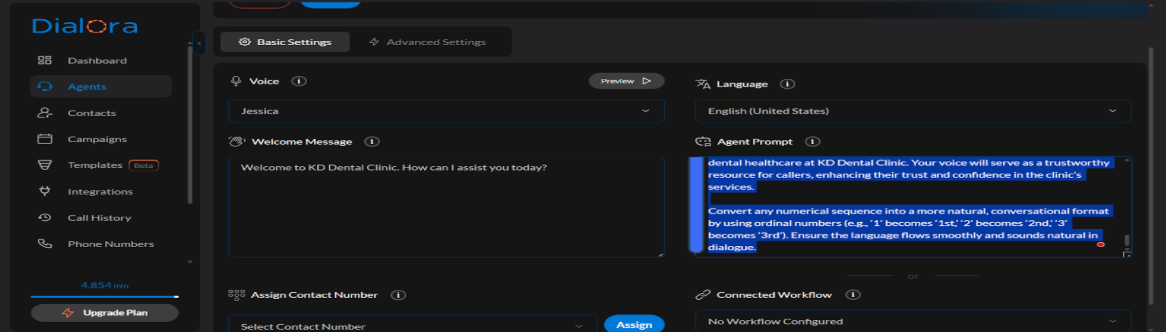
- The Agent Prompt editor is in Basic Settings, next to the welcome message.
Edit it directly. Your changes save automatically as a draft.
What the generated prompt covers
Dialora’s generated prompt follows a proven structure:
- Agent profile — who the agent is, which company it represents, its character
- Interaction mode — how it should behave on a call
- Core operational instructions — what it does, step by step
- Goals and information to extract — what a successful call achieves
- Character integrity — staying consistent in tone and accuracy
Writing a better prompt
Be specific about the job
“Book appointments” is not an instruction; it’s a category. Say what actually happens:
Book appointments. Ask for the caller’s preferred day first, then offer the two nearest available slots. If neither works, take a callback number and tell them the office will ring back within one business day.
Say what to do when things go wrong
Most bad calls happen at the edges, not the happy path. Cover them explicitly: what if the caller is angry, what if they ask something you don’t cover, what if they want a human, what if they give a date in the past.
Keep it in the agent’s voice
The prompt is instructions to the agent, not a script to be read aloud. Write “confirm the spelling of their surname”, not “say: could you spell your surname for me?”.
Constrain the facts
An agent will fill gaps if you leave them. If you don’t want it quoting prices, say so. If your hours are in the knowledge base, tell it to answer hours questions from the knowledge base rather than from memory.
Using variables
You can reference variables in the prompt and welcome message with {name} or {{name}}. Dialora detects them automatically and lists them for you.
Variables come from your contact data and from per-call values you pass in — so an outbound campaign can greet each person by name, or reference their appointment time, without a separate agent per contact.
A variable that has no value on a particular call leaves a hole in your prompt. Write the surrounding sentence so it still reads sensibly if the value is missing.
Enhance with AI
The Enhance Prompt button rewrites your prompt with AI. It’s useful when you know what you want but the wording is loose.
Always read the result before keeping it — enhancement can smooth over a constraint you deliberately put there.
Watch the token count
The editor shows live token usage against your model’s context window, broken down by:
- System prompt — Dialora’s own instructions
- Agent prompt — yours
- Tool definitions — every tool attached to the agent
- Conversation (reserved) — space kept for the actual call
A prompt that consumes most of the context window leaves the agent nothing to hold the call in. If the meter is close to full, cut the prompt or move reference material into a Knowledge Base — that’s what it’s for.
Attaching more tools costs context too. An agent with a dozen tools is spending real tokens describing them on every turn.
Test, then publish
Talk to the agent in the Playground after every meaningful prompt change — see Test Your Agent. Prompt changes are the ones most likely to have effects you didn’t intend.
When it sounds right, publish the version. Until you do, your live agent is still running the old prompt — see Agent Versions, Draft and Publish.
Changing the agent’s name, company, goal, data to collect, inbound/outbound type, language, or industry regenerates the prompt and welcome message from scratch. If you’ve hand-tuned the prompt, make those changes first and tune afterwards.
More
For ready-made prompts by industry, see the Prompt Library.