Manage Sub-Account Plans
This guide walks you through upgrading or downgrading a sub-account’s subscription plan directly from your Agency Dashboard, without your client having to switch plans themselves. The flow handles proration, end-of-cycle downgrades, and credit allocation correctly for both Stripe-billed plans (online card payments) and offline plans (billed through your agency’s credit pool, no Stripe transaction).
How It Works
Plan changes behave differently depending on whether the sub-account currently has a plan, which payment type backs the plan, and which direction you’re moving (up or down).
Sub-accounts on the free tier
A “free” sub-account is one with no active subscription (no Stripe plan, no offline plan). For these users you can convert them onto either payment type:
- Free → Stripe plan. Creates a new Stripe subscription on the spot. The sub-account is charged for the first cycle and Stripe generates an invoice. Requires a valid payment method on file.
- Free → Offline plan. Creates a new offline-billed subscription. The plan’s full included minutes are allocated to the sub-account as credits immediately. No charge.
Sub-accounts already on a paid plan
For sub-accounts already on a Stripe or offline plan, there are four cases:
- Stripe plan, upgrade. The sub-account is charged the prorated difference immediately. The new plan’s extra included minutes are added to the current billing cycle right away. Stripe generates an invoice for the prorated amount.
- Stripe plan, downgrade. The change is scheduled to take effect at the end of the current billing cycle. No refund is issued. The sub-account keeps full access and unused minutes for the rest of the paid period; the lower plan starts at the next renewal.
- Offline plan, upgrade. The change applies immediately. Credits are allocated to the sub-account for the price difference between the old and new plan.
- Offline plan, downgrade. The change applies immediately. No credits are issued.
Once a sub-account is on a paid plan, you can only switch them between plans of the same payment type. A Stripe-billed sub-account can move between Stripe plans, and an offline sub-account between offline plans, but you cannot cross between the two. Free sub-accounts are the exception — they can be converted onto either payment type.
Prerequisites
Before you start, confirm:
- The Change plan action is available in your Agency Dashboard’s Manage Users view. If it’s not in the row’s More actions menu, the feature isn’t enabled for your agency yet — contact Dialora support to turn it on.
- The sub-account is active and not blocked.
- The sub-account was created by your agency (invited by an agency owner).
- The target plan is active in your plan catalog. If the sub-account already has a paid plan, the target must also use the same payment type as their current plan. Free sub-accounts can be converted to either type.
- For Stripe-billed plans (including converting a free sub-account onto Stripe), the sub-account has a valid payment method on file.
If any of these aren’t met, the action will either be hidden, the plan won’t appear in the dropdown, or the change will be rejected with a clear error.
Step 1 – Open Manage Users in Your Agency Dashboard
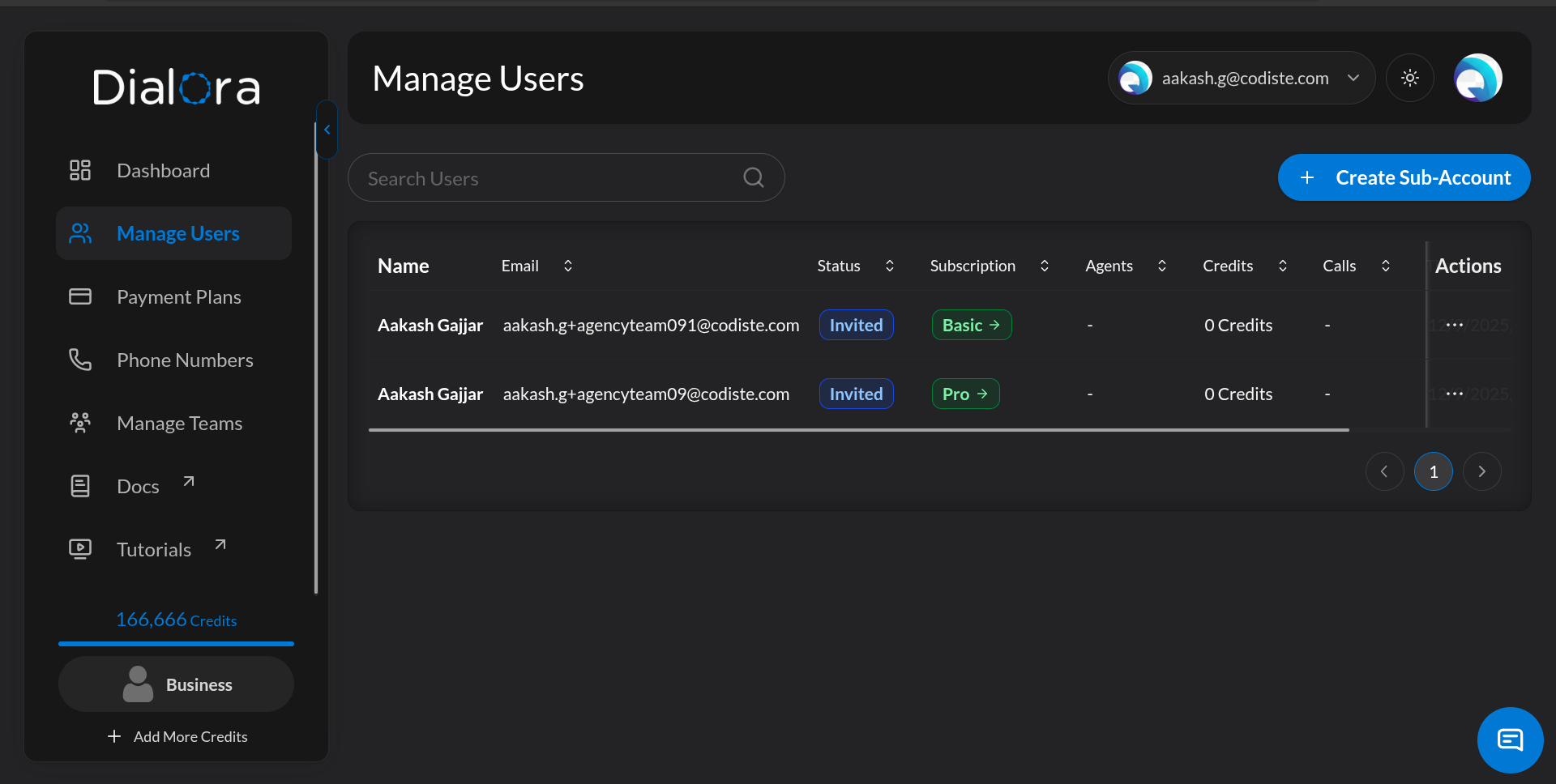
Open your Agency Dashboard and switch to Manage Users. You’ll see every sub-account user under your agency, with their current plan and status.
Step 2 – Select the User and Open Change Plan
Find the sub-account user whose plan you want to change. On that row, click More actions (the ⋯ button) and choose Change plan.
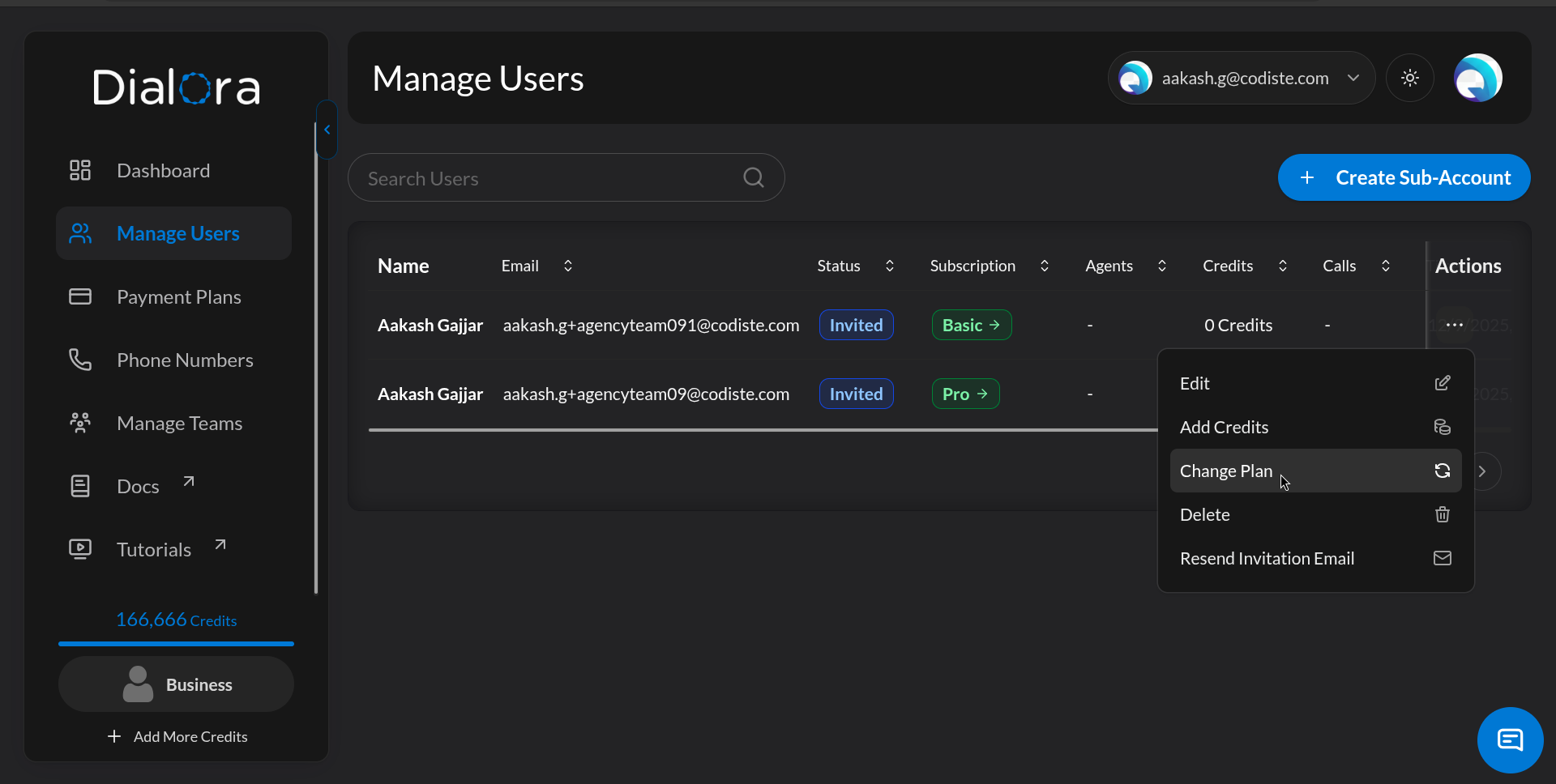
The Change plan dialog opens, showing the sub-account’s current plan (name and monthly price) at the top.
Step 3 – Select the New Plan
In the New plan dropdown, pick the plan you want to move the sub-account to.
- For sub-accounts already on a paid plan, the dropdown shows only active plans that use the same payment type as their current plan. The current plan is shown but disabled and labeled “(current)” — you can’t select it.
- For free sub-accounts (no active subscription), the dropdown shows all active plans of either payment type — pick a Stripe plan to put them on Stripe billing, or an offline plan to bill them through your agency’s credit pool.
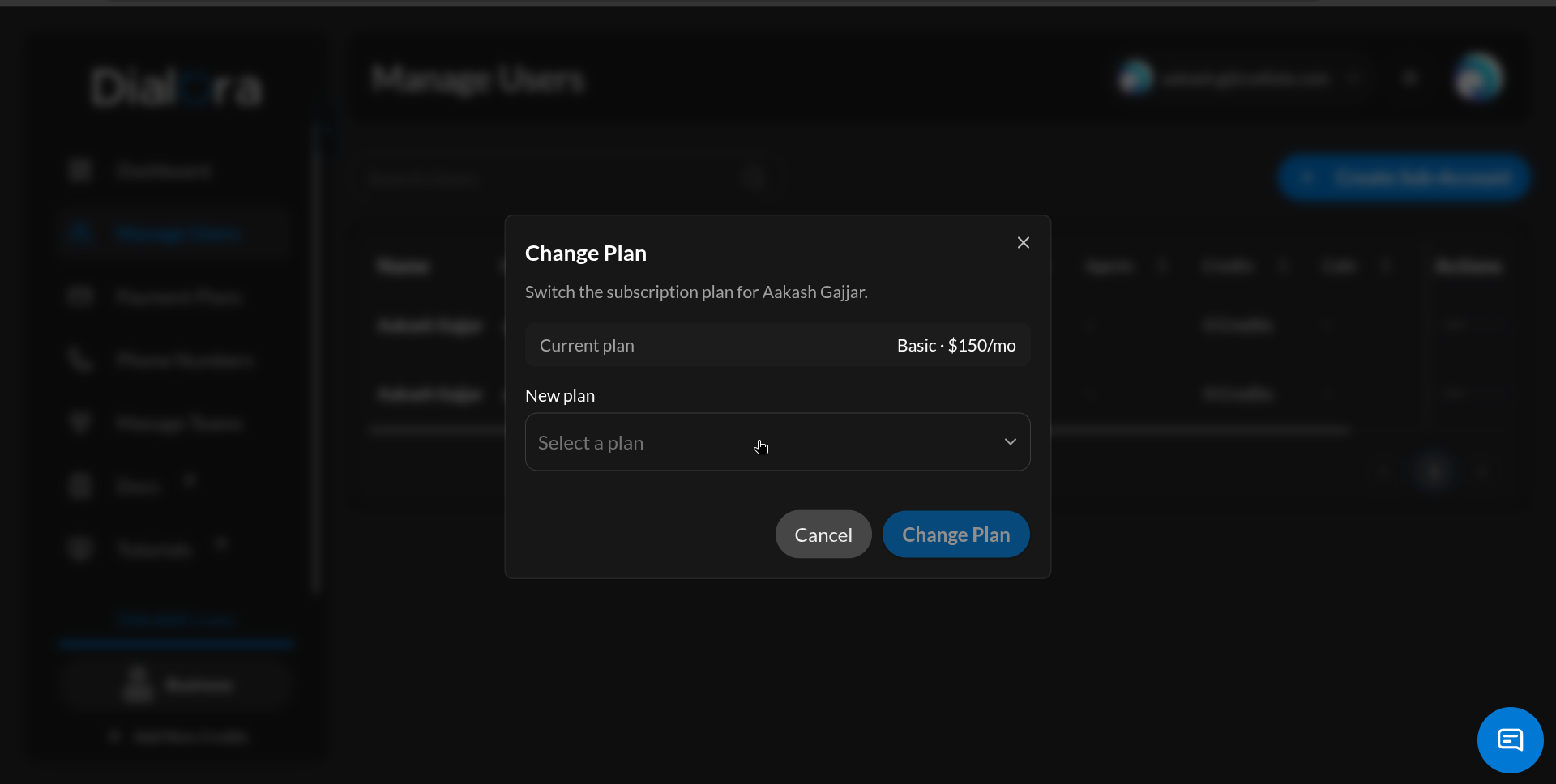
Each option shows the plan name, monthly price, and included minutes so you can compare without leaving the dialog.
Step 4 – Review the Billing Impact and Confirm
Before you click confirm, the dialog shows a short summary of what will happen. The actual effect depends on the sub-account’s current state — free, on a Stripe plan, or on an offline plan — and on whether you’re moving up or down.
Converting a free sub-account onto a paid plan
If the sub-account has no active subscription, picking any plan creates a brand-new subscription for them.
For a Stripe target plan:
- A new Stripe subscription is created for the sub-account immediately.
- The sub-account is charged for the first cycle right away (no trial). Stripe generates an invoice and you’ll see the invoice URL in the response.
- Requires a valid payment method on file. If none is saved, the conversion is rejected with a clear error and you’ll need to ask the sub-account to add a card.
For an offline target plan:
- A new offline-billed subscription is created for the sub-account immediately.
- The plan’s full included minutes are allocated to the sub-account as credits up front.
- No Stripe invoice, no card required. The sub-account is billed through your agency’s credit pool going forward.
Upgrades
For a sub-account on a Stripe plan:
- The sub-account is charged the prorated difference for the rest of the current billing cycle, immediately.
- The new plan’s extra included minutes are added to the current cycle right away.
- Stripe generates an invoice; you’ll see the invoice URL in the response and the sub-account will receive the receipt email.
For a sub-account on an offline plan:
- The plan switches immediately.
- Credits are allocated to the sub-account for the price difference.
Downgrades
For a sub-account on a Stripe plan:
- The downgrade is scheduled at the end of the current billing cycle. The sub-account keeps the higher plan’s access and unused minutes through the rest of the paid period.
- No refund is issued for the current cycle.
- The lower plan begins at the next renewal date.
For a sub-account on an offline plan:
- The downgrade applies immediately.
- No credits are issued.
This is the most common confusion: a Stripe downgrade is queued — the sub-account stays on the higher plan and keeps the current cycle’s minutes until the next billing date. If you need to reduce a sub-account’s resource usage right now, you’ll need a different approach (block, unassign resources, etc.) — the plan downgrade itself won’t take effect until the cycle closes.
Click Confirm to apply the change. The sub-account’s plan, included minutes, and resource caps update according to the timing rules above.
Restrictions
Who can be changed
- The sub-account must be active and unblocked. Blocked sub-accounts are rejected.
- The sub-account must have been created by your agency (invited by an agency owner). Sub-accounts that joined Dialora through any other path cannot have their plan changed from the agency dashboard.
- If the sub-account already has a paid subscription, it must be in a changeable state: active, trialing, past due, or unpaid. Sub-accounts with no active subscription (i.e. on the free tier) are allowed — they’re converted onto a brand-new subscription as described above.
Which plans you can switch to
- The target plan must be active in your plan catalog. Archived or draft plans don’t appear in the dropdown.
- For sub-accounts already on a paid plan, the target plan must use the same payment type as their current plan. You cannot move a paying sub-account between Stripe-billed plans and offline plans through this flow.
- For free sub-accounts, the same-payment-type lock does not apply — you can convert them to either a Stripe plan or an offline plan.
- You cannot select the current plan — it is shown but disabled.
Billing & payment requirements
- Stripe upgrades — and converting a free sub-account onto a Stripe plan — require a valid payment method on file for the sub-account. If none is saved, the action is rejected and you’ll need to ask the sub-account to add a card before retrying.
- Stripe downgrades never issue a refund. The sub-account keeps the current cycle’s minutes and access; the lower plan starts at the next renewal.
- Offline-plan upgrades immediately allocate credits for the price difference to the sub-account. Converting a free sub-account onto an offline plan allocates the new plan’s full included minutes as credits.
- Offline-plan downgrades issue no credits and apply immediately.
Resource limits after the change
The new plan’s caps — included minutes, agent count, team members, concurrent calls, knowledge-base size, feature toggles — take effect according to the timing rules above (Stripe upgrade and all offline-plan changes are immediate; Stripe downgrade applies at cycle end).
If you downgrade a sub-account to a plan with tighter caps than they’re currently using, the sub-account may be over-limit until they reduce usage. They won’t be able to add new resources until they’re back under the new caps.
Who can perform the action
- Only agency team members with access to the Agency Dashboard can change a sub-account’s plan. Sub-account users cannot self-switch through this dialog.
- The Change plan menu item is hidden until the feature is enabled for your agency. If it’s missing, contact Dialora support.
Troubleshooting
| Problem | Likely Cause | Fix |
|---|---|---|
| Change plan not in the row’s More actions menu | Feature not enabled for your agency | Contact Dialora support to enable it |
| Target plan not in the dropdown | Plan is inactive, on a different payment type, or is the current plan | Activate the plan, pick a same-type plan, or pick a different plan |
| Stripe upgrade fails with a payment-method error | Sub-account has no card on file | Ask the sub-account to add a payment method, then retry |
| Submit button stays disabled | Same plan selected as current | Pick a different plan |
| Stripe downgrade didn’t reduce minutes immediately | Expected — Stripe downgrades apply at next renewal | Wait for the cycle to close, or use a different mechanism if you need an immediate reduction |
| ”Cannot change plan from offline to online or vice versa” error | Sub-account is already on a paid plan, and you’re trying to cross between Stripe (online) and offline plans | Pick a plan that matches the sub-account’s current payment type. Cross-type conversion is only allowed when the sub-account has no active plan yet. |
| Free sub-account conversion to Stripe rejected with a payment-method error | No card on file | Ask the sub-account to add a payment method, then retry |
| Plan change rejected for a blocked sub-account | Sub-account status is blocked | Unblock the sub-account first, then change the plan |
You now have everything you need to right-size your clients’ plans on demand — upgrade them when they outgrow their current tier, and schedule downgrades cleanly at cycle boundaries when usage drops.