Phone Number Assignment for Sub-Accounts
This guide walks you through distributing phone numbers from your agency pool to your client sub-accounts. You buy the numbers once; then bills each assigned sub-account monthly so you never have to chase payment manually.
How It Works
Phone number distribution in Dialora is a three-step billing model:
- Agency buys the number (one-time charge). You purchase a phone number into your agency’s pool. Your card is charged the telco cost up front.
- Agency assigns the number to a sub-account. Dialora creates a recurring Stripe subscription on the sub-account.
- Sub-account pays the monthly subscription. Each month the sub-account is billed: telco cost + Phone Number Price (set by you on that sub-account’s plan).
You keep the margin between what you pay the telco on purchase and what your sub-account is billed monthly, via the Phone Number Price you configure on their plan.
Only agency team members can assign numbers. A sub-account can release a number they no longer want, but the release takes effect at the end of their current billing cycle. The agency can force-unassign at any time for an immediate return to the pool.
Prerequisites
Before you start, confirm:
- You have purchased at least one phone number into your agency pool (see Step 1 below).
- The sub-account exists under your agency.
- The sub-account user you plan to assign to has status approved.
- The sub-account has an active or trialing subscription with a valid payment method on file.
If any of these are missing, the sub-account will not appear in the assignment dropdown.
Step 1 – Purchase a Number Into Your Agency Pool
- Open the Agency Dashboard and go to Phone Numbers.
- Click Buy Number.
- Choose country, area code, and capabilities (voice, SMS, or both).
- Confirm the purchase. Your agency’s card on file is charged the telco cost immediately.
- The new number appears in your pool with status Unassigned.
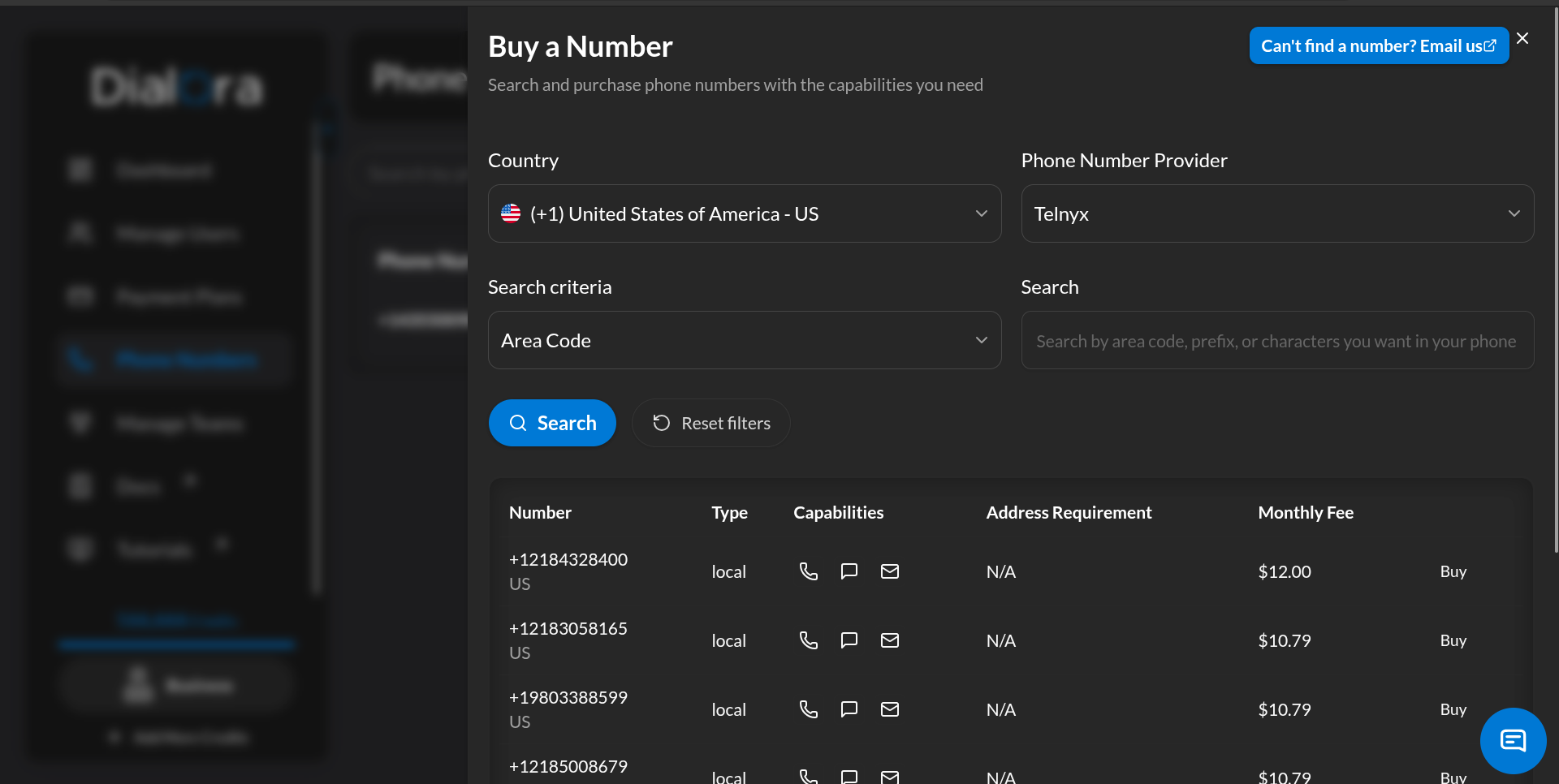
Numbers you purchase are owned by your agency. You can reassign them between sub-accounts at any time without re-purchasing.
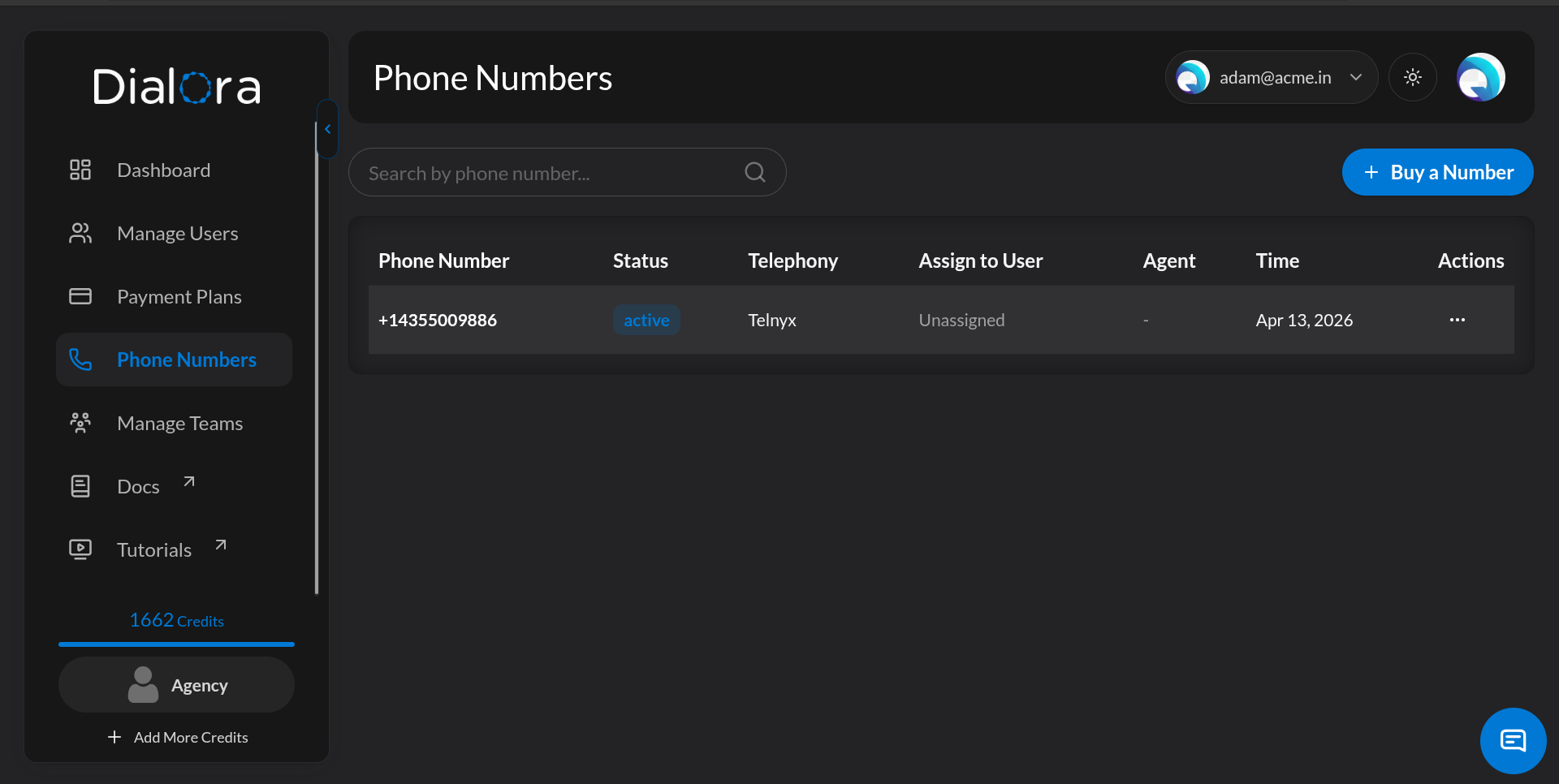
Step 2 – Open Phone Numbers in the Agency Dashboard
From the Agency Dashboard, click Phone Numbers. You’ll see every number in your pool, its status, which sub-account (if any) it is assigned to, and which agent is using it.
Step 3 – Assign a Number to a Sub-Account
- Find an unassigned number in the list.
- Click the
⋯menu on that row. - Choose Assign.
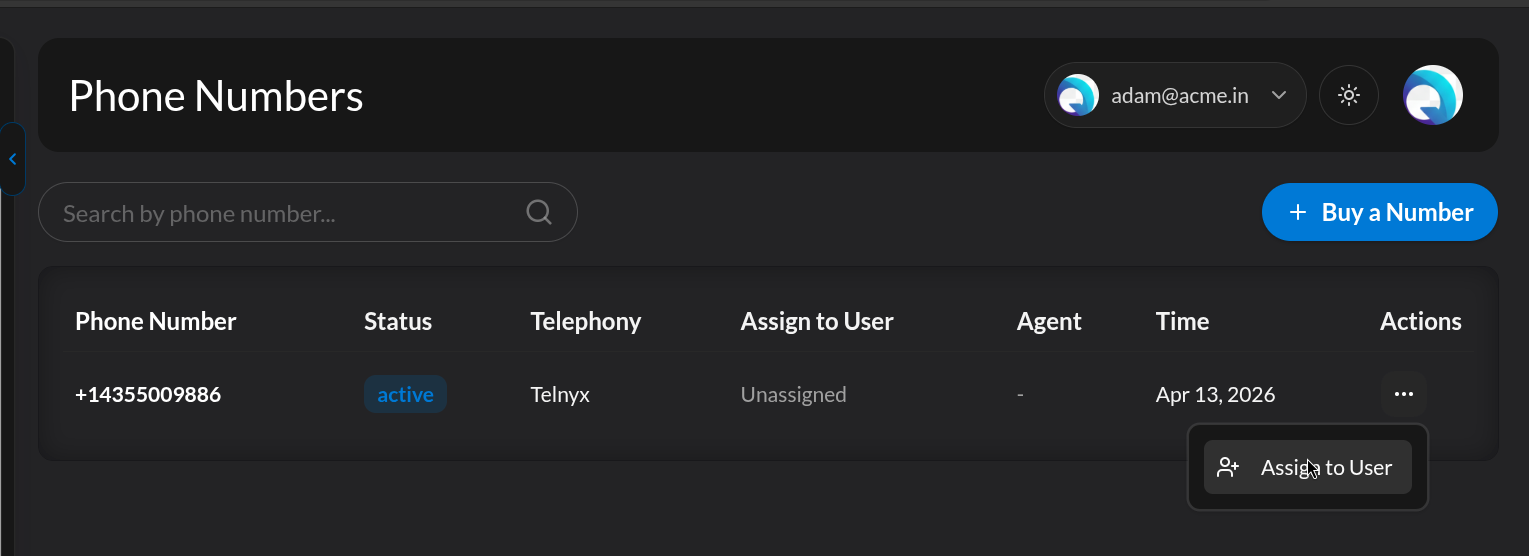
The Assign phone number dialog opens.
Step 4 – Select the Sub-Account User
In the dialog, pick the sub-account user who should own this number. The dropdown only shows approved users from your sub-accounts who have an active plan.
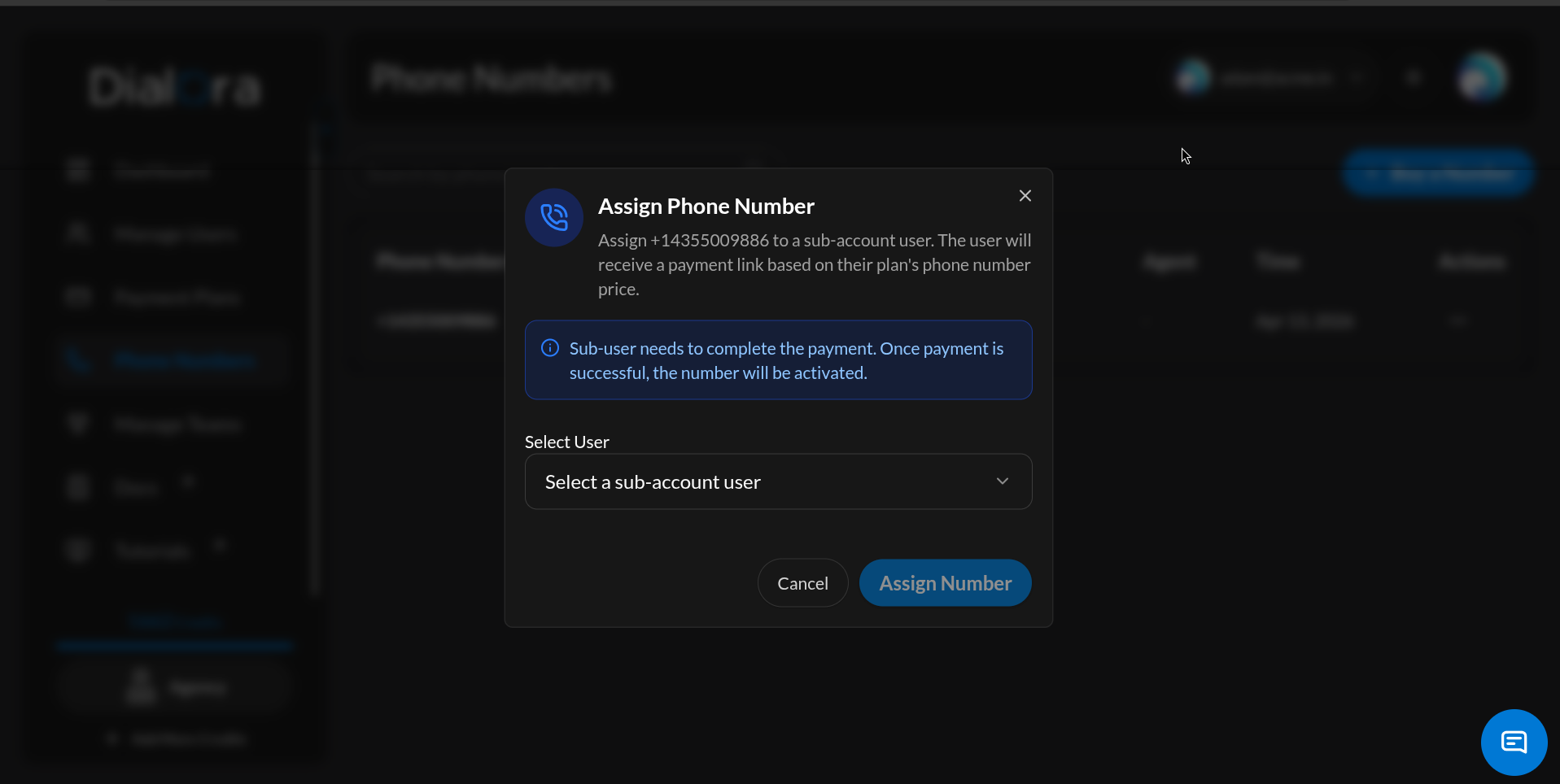
If the sub-account user you expect is not in the dropdown, check that: - The user’s status is approved (not pending or blocked). - Their subscription is active or trialing. - A valid payment method is saved on their account.
Step 5 – Confirm Assignment and Collect Payment
Click Assign. Dialora will:
- Reserve the number for the selected sub-account user.
- Prepare a monthly Stripe subscription for: telco cost + Phone Number Price (from the sub-account’s plan).
- Notify the sub-account user that a number is pending activation.
The Phone Number Price comes from the sub-account’s plan — you set it when you created the plan for that sub-account. This is how you control your margin per client: higher Phone Number Price = more margin per assigned number.
Step 6 – Sub-Account Activates the Number by Paying
The assigned number is not usable yet. The sub-account must complete payment to activate it.
On the sub-account side, the user will:
- Open their Phone Numbers page.
- See the newly assigned number with a Pending Payment status and a Pay Now button.
- Click the button to open a Stripe checkout for the monthly subscription (telco cost + Phone Number Price).
- Complete payment with their card.
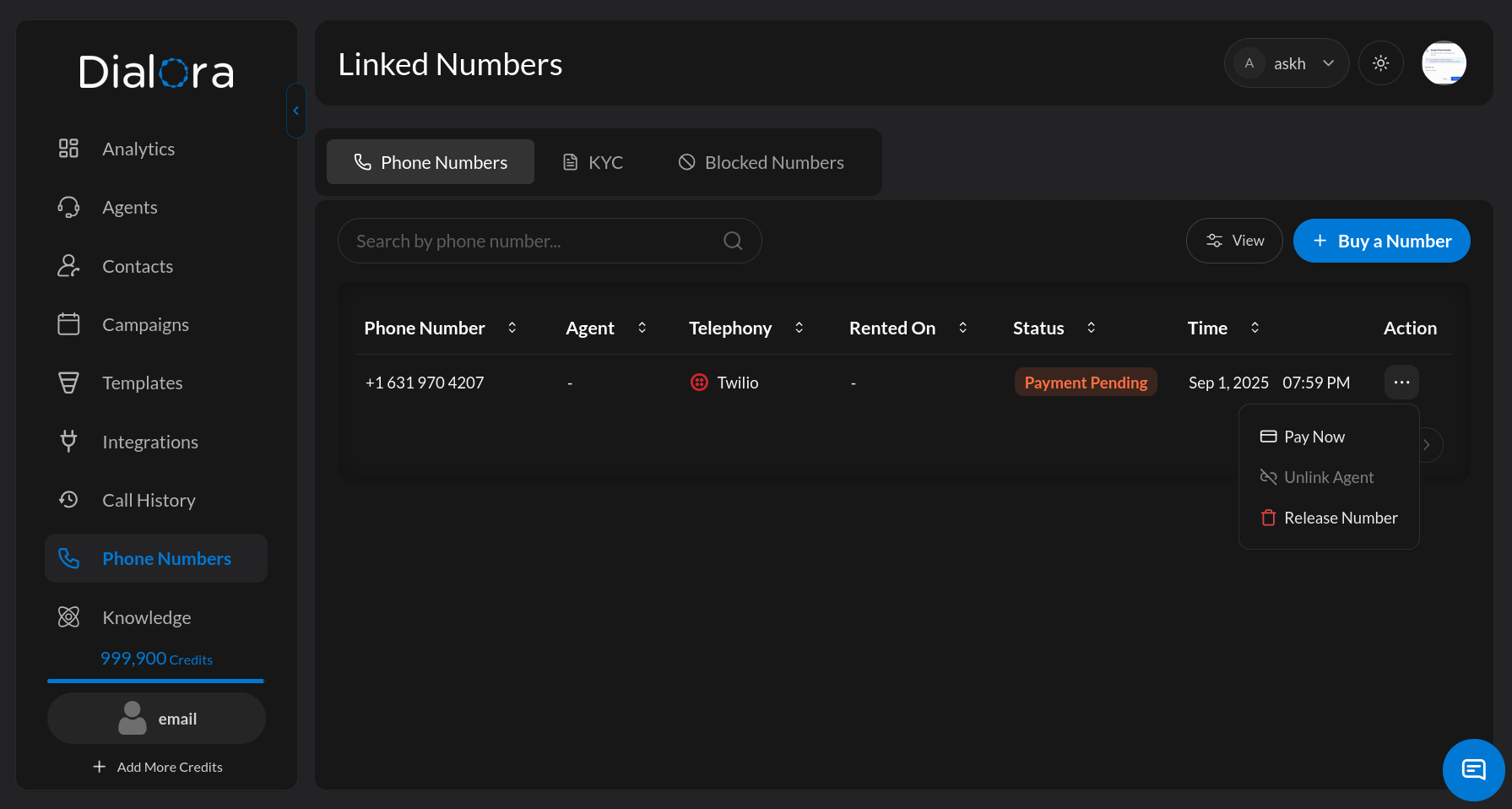
Once payment succeeds:
- The number’s status flips to Active.
- The monthly Stripe subscription is live; the sub-account is billed on the same day each month going forward.
- The sub-account can now attach the number to agents, campaigns, and workflows.
If the sub-account doesn’t pay, the number stays reserved but unusable. You can unassign it at any time to return it to your pool and assign it to a different sub-account.
Releasing a Number
There are two ways a number can come back to the agency pool. They behave differently.
Sub-Account Releases (End of Cycle)
The sub-account user can cancel the number’s subscription themselves from their Phone Numbers page. When they do:
- The subscription is marked to cancel at period end.
- The number stays assigned and usable until the end of the current paid billing cycle.
- No refund for the remaining cycle — the sub-account keeps full access through the paid period.
- At cycle end, the subscription ends, the number detaches from any agent, and it returns to the agency pool as Unassigned.
This is the default path when a sub-account no longer needs a number but has already paid for the current month.
Agency Unassigns (Immediate)
The agency can force an immediate return of the number to the pool at any time. To do this:
- In the agency Phone Numbers list, click the
⋯menu on an assigned number. - Choose Unassign.
- Confirm the action.
Dialora will immediately:
- Cancel the sub-account’s Stripe subscription for that number (no further monthly charges).
- Send an unassignment email to the sub-account user.
- Detach the number from any agent it was linked to.
- Return the number to your agency pool as Unassigned, ready to assign to a different sub-account right away.
Use this when you need the number back now — for example, to reassign to another sub-account without waiting for a billing cycle to close.
If the number is actively wired into an agent, unassigning (either path) will remove it from that agent’s configuration. Any live campaign using the number will stop being able to place or receive calls on it.
Restrictions
- A number can only be assigned to one sub-account at a time.
- You cannot assign a number that is currently linked to an agent — detach the agent first.
- The sub-account must have active billing with a valid payment method.
- Only agency team members can assign numbers.
- Sub-accounts can release a number themselves, but release takes effect at the end of the current billing cycle.
- Only the agency can force-unassign for an immediate return to the pool.
Troubleshooting
| Problem | Likely Cause | Fix |
|---|---|---|
| No numbers show up to assign | Agency pool is empty | Purchase a number (Step 1) |
| Sub-account user not in the dropdown | User not approved or plan inactive | Approve the user and confirm the plan is active |
| Assignment fails with “already linked to an agent” | Number is attached to an agent | Detach the number from the agent, then retry |
| Sub-account doesn’t see “Pay to Activate” | Their Phone Numbers page is cached | Have them refresh the page |
| Number stuck on Pending Payment | Sub-account hasn’t completed Stripe checkout | Ask them to open Phone Numbers and pay |
| Stripe checkout fails for sub-account | Missing or declined payment method | Sub-account adds/updates card, retries from Phone Numbers |
| Sub-account still sees the number after unassign | Page cache | Refresh the sub-account’s Phone Numbers page |
You now have everything you need to distribute numbers across your clients, keep billing on autopilot, and reclaim numbers when sub-accounts churn or no longer need them.